
A Machine for a Robot: Which Signals and Connections to Ask About
A machine for a robot needs signals, connectors, and cable entry points agreed in advance so you do not have to rework the cabinet, enclosure, or commissioning.
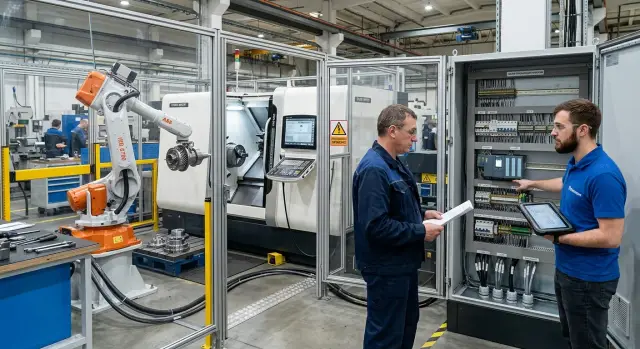
Why this should be discussed before ordering
If automation is only brought up after the machine has been approved, one small issue quickly turns into a chain of new problems. First, one signal is missing. Then it turns out that the cable entry blocks the enclosure. In the end, the installers are trying to figure out where to bring in power for the gripper, sensors, and peripherals.
Reworking the cabinet almost always affects schedule and budget. Engineers have to change the layout, add terminals, install new I/O modules, and reroute the cables from scratch. Even one such change can easily push the start-up back by several days. If the required components are made to order, the delay can be even longer.
The enclosure often turns out to be even more troublesome. It is designed around the machine, not around the entire cell. Later, the robot stand blocks the cable channel, the door opens the wrong way, and the connector can only be reached after partial disassembly. This is not always obvious on the drawing. On the shop floor, it becomes a real problem.
A machine that will work with a robot needs more than just free space nearby. The robot needs ready, enable, alarm, door status, cycle, and clamp signals. It needs power, safe access for maintenance, and clear connection points so the integrator does not have to solve everything on site by trial and error.
That is why, before ordering, it is worth checking at least the basics: how much spare capacity remains in the cabinet for terminals and modules, which entries will carry power and signal cables, where the safety circuits and connectors will be placed, and how service access will work after installation.
Without this check, start-up takes longer than it should. One team is waiting for the diagram, another is moving a sensor, and a third is reworking a section of the enclosure. Everyone is busy, but the project moves slowly.
A good example is a CNC lathe that later gets a robot for loading blanks. If you do not clarify the chuck signals, door opening, cycle end, and cable routing in advance, integration will drag on. If you plan it before ordering, installation goes more smoothly and there is no need to cut metal later in the shop.
What the robot will do at the machine
The robot does not need a vague task like "machine loading" but a precise sequence of actions. If you do not describe it in advance, the door, enclosure, trays, and signal exchange logic usually have to be redone later.
First, define the part path. The robot picks the blank from a specific point: a tray, magazine, conveyor, or buffer. Then it places it in a specific place too: in the chuck, on a support, in a measuring position, or in a tray for finished parts. Simple answers are needed here: which part it takes, in what orientation, which side it presents, and where it places it after machining.
For a CNC lathe, a typical cycle looks like this: the robot takes a raw blank from a magazine, opens the door or gains access to the loading area, places the part in the chuck, waits for clamp confirmation, starts the cycle, then gets access again after machining, removes the part, and places it in a separate tray. If your sequence is different, it is better to write it down in one paragraph without vague wording.
Decide separately who handles the door. Sometimes the machine opens the door itself, and the robot only waits for permission to enter. Sometimes the robot moves the door with a separate command. The same applies to closing. If this is not agreed in advance, the cell may keep stopping over something small.
The same rule applies to cycle start. Either the machine knows by itself that the part is in place and it can begin, or the robot sends a "cycle start" command. Both options are fine, but they cannot be mixed without a clear logic.
Additional operations are often forgotten. The robot may need to blow out the chuck jaws or the part, wash the part after machining, send the part for inspection, check whether the gripper is holding a part, or work through a buffer. If there is a feeder, magazine, or rotary table nearby, that also needs to be described in advance. Then it becomes clear whether the robot serves one machine directly or an entire small line around it. For the machine supplier, this is not a minor detail: the door, cycle, signals, and free connection points all depend on it.
Which signals to ask the supplier for
If you are ordering a machine for a robot, a note that says "automation-ready" is not enough. You need an I/O table with signal names, their purpose, and the operating logic. Otherwise, the integrator later has to search for missing points in the cabinet, and the mechanics end up reworking the enclosure and cable entries.
Which signals are essential for the cell to start
First, request the machine statuses. The robot and the cell controller need to know when the machine is ready, when it is busy, when the cycle is complete, and when there is an alarm. This is the basic set. Without it, the robot either waits too long or tries to work while machining is still in progress.
Then clarify the commands going to the machine. Usually you need cycle start, stop, and alarm reset. Sometimes the supplier exposes only start and leaves the rest to the operator panel. For an automatic cell, that is inconvenient: after any fault, the operator has to intervene manually, and the automatic mode loses its point.
Also ask separately about the signals for the door, chuck, and part clamp. The robot needs more than just knowing that the door "should" be open. It needs confirmation. The same goes for the chuck: is it open, is it closed, and is there a separate signal that the part is clamped correctly? In practice, this is a common mistake. A "chuck closed" signal does not necessarily mean the part is actually secured properly.
Another must-have is permission for the robot to enter the work area. The machine must clearly indicate that the spindle has stopped, the axes are in a safe position, the door is open, and the robot may enter. If such a signal does not exist, the integrator has to build it from several conditions. The scheme gets more complicated right away, and troubleshooting takes longer.
Do not forget the emergency stop circuit either. Ask for a diagram showing how the machine joins the cell’s common emergency chain and what signal is needed for a safe stop. For each item, also ask when the signal is active: at 24 V, with a closed contact, or under some other logic. On paper, this may seem like a minor detail, but details like these often decide whether the cell starts in a day or stretches into weeks.
Which interfaces and connectors are needed
The signal list by itself does not solve the task. You also need to know in advance how those signals will be transmitted physically: through discrete inputs and outputs, over a network, or through separate connectors on the body. Otherwise, the integrator will later start reworking the cabinet, and installation will drag on.
First clarify the basic electrical side. For simple commands, dry contacts or 24 V DC are often enough. But the supplier should say right away what the machine uses: signal type, allowable voltage, how many inputs and outputs are free, whether there is isolation, and where those points can be accessed.
For exchanging statuses and commands over a network, people usually ask about Ethernet and an industrial protocol. Most often this is Profinet, Modbus TCP, or another option already supported by the robot and the cell PLC. It is better not to guess here. If the robot uses one network and the machine another, you end up with an extra gateway, extra settings, and one more possible failure point.
Another question is where exactly to connect. Some machines provide terminals only inside the cabinet. That works, but it is not the most convenient option: cables have to be carefully brought inside, and access during commissioning is not always quick. It is much easier when there is an external connector or a prepared connection box on the body. For a robotic cell, this often saves time right at start-up.
Usually these five things are clarified in advance:
- inputs and outputs for the door, chuck, and loading-ready signal;
- separate circuits for monitoring the robot gripper or an external sensor;
- a network port with a clear communication protocol;
- terminals or an external connector with contact labeling;
- pneumatic ports if the robot or tooling controls cylinders.
With sensors, it is better not to leave vague wording. If the door, chuck, or gripper sends a signal to the system, the supplier should specify the sensor type, supply voltage, and connection point. Then the electrician can immediately see whether an intermediate relay module, a separate power supply, or extra input capacity is needed.
If the machine will work with pneumatics, ask not only about pressure but also about the physical air outlet. Do you need quick fittings? Where are the solenoid valves located? Can the control be brought outside without opening the cabinet? On a CNC lathe, this comes up often: the electrical part is agreed, but there is no room left for a blow-off or clamping cylinder.
The more precisely you describe the interfaces and connectors before ordering, the calmer the cell assembly will be. A good connection diagram saves not theory, but very real hours during installation and commissioning.
Where to leave the connection points
If cables and hoses have to be routed around the enclosure, installation almost always takes longer and costs more. It is even worse when a new signal requires removing panels or drilling into the cabinet after the machine has already been installed.
On the layout, note right away which side the robot approaches the machine from. For a CNC lathe, this affects almost everything: where to make the cable entry, where to place the connector near the loading area, and how to route the pneumatic hoses so they do not cross the operator walkway.
The most convenient option is simple: the robot cable enters the electrical cabinet by a short route, without going around the enclosure or making extra turns. If the robot is on the left side of the machine, it is better to leave the entry on the same side of the cabinet or in the lower section near the cable route. Then the installers do not have to run lines across half the cell.
Inside the cabinet, it is useful to provide a separate terminal area with spare capacity. Not for the current number of signals, but with at least a few free channels for the future. At first, you only need cycle start and ready status exchange. Later, you usually add a gripper sensor, door control, blow-off, and a couple more signals.
A separate place should be reserved for safety signals. They should not be mixed with ordinary discrete circuits. When the E-stop, door interlock, and robot enable circuits are routed separately and clearly, start-up goes more smoothly and troubleshooting takes less time.
Near the part loading area, it is better to leave an industrial connector or a connection box. This is convenient if the gripper has sensors, blow-off, or blank presence monitoring. A short run to the connection point is more reliable than a long harness across the whole cell.
One more thing is often overlooked. All of these points need to be accessible without disassembling panels, the roof, or part of the enclosure. If an electrician can open the cabinet door, reach the terminals, and check the connector in 10 minutes, the location was chosen correctly. For a machine-for-robot project, that is a very practical criterion.
How to gather the requirements step by step
The most common mistake is to start with the number of signals. First, you need a clear operating cycle. If the robot takes the blank, opens the door, loads the part, waits for clamping, and starts the cycle, each of those steps later turns into a specific input, output, and connection point.
Usually, a short 2-3 page document is enough. For a machine for a robot, that is enough for the machine supplier, robot integrator, and electrician to speak the same language and avoid arguments during installation.
Start by describing the cycle as actions. Who opens the door, who confirms clamping, who gives the start command, who removes the finished part. If a step cannot be described in one simple sentence, it almost always becomes a source of confusion later.
Then create an I/O table. For each signal, write the name, who sends it, who receives it, and at what point in the cycle it is needed. For example: "door open", "chuck unclamped", "chuck clamped", "cycle complete", "alarm", "robot entry permission".
For each line, specify the electrical side right away. You need not only the meaning of the signal, but also its type: discrete input or output, safety signal, analog channel, or network. Also note the voltage, for example 24 V DC, and the connection method: terminals, connector, remote I/O module, or industrial bus.
After that, take a simple sketch of the cabinet and enclosure. Mark where the physical connection points will be: the robot cable entry, the terminal area for communication, the passage through the enclosure, the door sensor zone, and the service access area. One such drawing often saves many hours on site.
Safety should be agreed separately. You need to write down in advance who is responsible for the emergency stop circuit, door interlocks, safe speed signals, and the robot’s permission to enter the work area. If this is not separated at the start, both the cabinet and the enclosure often have to be redone later.
At the end, check the spare capacity. Leave a few free inputs and outputs, room for one more module, and a proper cable path. In practice, another sensor, lamp, door lock, or ready signal almost always appears.
Example for a CNC lathe
Take a simple cycle: the robot takes a blank from a magazine, brings it to the chuck, and loads it into the machine. This example quickly shows which signals and connection points need to be planned in advance.
First, the robot approaches the loading area but does not enter until the machine confirms a safe state. In practice, it is better to ask not for one general ready signal, but for clear individual statuses: door open, spindle stopped, entry permitted. If these are missing, you later have to change the cabinet logic or add extra sensors.
Then the robot places the blank in the chuck and waits for clamping confirmation. This is not the place to save on signals. One "clamped" signal is useful, but a pair of "unclamped" and "clamped" is better: the robot and the setup technician can immediately see what the chuck is doing and find faults faster.
In such a scenario, at least these exchange points are usually agreed:
- door open;
- chuck unclamped;
- chuck clamped;
- machining cycle complete;
- robot outside the work area.
After machining, the machine gives a cycle complete signal. But the robot should not take the part based on that alone. It also needs a clear entry moment: the spindle has stopped, the door has opened, and entry is allowed. Then the robot removes the finished part without unnecessary pauses or ambiguous states.
The end of the cycle is also better described in advance. The robot removes the part and places it in the receiving tray, and the machine gets a signal that the area is free again and it can close the door or wait for the next load. If there is a magazine and a tray nearby, leave space right away for blank presence and tray-full sensors.
For the connection side, two clear points are usually enough: terminals or a connector in the machine cabinet for exchanging signals with the robot, and a point near the loading area where it is convenient to connect the magazine and tray sensors and, if needed, the air blow-off.
For the supplier, this scenario is best described on one page: who sends the signal, who receives it, and at what stage of the cycle it happens. That is already enough to avoid reworking the cabinet, enclosure, and cable routes after delivery.
Where mistakes happen most often
Problems are usually not caused by complex settings, but by small details that were never fixed before ordering. Then the machine is already on site, the cabinet is assembled, the enclosure is ready, and any change costs extra hours and extra money.
The first common mistake is buying a machine without enough I/O reserve. On the drawing, everything looks fine, but after commissioning it turns out there are almost no free inputs and outputs left. The robot needs signals for cycle start, ready, fault, door opening, part clamping, and machining complete. If no reserve was planned from the start, engineers have to add modules, change the cabinet layout, or give up part of the logic.
The emergency stop circuit is forgotten just as often. The robot and the machine must stop in a coordinated way. If this was left for later, during start-up you end up figuring out who gives permission to whom, how the alarm is reset, and whether it is safe to enter the work area after a fault. These things are better solved before ordering, not after installation.
Another typical mistake is not clarifying who controls the door and who gives the cycle start command. While everyone discusses this in general terms, it seems like there is no difference. In practice, without a clear answer the cell starts working in bursts: the robot waits for the machine, the machine waits for the robot, and the operator steps in manually.
The physical placement of the connections is also often underestimated. The signals are agreed, the diagram exists, but the connector ends up on the enclosure side, the terminals are hard to reach, and the pneumatics have to be routed on a long detour. Formally, everything was planned. In reality, installation becomes harder than it should be.
A short pre-order check
One page of pre-order checks often saves more time than a week of later fixes on site. If a machine for a robot is bought without this review, the same issues usually come up again: the wrong signal, no free input in the cabinet, a connector blocked by the enclosure, and no reserve for pneumatics.
First, collect the full list of signals by name. Not "ready signal" in general, but specific points: "auto mode", "door closed", "chuck clamped", "cycle complete", "alarm", "load permission". Then the machine supplier and robot integrator will be talking about the same thing.
For each signal, immediately specify the type and voltage. Dry contact, PNP, NPN, 24 V DC, analog signal, Ethernet, Profinet, Modbus TCP - none of this is a small detail. If you skip this point, the robot cabinet later has to be rebuilt to match the machine’s real interfaces.
On the layout, mark not only the signals themselves, but also the physical connection points. You need three simple notes: where the cabinet is, where the connectors will be, and through which entries the cables will run. In a compact robotic cell, even an extra 30-40 cm of cable path can create a problem.
Also check the enclosure separately. The cabinet door must open properly, service must be able to see the terminals, and the cable must not have to take an awkward detour. Sometimes the enclosure is designed before the connection points are approved, and later access is only possible after partial disassembly of a section.
Before sending the request to the supplier, it is enough to go through five points:
- every signal has a name, purpose, and exchange direction;
- each point shows the signal type and voltage;
- the layout shows the cabinet, connectors, cable entries, and room for pneumatics;
- the enclosure does not block access for installation and service;
- there is spare capacity for I/O, cable length, and the number of pneumatic lines.
A little spare capacity almost always pays off. One spare cable entry and a few free I/O points often save the project when a sensor, blow-off, or part check is added after commissioning.
What to send the supplier and what to do next
A message saying "we need a machine for a robot" is not enough. The supplier needs a short and clear data package so they can immediately check the signals, connectors, cabinet, and free space around the machine.
The easiest option is to send a signal table and a simple cell sketch. Not an archive drawing, but a working document that shows where the robot is, where the cabinet is, where the part is loaded from, and where the operator needs access.
In the signal table, include the signal name, exchange direction, signal type, voltage, connection point, and the action after the signal. That is already enough to remove most misunderstandings.
It is also better to add dimensions to the sketch. Usually, the robot size, control cabinet, loading area, enclosure, machine door, and cable routing points are enough. If this is missing, it later often turns out that the cabinet blocks the door opening and the cable entry is on the inconvenient side.
Safety should also be described in a separate section. Indicate how the cell should start, who gives the cycle permission, whether there needs to be communication with the enclosure locks, light tower, emergency stop, and the "machine ready" signal. If you have your own rules for restarting after an alarm or after the door is opened, write them down right away.
Before shipment, it is worth requesting not only a list of available interfaces, but also the exact preparation scope: signal leads brought into the cabinet, terminal labeling, I/O reserve, connection points on the drawing, and confirmation of where the connectors will physically be placed. It is also useful to ask for photos of the cabinet and connection area before shipment. One such step often saves days on site.
If you are selecting a CNC lathe, you can discuss the machine interfaces, commissioning, and service support with EAST CNC in advance. This is especially useful when the cell is assembled in stages and you do not want to return later to rework the cabinet and enclosure after delivery.
After you send the data package, do not wait only for a quote. Ask for a response in the form of an agreed signal table, a wiring diagram, and a list of what the supplier will complete at the factory before shipment. Then there will be far fewer disputed points at the start of the project.