
Machine Acceptance Documents: What to Request on Day One
Machine acceptance documents help verify completeness and reduce disputes after startup. We cover drawings, parameters, logs, certificates, and consumables.
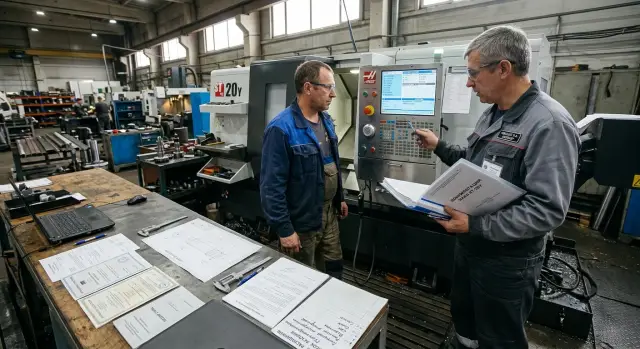
Why the paperwork is checked right away
A machine can be unloaded, moved into place, and even switched on. But if the document package is incomplete, problems will start at the point when it is already too late to prove anything. That is why machine acceptance documents are checked on the first day, together with the completeness check and external inspection.
The first reason is simple: without paperwork, it is hard to confirm shortages. If it later turns out that a chuck, sensor, cable, or separate unit is missing, the supplier will almost always ask why this was not noted in the acceptance report. A few days later the warehouse is already empty, the packaging is gone, and the dispute becomes long and unpleasant.
The second reason is startup. The operator and setter need CNC machine drawings, basic parameters, a list of connections, lubrication data, and operating limits. When that is not at hand, people spend hours searching, calling, and guessing. Sometimes one missed setting is enough to keep the machine idle for a whole shift, even though mechanically everything is fine.
Service teams need the paperwork right away too. If an error appears in a drive, sensor, or hydraulic system, the service engineer does not look for “roughly that module,” but for the exact unit with the part number, version, and wiring diagram. Without that, repairs take longer and spare parts are ordered blindly.
Another important point is reports and machine certificates. An error in the serial number, CNC model, delivery date, or package contents can later lead to disputes after startup. On paper, it may be one machine, while in the workshop there is another one in a similar configuration. That happens more often than people think.
In practice it looks like this: a lathe arrives, the mechanics are fine, the cabinet powers up. Everyone is happy until commissioning begins. There is no printout of the parameters, no electrical diagram, and one tool holder is missing from the report. Half a day is lost in correspondence, then another day is spent figuring out who is supposed to bring it.
If the delivery is handled by a company like EAST CNC, it makes sense to check the paperwork immediately on receipt, not after the first startup. A few attentive minutes that day often save weeks of disputes and downtime.
What to prepare before unloading
Order on site resolves half the disputes before the boxes are even opened. If you gather the paperwork in advance and assign responsibilities, machine acceptance documents will not get lost among packaging, photos, and delivery notes.
First, appoint one person responsible for acceptance. It should be someone who knows exactly what was ordered and can stop unloading if the figures in the documents do not match the nameplate on the machine or the configuration.
Before the truck arrives, pull the contract, specification, and all ordered options. Often the problem is not the delivery itself, but the fact that the workshop remembers one configuration while the signed specification shows another: a different chuck, chip conveyor, tool set, or transformer. Print the papers and keep them close at hand instead of searching for them in the accountant’s email.
It helps to divide the roles in advance:
- one person checks the documents and serial numbers;
- a second checks the crates, nameplates, and markings;
- a third takes photos of the packaging, seals, and condition of the shipment;
- the warehouse clerk or supervisor records the actual completeness.
Prepare a simple remarks form. A few fields are enough: date, machine number, what was found, where, who noticed it, and which photos are attached. Keep a folder nearby where copies of delivery notes, packing lists, reports, and passports can be placed right away. If you do not do this, some of the papers usually end up in the boxes and disappear with the packaging.
Clear space near the unloading area. You need room not only for the machine, but also for separate crates, removable units, nameplates, accessory boxes, and photo documentation. On a cramped site, small items go missing the fastest.
If EAST CNC is handling the delivery, it is useful to ask the manager in advance for the list of accompanying documents and the shipment contents. Then, on acceptance day, you are not guessing what package should arrive with the machine—you are checking it against a list.
One small thing that saves time: prepare a phone or camera with free memory and a clear file naming scheme. Photos like “crate 2,” “spindle nameplate,” or “crate with spare parts” help a lot later when you need to prove exactly what arrived on day one.
What is included in the completeness package
It is best to check completeness against the paperwork on the same day the machine arrives on site. If you put the check off, it becomes difficult later to prove what was missing from the delivery from the beginning and what was lost on site. For “machine acceptance documents,” this is one of the first checks.
First compare three things: the machine model, the serial number, and the delivery scope in the contract or specification. The model name must match without “roughly same meaning” shortcuts. Check the serial number on the machine nameplate and in the passport. If even one digit does not match, record it in the report right away and do not leave it for later.
Next, request a packing list for each shipping item. One general list often is not enough if the machine came in several crates or on separate pallets. These lists will quickly show where the cables, foot pedal, chuck, tool set, covers, documentation, and small accessories are. Without this check, some items can easily “disappear” between the warehouse, installers, and workshop.
A simple order works well:
- compare the machine nameplate with the passport and specification;
- check the number of shipping items against the packing lists;
- open the list of tooling, tools, and accessories;
- separately note ordered options and whether they are actually present.
When it comes to tooling and accessories, do not stop at “the set is there.” You need a precise list: chucks, jaws, mandrels, tool holders, wrench sets, pedals, cables, filters, pumps, manuals, media with parameters. If a chip conveyor, part catcher, high-pressure coolant system, or automatic bar feeder was ordered, list those items separately in the checklist. These are the options most often lost in the handoff between sales, logistics, and commissioning.
Take photos of the nameplate, all packing lists, and the markings on the crates. The images should clearly show the number, model, and date. Later they will help if the supplier asks what exactly arrived and in what condition.
If the machine is delivered by a company with a full-cycle service model, like EAST CNC, it is easier to request one consolidated packing list before unloading and check the delivery against it. That saves time and removes disputes on site.
Which drawings the workshop needs
On acceptance day, ask for more than just the passport and the general document set. The workshop needs the drawings that allow the mechanic, electrician, and setter to find the cause of a fault quickly and not wait for the supplier over every small issue. If these materials are missing from the folder, the machine acceptance documents cannot be considered complete.
Start with the electrical diagram. You need not a decorative sheet “for the record,” but a readable diagram with all designations: terminal numbers, cables, circuit breakers, relays, sensors, drives, and safety circuits. It is even better if the package includes a legend and a parts list. When a signal from a limit switch disappears or the coolant pump will not start, this sheet saves hours.
Then take the pneumatic and hydraulic diagrams, if your configuration includes them. They should show the lines, valves, filters, regulators, hydraulic unit, cylinders, and operating pressures. Without such a diagram, it is hard to understand why the chuck, steady rest, or automatic door is not working.
Request the lubrication diagram separately. It should come with a maintenance map: what is lubricated, with what material, at what interval, and in what amount. If this information is missing, the workshop starts guessing, and that quickly leads to extra wear on the guides, ball screws, and feed units.
Another essential document is the foundation and service area drawing. It is not only for builders. With it, the workshop checks anchors, supports, power feeds, space for the chip conveyor, access to the control cabinet, and safe walkways around the machine. Fixing these things after installation is slow and expensive.
Do not forget the peripheral and sensor connection diagram. This includes the chip conveyor, bar feeder, part catcher, high-pressure pump, tool measurement system, door sensors, level sensors, pressure sensors, and other external units. If a CNC machine works together with an automated line, startup often gets stuck on simple signal connections without this diagram.
It is convenient when the supplier, for example EAST CNC, hands over the drawings both on paper and in PDF. The paper set needs to stay near the machine, while the electronic version belongs in the repair department archive. It is better to check that right away while acceptance is still underway, not after the first downtime.
Which parameters and settings to save
Machine acceptance documents often include drawings and reports, but working parameters are forgotten. That is a mistake. If someone later changes the settings, finding the cause without the original baseline will take hours, sometimes even a whole shift.
CNC parameters at startup are best recorded on the commissioning day, when the machine has already passed checks and is running normally. Save a backup to a separate medium, such as a USB drive, and ask for a second electronic copy for the company archive. One file on the setter’s laptop is not a backup.
After startup, save the exact set of values with which the machine passed testing. That is your reference point. If the supplier adjusted parameters on site, ask them to note which values were factory settings and which were changed during commissioning.
The minimum set is worth collecting immediately:
- a backup of the CNC parameters;
- a list of factory and actual settings after startup;
- the CNC system and embedded software version;
- tables of zeros, tool offsets, and axis limits;
- the access rules for service menus and password storage.
Record the system and firmware version in the report or in a separate acceptance sheet. It is even better to save photos of the screens showing this data. When service is looking for a fault or preparing an update, these small details save time and prevent disputes.
Access to settings is often confusing. Clarify which access levels are available to the operator, setter, and service engineer, who knows the passwords, and where they are stored. A password should not live only on one person’s phone.
Also check the tables for zeros, offsets, and axis limits separately. This is especially useful for a lathe: a changed limit or offset can trigger an error on the very first part. If you have the original values, returning the machine to normal is much easier.
Which reports, logs, and certificates to request
If the paperwork is not complete on startup day, disputed issues will take longer to resolve than the installation itself. That is why machine acceptance documents should be checked right away, while the service engineer, warehouse clerk, and supplier representative are still nearby.
First, take the commissioning report. It should include the date, machine model, serial number, scope of work completed, and signatures from both sides. If the engineer adjusted geometry, started the spindle, checked the axes, or changed parameters, that should be listed too, not hidden behind a generic phrase.
Compare the machine passport with the nameplate on the body. The model, serial number, year of manufacture, power supply voltage, and basic configuration must match. Even one mistake in the number later creates problems for the warranty, spare part orders, and internal asset tracking.
Request the maintenance log and service schedule separately. The log is not just for the archive; it is for day-to-day workshop work: who changed the oil, when the filters were cleaned, how often to check the guide lubrication, and what to do during the first hours of operation. If there is no schedule, the mechanic often maintains the machine “from memory,” and that is a bad habit.
You also need two manuals: the operator’s manual and the service manual. The first stays by the machine, the second goes to the mechanic or repair team. They make it easier to find error codes, shutdown procedures, lubrication points, replacement intervals, and consumable requirements.
The package usually also includes documents such as:
- certificate or declaration of conformity;
- warranty terms;
- packing list or completeness statement;
- transfer report with a list of included items;
- test reports, if any were prepared during commissioning.
If any document will be “sent later,” record that in writing in the report or a separate statement. Otherwise, a week later it turns out that the log was never handed over, the certificate is with the carrier, and the service manual stayed with the engineer in the car.
How to prepare the consumables list
It is best to build the consumables list on acceptance day, while you still have the manual, packing lists, and the engineer who commissioned the machine. If you leave it for later, the workshop almost always loses time on small things: the wrong filter, unsuitable oil, or a sensor without a part number.
The easiest way is to make a simple table. For each item, write down the name, exact part number, where it is used, how many units should be kept in stock, replacement interval, and signs of wear. This list will later help both purchasing and the first service visit.
Start with the items replaced most often: filters, belts, seals, lamps, sensors. For tooling and assemblies, do not use general names. You need exact numbers for jaws, chucks, sensors, lamps, and other replaceable items. Otherwise, a month later you will receive a part that “almost fits” but does not fit the machine.
List all fluids in a separate line: the hydraulic oil grade, guide lubrication oil, spindle unit oil if required, and coolant. Record not only the name, but also the acceptable equivalent, fill volume, and replacement interval according to the manual. This is especially useful if the machine runs two shifts and consumption is higher.
A minimum first-month запас usually includes:
- a set of filters
- one spare belt of the required type
- a set of seals that are changed during service
- lamps and sensors that can stop the machine if they fail
- the required amount of oils, lubricants, and coolant
If the machine is delivered by EAST CNC, ask for the consumables list specifically for your model and actual configuration. At the end, check that the list includes not only the items, but also replacement intervals and simple wear signs: leaks, noise, overheating, darkened oil, pressure drop, or unstable sensor operation.
How to carry out acceptance step by step
Start not with startup, but with checking what actually arrived on site. Compare the contract, the specification, and the nameplate on the machine: model, serial number, voltage, and option set. Then check the shipping items against the dispatch list. If the delivery includes a chuck, tool block, chip conveyor, or separate cabinet, it is better to note each item immediately.
Then open the document folder and check its contents against the list. On acceptance day, it often turns out that the passport is there, but the electrical diagram is missing, or the manual is for the wrong model. For the workshop, this is not a minor issue: without diagrams and factory parameters, startup and service later take extra hours.
A good order is this:
- Compare the contract, specification, nameplate, and all shipping items.
- Check the document set: passport, manual, diagrams, completeness list, reports, and certificates.
- Switch on the machine together with the engineer and save the CNC parameters to your own medium.
- Record shortages, damage, and mismatches in the report the same day, with photos and serial numbers.
- Sign the final report only after the list of remarks and the deadline for fixing them are set.
A separate step is the settings backup. CNC parameters at startup, offset tables, service settings, and the PLC backup should remain not only with the supplier, but also with your company. Save the files to a USB drive, the workshop server, and the chief mechanic’s folder. Label them clearly: machine model, serial number, date, system version.
If you find a mismatch, do not leave it for later. Today one cable is missing; tomorrow the dispute is already more complicated. In the report, write exactly what is missing, what is damaged, what does not match the contract, and who was present during the inspection. A short, precise note is better than a vague phrase like “there are remarks.”
For the topic of machine acceptance documents, this is the most common failure: the machine has already been unloaded, everyone is in a hurry, and the paperwork is checked from memory. It is better to spend an extra 30 minutes on the first day than to later hunt for CNC machine drawings, machine certificates, or the original consumables list from several different people.
If the delivery is handled by a company like EAST CNC, ask the service engineer to show right away where the backups are stored and how they are restored. That removes many unnecessary questions during the first week of operation.
Where mistakes happen most often
The most common mistake is simple: the report is signed before the full package is checked. The boxes are there, the machine powers on, so everything must be fine—that is how people often think. Then it turns out that the CNC backup files were not handed over, the paper copies are incomplete, and some sheets only exist in email correspondence.
In machine acceptance documents, serial number checks are often skipped. The number on the machine nameplate, the number in the passport, the number in the certificates, and the number in the shipping papers must all match. If even one digit is wrong, it becomes harder later to handle warranty claims, service, or internal accounting.
Another common problem is accepting only the base machine package. That is not enough for the workshop. If a chip conveyor, hydraulic unit, bar feeder, coolant system, or other module arrived with the machine, they need drawings and documents too. Otherwise the electrician and mechanic will be searching for the cause of a shutdown blindly.
People are often glad the manual is there, but do not check whether it includes consumable codes and part numbers. Without that, the machine consumables list is built “by eye”: filters, belts, seals, lamps, sensors, and fuses are then ordered from photos. That wastes time and creates extra downtime.
Another risk is keeping CNC parameters at startup with one setter on one laptop. The laptop breaks, the person goes on vacation, and after a fault nobody can quickly restore the machine. At minimum, you need:
- a backup of the parameters on two media;
- a printed or PDF export of the main settings;
- a folder with file versions and save dates;
- access for the shop supervisor and service team.
In practice it looks like this: the lathe was accepted, the report was signed, and a week later the CNC battery was replaced and some settings were lost. If the CNC machine drawings, parameter archive, and consumable codes had been checked on day one, the issue could have been closed in an hour, not over several shifts.
Example: accepting a lathe on the shop floor
The workshop accepted a CNC lathe in the morning, right after unloading. The supervisor, warehouse clerk, and setter compared the crates with the packing list and quickly saw that everything was present in terms of completeness: tooling, cables, covers, tool box, and the paperwork folder.
The problem was not in the hardware, but in the documents. The folder had the operator’s manual, passport, and general electrical diagram, but the lubrication diagram and a separate filter list were missing. At first glance that seems minor, until startup time and the first consumables order arrive.
That same day, purchasing asked for the oil grade, fill volume, and part numbers of the replaceable items. Nobody could answer immediately. The setter knew the general requirements, but without the lubrication diagram and filter list, he did not want to guess. For a new machine, that is sensible: a mistake with oil or a filter costs more later than one day of clarification.
The remark was entered in the acceptance report immediately, with no verbal promises. The report noted:
- which documents were missing
- who on the supplier’s side would send them
- the deadline for delivery in paper and electronic form
- that startup would take place after the missing data was received
The supplier sent the package the next day. After that, purchasing calmly ordered oil, filter elements, and the first-service stock. The setter checked the lubrication points, fill volumes, and replacement intervals, then started the machine without unnecessary delay.
This example shows well how machine acceptance documents work in practice. If something is missing, it is better to record it on acceptance day. Then the workshop has a clear timeline, and purchasing has exact data for ordering instead of guesses from memory.
What to check before signing and what to do next
You should sign acceptance only after the final cross-check. Compare the serial number on the machine plate, in the contract, in the specification, and in the reports. If even one character does not match, ask for the documents to be corrected immediately.
Then check the paperwork and file package. You should have CNC machine drawings, a list of CNC parameters at startup, completeness and commissioning reports, the maintenance log, machine certificates, and the list of starting consumables. It is best to keep the parameters in two forms: an electronic file and a printed copy.
Do not keep all machine acceptance documents in one folder with one person. Copies should be distributed the same day:
- to production — drawings, manuals, and basic parameters for operators
- to service or maintenance — logs, service maps, reports, and service contacts
- to purchasing — the machine consumables list, filter codes, lubricants, and other items
Enter the date of the first service into the calendar or internal system right away. On the same day, it is a good idea to buy the startup kit: oil, lubricant, filters, coolant, fuses, and other items recommended by the supplier. If you wait until the first maintenance, downtime is almost guaranteed.
Also agree on one communication channel with the supplier for startup and service. One chat or one email address with one responsible contact on your side works better than calling different people. That way questions do not get lost, and the communication history stays close at hand.
If the machine is delivered by EAST CNC, ask the engineer in what form the parameters are stored, where the backup is kept, and which service documents you will receive. It is useful to know right away who handles startup, who receives service requests, and what data you need to provide when contacting them. One well-organized archive on the first day later saves hours of searching during the first machine stop.