
Limit Switch and Sensor Faults: Warning Signs Before Downtime
Limit switch and sensor faults rarely begin with a complete stop. Learn the early symptoms, simple checks, and common shift mistakes.
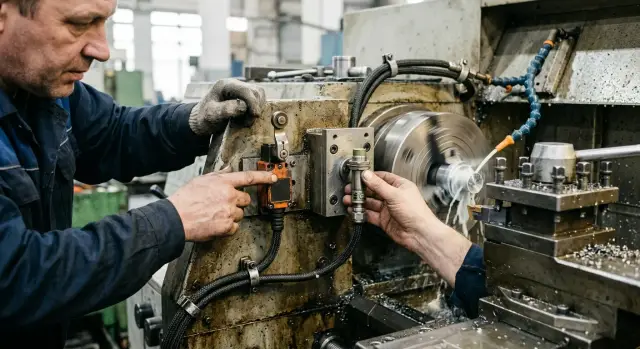
Why a small fault can stop a machine fast
On a CNC machine, even a minor issue rarely stays minor. A limit switch or sensor gives the controller a simple answer: is the unit in place or not, is the door closed or not, has the clamp engaged or not. If that signal turns false, even for a fraction of a second, the system breaks the cycle because, for it, that already means a risk of collision, scrap, or damage to a component.
That is why a false signal often interrupts machining right in the middle of a pass. From the shift’s point of view, it looks strange: the program was running fine, the tool was cutting, and then the machine stopped for no obvious reason. Because of that, the operator often blames the NC program or the postprocessor, while the real cause is a dirty limit switch, a loose connector, or a sensor that starts acting up after it warms up.
A short pause can quickly turn into a full stop for a simple reason. After a fault, it is not enough to press “reset.” The operator checks the position, makes sure the zero point has not shifted, verifies that the tool is not left in a dangerous spot, and decides whether cutting can continue safely. If the machine stopped during tool change, coolant delivery, or clamp confirmation, a 20-second delay can easily eat up 15–30 minutes.
This is especially common on CNC lathes. For example, the turret position sensor may give an unstable signal only when the machine is hot. The first couple of times, the shift restarts the cycle and moves on. A few hours later, the false triggers become more frequent, the turret no longer confirms position, and the machine can’t keep working.
That is what a limit switch or sensor fault looks like in its early stage: not one major failure, but a series of small glitches. One operator dismisses the stop as a coincidence, the next shift assumes the program is to blame, and the third simply clears the error and keeps going. The faults add up over several shifts, and then they all come together in one full downtime event, when the machine can no longer be started safely without finding the cause.
The controller is not being overly cautious. It is doing exactly what it was set up to do: stop the cycle before a small fault turns into a hit on the part, the tool, or the mechanics.
Which components usually give the first warning
Early signs of an upcoming stop often come not from a major assembly, but from small elements that tell the control system something simple: the axis reached the point, the door is closed, the workpiece is in place, the mechanism has engaged. When a limit switch or sensor fault begins, the machine may still run. But it already does so with caveats: it may not start on the first try, may throw an occasional error, or may require repeating the action.
Where to look first
Most often, problems start with axis limit switches and safety doors. On an axis, this shows up as strange behavior during homing: the machine takes longer to find zero, sometimes overshoots the point and comes back, or throws an error on only one axis. The door signal is even simpler: the operator closes it as usual, but the machine does not see it as closed. If the door has to be pressed harder, lifted slightly, or opened and closed a second time, the unit already needs attention.
The second common trouble spot is the sensors in the loading area. Inductive sensors suffer from built-up chips and dirt. Optical ones are affected by coolant mist, droplets, and residue on the lens. In practice, this does not look like a major failure, but like a small mix-up: the workpiece is there, but the machine does not see it; the feed engages on the second try; the clamp is sometimes confirmed and sometimes not. Many people write these off as random glitches, even though the cause is often right nearby.
Cables, connectors, and mounting points are just as often to blame. Vibration, tension, a bend in the cable track, a loose mounting screw—and the signal disappears for a fraction of a second. That is already enough to trigger an alarm or stop the cycle. It is especially suspicious when the error appears only in one axis position or after long operation, once the cable and connector have warmed up.
It is also worth checking areas that are constantly hit by chips and coolant. There, a sensor may work in the morning and start failing by mid-shift. Sometimes the issue is not the sensor itself, but the bracket: it has shifted slightly, the gap is off, and the signal has become unstable.
These are usually the first signs:
- a rare error that is hard to repeat right away;
- the same fault on one axis, door, or feed position;
- dependence on vibration, heat, or cable position;
- normal operation after cleaning, but only for a short time.
If the shift notices these small issues and does not delay the check, downtime can often be avoided before an emergency stop occurs.
Symptoms the shift often misses
Serious downtime rarely starts with a loud alarm. More often, the machine gives small, annoying warnings for several shifts, and then stops at the worst possible moment.
One common symptom is that the machine does not find its home position right away. The axis takes longer than usual to home, makes a second attempt, or stops a little earlier than it did yesterday. Today it takes an extra 10 seconds; tomorrow it already interferes with starting the whole shift.
Another warning sign: the door is closed, but the cycle only starts on the second attempt. The operator presses start again, gets the cycle going, and moves on with the job. In reality, the door contact is already becoming unstable. That kind of behavior almost never disappears on its own.
If an axis stops at a slightly different point each time, many people immediately think the mechanics are to blame. But the sensor can cause that variation too. A small shift in the bracket, dirt on the surface, weak mounting, or a worn-out switch can all create an inconsistent result. On a CNC lathe, that quickly turns into dimensional scrap.
There is one symptom that people especially like to ignore: the error disappears after the cable is moved. If someone adjusts the harness, connector, or cable track and the machine comes back to life, the sensor or limit switch fault is still there. The contact simply returned for a while.
Heat during the shift also reveals a lot. When the machine is cold, everything seems normal, but after two or three hours, false triggers appear, the door signal is lost, or the axis starts losing repeatability. This is often connected to the cable, connector, sensor, or mounting that changes position with temperature.
It helps to write down a few details right away:
- when the fault appeared: after startup or closer to mid-shift
- which unit behaves oddly: door, axis, magazine, enclosure
- whether a restart or moving the cable helps
- whether the same error code appears each time or a different one every time
These notes save time for the technician. In practice, service engineers, including those working with EAST CNC machines, find the cause faster when the shift passes along not only the error code, but also how the machine behaved before it stopped.
How to check the cause step by step
If the machine does not stop on every cycle, do not look for a “bad sensor” right away—look for the exact conditions that trigger the fault. Write down when it happened: on a cold machine or after warm-up, during idle travel or under load, when closing the enclosure, during homing, during tool change, or while loading a workpiece. One detail like that can save half a shift.
Next, don’t focus only on the alarm on the screen—watch how the sensor behaves during a live cycle. Most machines show an input indicator: a light on the sensor body or a signal on the panel. If the stop reached the point and the indicator stays dark, the cause is usually the gap, a shifted mount, dirt, or the cable. If the indicator does trigger but the CNC does not see the signal, then it makes sense to look for an open circuit, poor contact, or a fault in the input chain.
Before trying again, clean away chips and coolant residue around the trigger area. Fine chips can easily change the position of a stop by fractions of a millimeter, and a film of coolant can make it hard to see the mark, flag, or the sensor itself. That is why a limit switch or sensor fault often looks “random.”
A useful order to follow is:
- Record the exact moment of the fault and what the machine was doing one second before it.
- Check whether the sensor indicator changes at the same moment.
- Clean chips, dirt, and coolant from the working area.
- Check the gap, the position of the stop, and whether the mount has shifted.
- Inspect the cable along its full length, especially bends and worn spots.
After that, do not rush to close the ticket. Repeat the same cycle several times and compare the results. If the fault appears only on the third or fifth repeat, that is already a clue: the contact may be dropping out because of vibration, heat, or cable movement.
A good example is a door limit switch that works in the morning and starts “disappearing” after lunch. The sensor itself may be fine, but the bracket is shifting slightly under vibration. Without several repeats, that kind of defect is easy to miss.
What to check in five minutes before startup
Five minutes before starting can save an hour of downtime. A limit switch or sensor fault often begins not with an emergency, but with small things: a flag moves stiffly, a connector is slightly loose, a sensor triggers only every other time.
On a CNC lathe or a machining center, that is already enough for the shift to get a false alarm, an axis fault, or a homing failure. A quick inspection is necessary even when the machine worked fine yesterday.
Before startup, do a short check:
- Look at the stops and flags. They should move freely, without sticking, misalignment, or signs of impact. If a flag rubs against the enclosure or approaches the sensor at the wrong angle, the unit may trigger inconsistently.
- Wipe the lenses and sensor faces. Oil film, chip dust, and dried emulsion often cause the same drifting error that people later spend a long time chasing in the electrical system.
- Check the connectors by hand. Slight play, weak locking, or a broken cable at the connector entry can already cause signal loss under vibration.
- Switch to manual mode and repeat the same motion several times. The unit should trigger the same way every time, without delay and without differences between slow and normal feed.
- Make sure no temporary jumpers, bypasses, or disconnected plugs were left behind from the previous shift. These measures can sometimes keep production going for a couple of hours, but in the morning they make it hard to understand what is really happening.
If the same sensor is sometimes seen and sometimes not, do not rush to replace it with a new one. First check the mechanics of the unit and the condition of the cable. In practice, the problem is often not in the sensor itself, but nearby.
It is useful to compare the left and right sides if they are identical. On the healthy side, it is easier to spot where the gap changed, the mount loosened, or extra play appeared.
For shops with different machines, including heavy lathes and automated lines, this short startup routine quickly becomes a habit. And it is one of the cheapest checks that truly works.
Mistakes that make troubleshooting drag on
When a limit switch or sensor fault is suspected, what slows things down most is not the failure itself, but the rush. The shift wants the machine back online fast and takes the first step at random. After that, the cause hides even deeper.
A common mistake is replacing the sensor immediately without touching the cable, connector, or terminals. In practice, the new sensor is often installed on the same damaged wire. An hour later the signal drops again, and it looks like the new part was defective. In reality, the problem may be a broken conductor, oil in the connector, or a weak contact in the cabinet.
Trying to “slightly adjust” the mounting without marking the original position creates just as much trouble. The switch was sitting right on the edge of activation, it was moved by a couple of millimeters, and now the machine behaves differently. After that, it is hard to tell what the original cause was: the sensor itself, the bracket play, or the wrong gap. A phone photo and a simple mark with a pen often save more time than a new part.
Another typical trap is looking for the cause only in the CNC control. The screen shows an axis or sensor alarm, but the mechanics can tell you more. Metal chips on the switch, a bent flag, a loose stop, coolant dirt, stiff movement of the unit—all of these can easily create an “electrical” error. If you only look at the control messages, part of the picture gets lost.
Error history is also often cleared too early. The machine is restarted, the signal disappears, the log is wiped, and there is nothing left to trace. But the sequence of events is usually what reveals the cause: which operation triggered the fault, after which axis, on a cold machine or after warm-up.
Worst of all is when the machine keeps running after the fault disappears on its own. That kind of failure rarely goes away for good. It is just waiting for the right moment: tool change, homing, or clamping the part. Then a short stop becomes a long downtime event.
Usually, simple discipline is enough:
- check the cable and connector before replacing the sensor
- mark the original mounting position
- inspect the mechanics near the fault area
- save the code and sequence of errors
- do not restart the machine without a quick check
That keeps the troubleshooting shorter and the cause visible. And it is almost always cheaper than replacing parts one by one and hoping the problem does not return on the next shift.
A real example from a regular shift
After lunch, a CNC lathe loses its zero on the Z axis twice. The operator sees the alarm, clears it, homes the axis again, and starts the cycle one more time. The part keeps moving, and no one has canceled the shift plan, so the fault seems random.
This is often underestimated. If an axis has lost zero twice in a few hours, the cause is worth looking for beyond the program. Much more often, the problem sits in the signal chain: the limit switch, sensor, connector, or cable near a constant bend.
The operator gets through the shift without a long pause for inspection. From the outside, everything looks manageable: the alarm is cleared, the cycle runs again, and the parts do not go to scrap. But that is the trap. An intermittent contact can disguise itself as a minor glitch right up until the stop happens.
While the damaged conductor still touches the neighboring one, the machine may run for an hour or two without another error. Then the cable bends again, the signal disappears for a fraction of a second, and the system no longer sees the axis in a normal position. For the shift, it looks like the machine is being temperamental, although the cause is very concrete.
At night, the cable finally breaks completely. In the morning, the machine no longer passes the normal startup sequence, the axis cannot return home properly, and production is waiting for diagnostics. Now it is not two minutes for a restart anymore, but several hours: the technician looks for the break, the electrician tests the circuit, and the supervisor reshuffles the part queue.
During the day, a short check would have been enough:
- move the cable in the bend area and see whether the signal changes
- inspect the connector and the cable entry into the sensor
- compare the error with the moment the axis returns home
That is often how a limit switch or sensor fault begins. First the machine still runs, then the fault repeats more often, and then the machine stops at startup. Formally, the shutdown happened in the morning, but the first signal appeared after lunch.
If an axis loses zero even once without a clear reason, it is better to stop for 10 minutes and check the wiring right away. That pause is almost always cheaper than a morning downtime event, an urgent search for the cause, and the resulting shift in the whole shop schedule.
When a temporary fix is no longer enough
If the operator wiped the sensor, tightened the connector, cleared the alarm, and the machine started running again, that does not mean the problem is gone. When the same error returns an hour later, by the end of the shift, or after the next startup, the temporary fix is only delaying the stop.
This is often what a limit switch or sensor fault looks like in its early but already dangerous stage. On the outside, everything seems to work, but inside the contact is already unstable, the cable is cracked, or the sensor itself is losing signal under load.
It is a bad sign if the fault appears only sometimes, and only under vibration or after warm-up. A cold machine starts normally, then the axis begins to jerk, the sensor loses the mark, and the system throws an alarm. That kind of “floating” symptom is almost never fixed by cleaning alone.
Another separate case is a cracked housing or signs of coolant inside the sensor. Even if it still triggers for now, moisture and dirt are already changing how it works. Today it is a rare glitch; tomorrow it is a stop in the middle of the cycle.
There are a few signs after which it is better to move straight to replacement or proper diagnostics:
- the error came back after cleaning, tightening, and restarting
- the signal disappears on a warmed-up machine or at high speed
- the sensor housing is damaged, the connector has play, or the cable is stiff or worn through
- similar faults have appeared on neighboring units
- resets and repeated starts are taking noticeable time during the shift
That last point is often underestimated. If each stop only lasts 3–5 minutes, it seems minor. But over a shift, that adds up to 20–30 minutes, and with it the risk of stopping the machine in the middle of a batch grows.
When similar errors appear across several units, it is worth checking more than the individual sensor. The cause may be in the shared power line, grounding, cabinet, cable track, or contamination in the working area. In that situation, replacing one CNC machine limit switch only helps for a short time.
If the machine has already entered this pattern, do not wait for a full failure. Record the conditions under which the fault repeats and replace the suspect unit on a planned basis. For this kind of work, a service check from the supplier, including support from EAST CNC, is usually cheaper than an unexpected stop during a busy shift.
What to do next without extra downtime
If the same fault has repeated several times in a short period, do not wait for a complete stop. A limit switch or sensor fault rarely begins with a major alarm. It usually starts with small but similar signals: a false trigger, loss of zero, an error after warm-up, or failure only in one travel zone.
The most useful habit for the shift is keeping a short repeat log. This is not bureaucracy, just a simple way not to start the search from scratch every time. It is enough to note:
- the date and time
- which sensor or limit switch triggered incorrectly
- what the operator was doing before the error
- whether a restart, homing, or moving the cable helped
After a few notes, the pattern usually becomes clearer. Often it shows that the problem happens on one axis, after one operation, or with the cable in the same position. Then the mechanic checks a specific unit instead of spending half a shift guessing.
Weak components are better replaced on schedule, not after the machine stops. If a sensor has already lost signal once, and a limit switch only worked after the connector was pressed in, it is not worth expecting long, trouble-free operation from them. A temporary fix may help finish the order, but on the next shift the problem often returns.
Another simple step is to keep spare common sensors, limit switches, connectors, and cable lengths for the models already on your floor. These parts cost far less than a few hours of downtime. This is especially noticeable in shops where the machine runs all day and every delay shifts the whole schedule.
If you have cleaned the area, checked the mounting, cable, power, and connectors, and the fault still comes back, call service. At that point, proper diagnostics are needed: circuit measurement, cable shield check, input status, and settings review. For choosing components and getting service help for CNC machines, you can contact EAST CNC. It is the sensible move when you need not just a similar sensor, but a part that will fit without extra modifications.
The worst case is when every shift solves the same fault from memory and the history is lost. Short notes, planned replacement of weak units, and a small stock of standard parts usually do more good than yet another emergency restart.