
Post-Laser Cutting Parts: How to Prepare Datums for CNC
Parts after laser cutting need checks for datums, allowance, and clamping zones. Learn where to leave technological areas and how to remove twist.
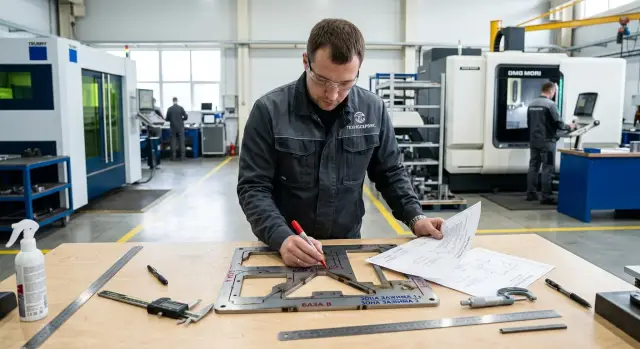
Where the problem begins
After laser cutting, a part often looks almost finished. The contour is already there, the holes are in place, and the edge looks clean. Because of that, it is easy to treat the cut blank as a proper datum for the first setup, even though the real datum has not been created yet.
The mistake appears the moment the operator uses the outer contour or the fresh edge as support for CNC machining. After cutting, that edge does not always provide exact geometry. A slight angular shift, taper, local melt, or a tab mark already moves the zero point. The eye often does not notice it, but machining then produces an extra 0.1 mm where nobody expected it.
There is a second reason as well. After heating, the sheet often warps because internal stresses in the metal are released. On the table, the part may seem flat, but after flipping it or applying a light clamp, a bend appears. If it is clamped in that state, the machine will not correct the shape. It will simply machine the surface relative to a crooked workpiece position.
That is how the twist gets into the final geometry. The plane shifts, the holes keep their size relative to each other, but move relative to the outer contour. The fit ends up tight or, on the contrary, loose, even though the program is correct and the tool is fine.
Usually it starts with a simple mistake. After cutting, the operator takes the plate, rests it against two sides, clamps it, and immediately mills the datum plane and holes. If one side has already shifted by a couple of tenths, the first setup locks in that defect. Every next operation only makes it more expensive.
So the first thought should not be "the part is already cut," but "which surface can I really treat as a datum?" That is where proper CNC preparation begins.
What to check before the first setup
If you clamp the blank on the table right after laser cutting, the machine will simply repeat its errors. First you need to check the part itself.
Even a neatly cut blank can show a twist on the first setup. Heat may have warped the sheet, the edge may have tapered, and scale and small spatter often remain at the support points. Sometimes 0.2-0.3 mm is enough for the part to start rocking.
Before setup, a few quick checks are enough:
- place the blank on a flat plate or a verified table and see whether it rocks at the corners;
- clean all spots that will sit on supports, in the vise, or on V-blocks;
- measure the sheet thickness at several points, not just at the edge;
- inspect the cut around the perimeter and immediately mark areas with taper, burn marks, and visible distortion.
Flatness is best checked before marking and before clamping. If the part already sits crooked, further measurements lose meaning. First you need to understand how it stands on its own, and only then decide what to use as the datum.
Where to leave technological zones
If the part is laser-cut without extra stock for clamping, the first setup becomes stressful right away. The operator has to grab areas that should already remain finished. Any extra pressure pulls the geometry sideways.
Technological zones are best left where the clamp, stop, or temporary datum will later be located. The principle is simple: everything that clamps the part should act on material that will later be removed in rough machining. Then clamp marks, scale near bridges, and a slight shift after cutting will not end up in the finished dimension.
Do not move such zones onto finished edges, fit surfaces, precision holes, or thin walls. Even a small mark later becomes a problem. The datum no longer sits flat, and the mill simply repeats that error.
How to choose a place without wasting material
Look not only at the contour, but also at how the part will sit on the machine table. Usually a few rules are enough:
- leave extra stock where there will be a roughing pass and a later trim cut;
- keep bridges and tabs away from narrow areas and long thin walls;
- do not place machining allowance near a finished datum;
- make sure the clamp does not press on an area that easily flexes.
It is better to give an extra 2-4 mm for removal than to search for twist on every part later. That extra stock costs almost nothing in cutting, but saves a lot of rework.
A good example is a plate with a step and two precision holes. If bridges are left near the narrow area between the holes, the metal can pull slightly after cutting. From the outside it is almost invisible, but during setup the part no longer sits calmly. If, on the other hand, the technological zones are moved to an outer allowance for clamping and removed in the first pass, the datum comes out cleaner and more stable.
It is better to agree on these areas during the cutting stage. When the process engineer, laser operator, and milling operator look at the same drawing, the first setup goes without guesswork.
How to choose a datum without unnecessary risk
For the first setup, the datum should be chosen not "by the drawing," but by stability. First look for a surface on which the blank sits calmly, without rocking and without clamp-induced stress. If you place the part on a questionable edge right after cutting, the error will move further into the holes, planes, and dimensions between them.
Most often, the widest and calmest surface works best. It does not have to be the part's future working datum. On the first setup, a temporary datum is often used so that you can safely create a clean working surface afterward.
A burnt edge cannot always be used. After laser cutting, it often has taper, burr, melt, and local heat distortion. To the eye that edge may look straight, but an indicator quickly shows otherwise. If the edge has not been checked, do not build the entire datum scheme on it.
The usual order is:
- first find the plane or area that gives the most stable support;
- then check whether there is heat damage, warping, or burr nearby;
- after that decide what will be the temporary datum and what will become the working datum after the first machining pass;
- finally, simplify the clamping so the part is not bent by the clamp.
The simpler the setup, the lower the risk. Three clear support points are almost always better than trying to "clamp everything at once." Clamps should be placed closer to the supports, not over a gap. Otherwise the blank only takes the shape of the machine while clamped, and after the tension is released the twist returns.
A good sign of the right datum is that the part sits the same way several times in a row. If the readings change when you set it up again, the problem is usually not the machine, but the datum itself or the clamping scheme.
The order of the first setup
The first setup often decides more than the program itself. If you place the cut blank on the table as is, the machine will simply transfer its twist into the finished geometry.
After laser cutting, the part rarely arrives in perfect condition. There are melt marks on the edge, scale in places, and the plate may lift a corner slightly. That is why the datum is created step by step.
-
First, clean the part. Remove melt, spatter, and burrs at the support and clamping areas. Even a small bump can lift the workpiece enough for the plane to shift.
-
Then place the blank on the supports without tension. It is better to support it at clear points than to try to clamp an uneven surface over its entire area. If the part rocks, the cause should be found immediately, not forced flat with stronger clamping.
-
Check the contact points. The eye is often wrong here. Use a feeler gauge, an indicator, or at least a thin strip of paper and go through all the supports. If paper moves freely under one point, that support is not working, and the part is already sitting crooked.
-
After that, machine a rough datum face or end. Remove the minimum amount of material needed to get a true plane or a straight reference line. If technological zones were left on the part, use them for clamping and for the first roughing pass, and do not touch the finished surfaces yet.
-
Set the zero only from that datum. Otherwise the program will be tied to the raw geometry after cutting, not to the surface you are actually machining from.
This is exactly where shops usually rush. The blank is quickly set by the laser-cut edge, clamped harder, and immediately cut to size. While the clamps hold the part, everything looks fine. After unclamping, the metal relaxes and the size shifts. Five minutes spent on cleaning, checking supports, and creating a rough datum is almost always cheaper than reworking a batch.
A simple shop example
A 12 mm bracket looked fine from the outside, but after laser cutting the long side bent slightly upward. It was barely noticeable by eye until the part was placed on the table. One edge no longer sat firmly, and the clamp could easily pull the metal into a new position.
If you take the datum from the cut contour at that moment, the error will spread across the whole part. The drawing dimensions will still be correct, but on the machine the holes and planes will shift relative to each other. Later this is often called "the machine drifted," although the problem started before the first setup.
In this case, the finished contour and holes were not machined right away. First, two temporary pads were made on the first setup. They were chosen where they would not interfere with the finished geometry and where the clamp would not twist the blank. It took a little time, but it gave two clear supports instead of a questionable datum after cutting.
Then the work continued like this:
- the part was seated on supports so the internal stress could be released without extra bending;
- two temporary pads were machined in the same coordinate system;
- on the second setup, the zero was taken from those pads;
- after that, the final holes and contour were machined.
On paper, that sequence looks slower. In practice, it saves time because you do not have to look for the cause of drift after the first part. When the operator takes the zero from machined pads, they rely on a true surface, not on an edge that laser cutting and heat have slightly pulled.
Mistakes that shift the geometry
More often than not, it is not the cutter or the program that ruins the part, but a poor first setup. If you clamp the blank by a thin edge after laser cutting, it will bend even before the tool touches it. Then one area will be in tolerance, but assembly will show a shift across the whole part.
One of the most common mistakes is taking the zero directly from the cut edge. Laser cuts can have taper, burn marks, melt, and scale. A feeler gauge or indicator catches not a datum, but random texture. On the screen everything looks flat, but in reality the zero has already shifted.
Another typical rush is cutting off technological zones too early. Until the part has a reliable datum and has passed the first machining step, the extra material works as protection. It holds the clamp, takes the clamp marks, and keeps the future working surface untouched. If those zones are removed at the beginning, the part immediately becomes sensitive to any twist.
People often look only at the distance between points and forget about flatness. After laser cutting, the sheet may still be twisted or have local warping. A caliper may show the right number, while an indicator on a plate reveals the problem at once. If flatness is not checked before machining, the machine will simply repeat the error.
The same happens with clamping. When one side is pulled harder and the other is only supported, the blank shifts and rotates in the fixture. For cut parts, such small things are especially dangerous. A mistake at this step breaks the entire datum scheme.
A quick check before start-up
Before the first run, it is better to spend five minutes on a dry check than to spend the whole shift hunting the cause of scrap on the first operation. After laser cutting, the problem is more often not the program, but the seating of the part itself: it rests on an uneven spot, hangs on a bridge, or gets zero from a random edge.
First, check the contact areas. Where the part will sit on supports and where the clamps will hold it, there should be no burr, scale, melt, or signs of local overheating. Even a small bump under one support already creates a twist.
Before starting, it is useful to quickly confirm five things:
- the part has clean areas for supports and clamps;
- there is enough allowance to create the first datum without entering the finished geometry;
- bridges and technological ears do not fall into the precision-size areas;
- the zero is set clearly and can be repeated on the next setup;
- after the first operation, there is already a clear plan for the second setup.
Look separately at the first datum. If you plan to take it from the edge after laser cutting, assess that edge without self-deception. It may look straight, yet still have taper, melt, or local shift. In that case, it is better to machine a separate technological zone first and build the rest of the geometry from there.
If even one point causes doubt, it is better to delay the start. A few minutes at the machine often save an entire shift of rework.
What to do next
If the first part already showed drift after cutting, do not try to correct everything by eye right at the machine. It is better to define a clear setup scheme once: where the part rests, what you clamp it by, and which areas must not be touched until the first setup is complete. For the first batch, that is usually enough to keep the operator from making a new decision on every part.
Cutting and machining should be aligned before the laser run starts. The cutting engineer needs to understand which surface will become the datum, and the CNC engineer needs to know where extra stock, a bridge, or a separate clamping zone is required. Otherwise the part arrives with the correct contour, but the first setup begins with unnecessary risk.
On a trial part, do not limit yourself to the drawing dimensions. First, check how the datum behaves after the first clamp. It is important to verify the flatness or straightness of the datum, repeatability after re-setup, whether the technological zone is sufficient for secure clamping, and whether the part changes position after the clamp is released.
If the error appears at this stage, change the setup scheme rather than trying to save the batch with dimensional correction. It is much more useful to make a simple sketch for the shop or put the setup into the route sheet. Then cutting, the first clamp, and the first machining operation will work as one chain.
If the task depends not only on setup, but also on choosing equipment for serial metalworking, EAST CNC can help at the practical stage. The company supplies CNC machines for metalworking, helps with selection, commissioning, and service, and the east-cnc.kz blog publishes equipment reviews and tips for working with these operations.
FAQ
Can you take a datum from the edge after laser cutting?
Usually not a good idea. After laser cutting, the edge often has taper, burr, dross, or a slight angular shift, so the zero point moves right away. It is better to make a temporary datum or a rough-machined pad first, then build your dimensions from that.
Why does a workpiece rock on the table after laser cutting?
Most often, the metal has warped from heat, or spatter, scale, and burrs were left under the support points. Sometimes just a few tenths of a millimeter are enough to make one corner hang in the air. Clean the support points first and check the part on a plate or flat table without clamping.
What should be checked before the first setup?
First check whether the part sits still without rocking. Then clean the support and clamping areas, check the thickness at several points, and inspect the edges for taper, burn marks, and distortion. If you already see a twist at this stage, do not put the part into the machine as is.
Where is the best place to leave technological zones for clamping?
Leave them where the material will later be removed during rough machining. That way the clamp acts on extra stock, not on a finished edge or a precision hole. It is better not to place such areas near a finished datum, a thin wall, or a fit surface.
How do you choose the datum for the first setup?
For the first setup, use the most stable surface, not the one that looks best. If a wide flat area sits calmly, it is usually safer than a fresh laser-cut contour. The working datum is often created only after the first pass.
How can you tell that the clamp is already bending the workpiece?
You can tell by how the part behaves. While the clamps are tight, everything looks fine, and after releasing them the size or flatness shifts. Another sign is that the part sits differently when set up again. In that case, loosen the setup and move the clamps closer to the supports.
When should the part zero be set?
It is best to set the zero only after you have created a true datum by machining. If you reference the raw geometry from cutting, the program will treat an already shifted position as correct. On the first setup, that almost always adds extra error.
Should bridges and technological tabs be cut off right away?
No, there is no need to rush. Until the part has a reliable datum, the extra material helps hold the clamping force and takes the clamp marks instead of the working surface. If you remove these zones too early, the workpiece becomes much more sensitive to any twist.
What should you do if the first part already drifted in geometry?
Do not try to fix the size by eye or blame the machine immediately. It is better to stop, check the support scheme, clamps, and zero point, and then make a simple temporary datum. If the first setup is wrong, program correction usually only hides the cause.
How can you check whether the setup scheme repeats correctly?
Take the part off and set it up again the same way. If the indicator reading or the size changes noticeably, the datum or the clamping does not repeat well. A proper setup gives almost the same position several times in a row without extra tightening.