
Knocking in the Turret After Indexing: A Check Without Disassembly
A knocking sound in the turret after indexing does not always mean a serious failure. Let’s go through fasteners, sensors, tool backlash, and alarm logs step by step.
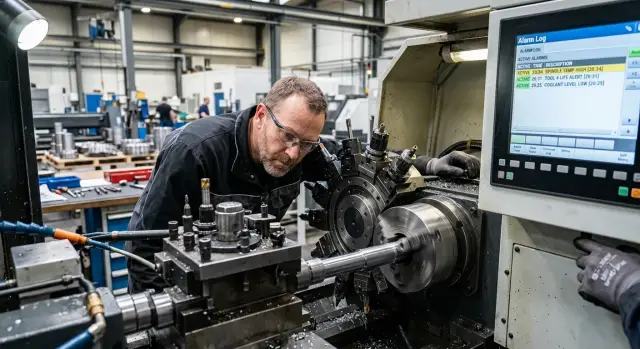
What this knocking means
A knocking sound in the turret after indexing does not by itself mean a breakdown. First, you need to understand exactly when it appears. One sound is heard as the head turns, another at the moment of locking, and a third after it stops, when the tool seems to “settle” slightly in place.
A normal working sound is usually short and the same from cycle to cycle. It may be a distinct locking click or the ordinary noise of the mechanism. More worrying is a sharp удар, a dull knock, or a sound with vibration. If the operator does not hear it every time, but only at one position or after a specific tool, the list of possible causes narrows right away.
It helps to note four things:
- at what point in the cycle the sound is heard
- whether it repeats at the same position
- whether the sound changes without the tool or with a different holder
- what happens right after indexing: does the size drift, does vibration increase, does an alarm appear
A repeated knock on every position is more often tied to general locking, the drive, or the operating conditions of the unit. A knock on only one position usually points to the tool itself, the fastening, the seat, or that station’s mark. This simple observation saves a lot of time.
Look not only at the sound, but also at how the machine behaves. After indexing, the tool position may change, a slight hand-play may appear, surface finish may get worse, or the part size may shift. Sometimes the impact is heard once, but the problem only shows up after a couple of cycles.
If the machine used to run smoothly and the sound appeared suddenly, that is already a good reason to stop and check the turret head without rushing. A short early inspection is almost always better than running it “just to see” and ending the shift with a broken tool.
Where to start right after stopping
If the turret clicked or gave a dull knock after indexing, do not start the next part. Even if the machine keeps running, the batch may go bad, and the unit itself may take a harder hit on the next turn.
First, stop the cycle with the normal command and leave the machine in the state it is in. Do not move the turret to another position “to listen better,” and do not try to repeat indexing right away. After that, it becomes harder to tell when the noise first appeared.
Save four things while they are still in front of you:
- the program number running when the knock happened
- the tool number or turret position
- the alarm text, if one is shown on the screen
- the exact time the noise appeared
These notes often save more time than any quick check. Later, the event log can be used to match the knock, the indexing command, and the machine’s response. If the screen allows it, take a photo of the alarm page and the active program. This is useful when the shift is over and another setter or a service engineer will investigate.
If there is no alarm, that should also be noted. A knock without an alarm often points not to an electronics failure, but to a mechanical detail: a loose tool, dirt in the seating area, or incomplete locking of the position. But it is too early to draw conclusions until the initial data is recorded.
A good shop-floor habit is simple: one person stops the cycle, the other writes down the screen readings. On CNC machines, that kind of discipline often helps find the cause in 15 minutes instead of after a long round of guesswork.
If the equipment is running in a series, mark the last good part and the first suspicious one. That will later prevent arguments about where the deviation began.
Step-by-step check without disassembly
First, take cutting out of the equation: switch the machine to a safe mode and run the turret only through indexing. That makes it easier to understand whether the noise comes from the head itself, the tool, or the operating mode.
Follow the same order each time. If you jump from one step to another, it is easy to get confused and mistake a random noise for the cause.
- Run the turret several times without cutting and listen for when the knock appears: right after rotation, at the end of locking, or already in the stationary position.
- Compare neighboring positions. If the noise is present only at one station, the cause is often closer to the tool, its fastening, or the position itself. If the sound repeats on all stations, look wider: locking, the drive, the indexing sensor.
- Remove the suspicious tool and repeat indexing in the same position. If the knock disappears or becomes noticeably quieter, you have already narrowed the search.
- Switch to a slower indexing mode, if the machine allows it. When the sound changes at low speed, that often points to a problem during engagement, final tightening, or locking.
- After each step, write down the result. A short note is enough: which position, whether a tool was installed, normal or slow speed, and exactly when the knock was heard.
This log is not for formality. After ten minutes, similar sounds start to blend together, and memory fails even an experienced setter.
A small example: on the eighth position, the knock is heard only with the holder installed, and without it the turret indexes quietly. In that situation, there is no point in immediately digging into the turret drive. First check the tool itself, overhang, fastening, and seating on that station.
If the sound is the same on all positions and remains at slow speed, the source is usually not one tool. Then it makes sense to move on to checking the sensors, locking, and backlash.
What to check in the tool clamping
Even a small shift in the holder can cause a dull knock after indexing. The reason is often simple: a screw has loosened, chips got under the clamp, or the tool block did not seat fully. This can be checked from the outside, without disassembling the turret head.
First, inspect the position where the impact is heard. Look for fresh signs of movement: shiny streaks at the base of the holder, a clamp mark off center, or a gap that is not present on neighboring positions. If the tool was changed recently, the risk is higher.
Check the following in order:
- holder screws and clamping plates — no looseness, skew, or stripped edges
- seating surfaces — no chips, oily grime, or dried coolant under the block
- the tool block position — whether it has shifted sideways or upward relative to its base
- tool overhang — whether it matches the setting and does not differ noticeably from the neighboring position
- the neighboring tool — whether there is enough clearance and no signs of contact on the shank, holder, or cover
Chips under the base create a very misleading picture. From the outside, the fasteners may look fine, but the block sits slightly skewed by fractions of a millimeter. During indexing, the turret locks, but the tool ends up not where it should. That is where the impact comes from.
Comparing it with a neighboring position often helps faster than a long inspection. If one holder of the same type has more overhang, a slightly different angle, or a clamp plate that sits unevenly, that is already a reason to stop and not start the cycle.
It is also useful to look for contact marks. A small scratch on a neighboring tool, a damaged edge, or a polished spot on the holder often points directly to contact during turret rotation. In that case, the knocking in the turret after indexing may come not from the mechanism, but from a poorly secured tool.
Indexing sensors and the mark
If the knocking in the turret after indexing does not appear on every tool change, the first thing to check is not the mechanics, but the position signal. On the CNC screen, you can usually see which position the system considers current and when it confirms locking.
The position number should change clearly, without jumps or delays. If the turret moves to one station but another number flashes on the screen for a split second, that is already a reason to check the sensor, the indexing mark, and the wiring. Even a brief number “wander” often causes an impact at the end of the turn.
It is useful to compare several transitions in a row. Move the turret to positions 1, 3, 5, and 8 and see whether the locking confirmation arrives at the same speed. If one position takes noticeably longer than the others, the problem is often not the tool itself, but the mark, sensor, or contamination in the reading area.
Oil, coolant dust, and fine chips often collect near the sensor. Even a thin layer of dirt sometimes changes the gap and throws off the switching point. Clean carefully, without a screwdriver and without pressing hard on the sensor body.
Then inspect everything that is accessible without disassembly:
- the cable near the turret
- the connector and its lock
- signs of strain, bending, or rubbing
- the indexing mark, if it is visible from the outside
The connector is a common culprit. It may stay in place but give an unstable contact under vibration or after the machine warms up. If the cable moves too freely or the insulation has darkened, that is no longer a small issue.
A good reference point is the locking time. When the sensor and mark are working properly, the turret stops with almost the same rhythm on identical transitions. If the rhythm is different and the knock is heard only on some positions, do not rush to blame the tool clamp. First, get a stable position signal.
Tool backlash and turret locking
If the knocking in the turret after indexing repeats, first check whether the tool itself moves or whether the turret does not fully reach a firm lock. Do this only on a fully stopped machine, when the spindle is still and access to the holder is safe.
Grab the holder by hand and gently move it up and down and side to side. Strong movement, a dry click, or a different response in two directions already point to a problem. On a healthy position, you usually feel only a small elastic response, without impact.
Do not check one position and draw conclusions immediately. Compare at least 2-3 neighboring tools. If backlash exists only in one pocket, the cause is often in the holder itself, the clamp, or the seat. If similar movement is present on several positions, look at the turret locking and the indexing mechanism.
Watch how the turret seats into the lock when indexing again. If the unit approaches the position, makes a short final turn, and then you hear a knock, the turret may not be seating firmly the first time. Sometimes the noise disappears after indexing again. This often points not to the tool, but to incomplete locking.
Inspect the holder, the seating face, and the turret body. Fresh impact marks usually show up quickly:
- a shiny stripe on the edge
- a dented corner on the holder
- fine metal dust near the seat
- a repeated mark on one position
These marks help you understand where the part shifts during clamping. If the marks are on both the holder and the body, do not run the machine until the next check.
If backlash is present only on one tool, start with the mounting screws, wedge, and the cleanliness of the seat. If the same knock is heard in different positions, check not only the tooling, but also the turret locking confirmation. This often saves time and helps determine whether the unit needs to be disassembled.
What to look for in the alarm log
The alarm log often narrows the possible causes right away. If a knocking sound appears in the turret after indexing, first find entries related to turret rotation, position locking, and clamping.
Errors with words like indexing, turret clamp, unclamp, position, timeout, sensor, orient are usually helpful. The names depend on the control, but the meaning is the same: the turret did not reach position, did not confirm clamp, or did so with a delay.
Look not only at the code, but also at the event time. Compare the log timestamp with the moment the operator heard the knock. If the noise happened at 10:42 and the alarm was recorded at 10:15, it is probably an old trace and will only confuse things.
It helps to quickly check five things:
- whether there are errors related to turret indexing or clamping
- whether the alarm time matches the moment of the knock
- whether the same code repeats several times
- whether new records have mixed with old ones
- whether the error code is written together with a short description
A repeated code matters more than a long list of different alarms. If the machine writes the same indexing error several times in a row, the problem is usually not random. Often it is the position confirmation sensor, weak turret clamping, or tool backlash that causes the impact at locking.
Separate a fresh failure from old history. After a tool change, setup, or previous stop, the log may contain many entries that are not related to the current noise. It is better to look at the events from the last few minutes before the stop and immediately after it.
Write down the code and the short error text by hand or take a photo of the screen. Memory for details fades quickly, especially if the machine is then reset and started again. For a service engineer, this pair of details is often more useful than a long spoken description like “something clicked on the right.”
If the log is empty, that is also a clue. Then the cause may be mechanical: a weak tool clamp, slight seat backlash, or an impact during clamping without an alarm. In that case, the log does not replace sensor and locking checks, but it does help avoid wasting time on unnecessary versions.
Common mistakes in this kind of check
Most often, the operator loses time not because of the fault itself, but because of the wrong order of actions. When a knocking sound appears in the turret after indexing, it is easy to blame the mechanics right away. But the same sound can come from a sensor, a weak tool clamp, a shifted mark, or an old message in the system that nobody opened.
The first mistake is simple: looking for the cause only in the hardware. If the turret looks intact on the outside, that does not mean much. First check the fasteners, tool position, sensor indication, and the CNC machine alarm log. This set often tells you more than a quick flashlight inspection.
The second mistake is changing parameters by guesswork. The operator changes a delay, offset, or locking condition, the noise disappears for a minute, and then comes back in a different form. After that, it is harder to understand what the original cause was. Before any change, it is better to record the current values or at least take a photo of the screen.
Dirt also interferes with the check more than it seems. If there are chips, oily dust, or stuck coolant on the turret head, you are not seeing the real condition of the unit, but a dirty copy of it. Because of that, a slight tool skew, a loose block fit, or impact marks get missed.
Another common mistake is ignoring one noisy tool. If the knock is heard only at one position, the problem can still be serious. One poorly clamped block can quickly damage the seat and then affect the other positions as well.
Usually, these decisions cause the most harm:
- immediately changing settings without saving the initial state;
- listening to the turret only on idle and not comparing positions;
- checking the unit without removing chips and dirt;
- treating a single click as a coincidence;
- starting a batch after a short quiet anomaly.
The last mistake is the most expensive. The machine made a quiet click, then seemed to settle down, and the shift decides to keep working. An hour later, the impact returns, the size drifts, or the insert breaks. It is much cheaper to stop for ten minutes and recheck the unit than to later deal with a breakdown and scrap.
Quick checklist before restarting
Before restarting, do not try to return the machine to normal mode right away. First, go through a few checks once. This takes only a few minutes, but often shows immediately whether the knocking in the turret after indexing will come back.
If anything seems doubtful, stop at that step and do not move on to an idle cycle. Two extra minutes here are better than a damaged tool or another alarm.
- Check that the tool and holders sit without movement. Tighten the fasteners in place if you see even a small shift, an impact mark, or a poor seat.
- Run the neighboring positions and check the clearances. The tool should not touch the adjacent tooling, cover, or part even on a slow move.
- Inspect the indexing sensor and the mark area. Dirt, chips, and oil often create a wandering signal, and on the screen that looks like a random error or unstable locking.
- Save the alarm log before the next start. Then you will have something to compare against the time, code, and sequence of events if the noise appears again.
- Run a short idle cycle at reduced feed, without cutting. The turret should index and lock cleanly, without impact, vibration, or extra noise.
After that, do not rush to increase speed to production values. Do another 2-3 indexings in a row and listen to each transition. If the sound does not change and the positioning stays steady, you can move on.
On CNC lathes, this simple checklist often does more than long guessing at the panel. If the knock returns even after a clean idle cycle, it makes sense to call a service engineer and show the saved log instead of trying to explain the problem from memory.
A simple shop-floor example
In one shop, the operator noticed knocking in the turret after indexing, but only when the head moved to the eighth position. The sound did not repeat on the other positions. That immediately narrowed the possible causes: a general drive fault seemed unlikely, while a problem in one specific position was very plausible.
He did not disassemble the unit. First he removed the workpiece from the machining area, switched the machine to a safe mode, and repeated indexing several times between the seventh, eighth, and ninth positions. The knock appeared exactly at the moment of locking on the eighth position.
Then the operator removed one tool from that position and started indexing again. The noise became quieter, but did not disappear. That result often points not to the drive itself, but to two small issues at once: the tool seat is dirty, and the fastening has already loosened a little.
After that he cleaned the seating surface, removed chips and oil residue from under the tool block, and then carefully tightened the fasteners to the machine’s specification. The next check went differently: the turret turned and locked without impact.
To avoid guessing, the operator opened the CNC machine alarm log. The same turret locking error repeated several times on the eighth position. That confirmed the conclusion: it was not random noise, but a local problem exactly where the knock was heard.
This case is useful for one reason: the operator followed the sequence. He found the position where the sound always appears, removed one tool, cleaned the seat, checked the fastening, and only then looked at the alarm log. That approach saves time and often reveals the source of the knock faster than a rushed disassembly.
What to do next
If the knock does not disappear after all external checks, do not put the machine back into series production. One test cycle under supervision is acceptable only to confirm the symptom, but part production should be stopped. The idea of “let’s make a few more and then look” usually ends worse: wear increases, size drifts, and the tool and turret seat may be damaged.
Immediately collect a short note about the situation. These details are often forgotten later, yet they are exactly what helps find the cause faster.
- which tool position makes the noise
- when it appears: after indexing, during clamping, at idle, or under cutting
- the exact time of the event
- the error code, if there was one
- what changed before that: tool, holder, setup, program
After that, take a few normal photos. Capture marks on the holder, the pocket, the turret face, the fasteners, and the sensor area if they can be reached without disassembly. What is useful is not “beautiful” photos, but clear ones: a general view and a close-up of one spot. If the knocking in the turret after indexing does not appear every time, note that too. Irregular noise often points to borderline locking or a weak fastener.
If the machine is needed for production, it is better to move the parts to another route than to keep producing with an unexplained impact. This is especially true for serial orders, where the same failure quickly creates a batch of scrap.
When the cause cannot be found on your own, a service inspection is needed. For that kind of request, it is convenient to prepare photos, the position notes, and the alarm log in advance. EAST CNC handles the supply, commissioning, and service support of CNC lathes, so you can discuss the inspection and next steps with them without unnecessary guesswork.