
Hole accuracy after a tool change: what causes size drift
Hole accuracy often drops after a tool change due to overhang, runout, tool length and offset errors. We explain causes and quick checks.
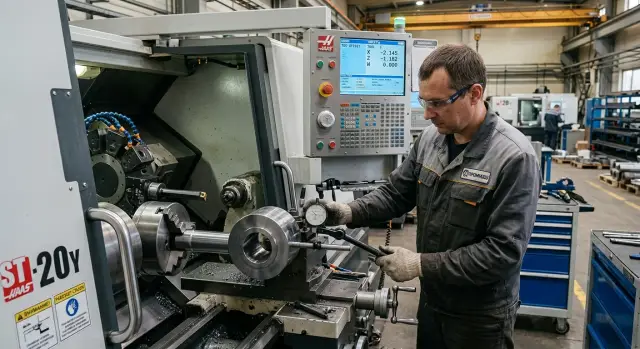
Why the size shifts after a tool change
When a tool is replaced the problem often appears immediately: the very first part has a hole out of size. The program is the same, the machining parameters are the same, the blank is from the same batch, yet the tolerance is gone. In such cases the cause is usually not the material but the setup.
The machine follows coordinates from the program and the tool table. But after a change the assembly itself changes: length, overhang, seating in the holder, position of the cutting edge. For the machine it's already a different tool, even if the magazine number stayed the same.
So the old program won't save you. It was calculated for the previous assembly geometry. If the drill was clamped a bit deeper, a boring tool was fitted with a different overhang, or an operator left the old offset value, the hole will shift predictably. The program isn't to blame — it simply executes incorrect input data.
It's useful to split the problem into two cases right away:
- the size shifts consistently in the same direction from part to part
- the size fluctuates: one part is OK, the next is borderline or out of tolerance
In the first case you typically check tool length, overhang, offsets and correct installation. In the second you more often find runout, dirt on the seating, weak clamping or an assembly error.
This distinction greatly simplifies troubleshooting. If the size moved by the same amount each time, there's no point blaming the metal first. If the spread changes from part to part, a simple offset tweak rarely helps for long.
Material of course affects cutting. But if the problem appeared immediately after a change, start with the assembly and setup. Usually the cause lies in a few simple things: how the tool was clamped, what the actual overhang is, and what the operator entered into the offset table.
What most often ruins the hole
After a tool change the size usually shifts not because of one big failure but because of several small issues at once. The tool can be slightly less rigid in the holder, cut with small runout, or work with an incorrect length in the offset. Even a new tool won't help if the seating is dirty or the clamping is weak.
Excessive overhang is one of the most common causes. When the cutting part sticks out too far from the holder the tool deflects more under load. On the hole you see this quickly: the axis shifts, size fluctuates and it's harder to keep roundness.
Runout spoils the result in a different way. The rotation axis and the cutting axis no longer coincide, so one side removes more metal than the other. Because of that the hole can end up larger than required, and the surface often becomes rougher already on the first parts.
Tool length is a separate story. A new tool can differ from the previous one even with the same designation. If the operator didn't remeasure the actual length or left the old offset, the machine will present the tool at the wrong axial position. Depth is then off, and sometimes the hole diameter as well.
Typically the problem is found in one of these places:
- extra overhang after the change
- runout in the tool or holder
- wrong length offset
- dirt in the taper, collet or holder
- weak clamping or worn seating
Dirt on the seating has almost the same effect as wear. A thin film of oil with chips is enough for the tool to seat unevenly. Outwardly everything may look normal, but the axis is already shifted and the hole goes out of tolerance.
Weak clamping also confuses the picture. The tool can slip out slightly or rotate under load and the size changes without an obvious reason. So after a change the first checks target the mechanics of the installation, not the cutting parameters. If the process held size before the change, the cause is usually right there.
How overhang shifts the size
The farther the tool protrudes from the holder, the more it deflects sideways under load. A drill, reamer or boring bar begins to act like a long lever. The load is the same, but deflection is larger, and the hole quickly loses size.
An operator fits a new assembly, sees the same nominal diameter on the tool and expects the same result. But if the overhang became longer by even a few millimetres, the tool's behavior changes.
At shallow depths the deviation sometimes still fits the tolerance. At deeper holes the problem grows faster. The tool cuts longer in the clamped position, holds the axis worse and reacts more to material resistance.
What changes in the hole
Overhang affects not only the diameter. It also worsens the hole form. Instead of a clean geometry you get taper, ovality, wall waviness, and sometimes axis drift.
A typical picture: the hole entrance looks normal, but deeper down the diameter drifts. Or the entrance shows a split because the tool rocked at the very beginning and then continued on the shifted path. If the diameter "wanders" along the depth after a tool change, check the overhang first.
A simple shop example: previously the drill worked with a 55 mm overhang and held size stably. After changing the chuck the overhang became 72 mm. Cutting parameters were not changed, but deep in the hole the diameter increased and a noticeable wave appeared on the wall. The cause was not the program but the extra assembly length.
A simple rule helps here: leave only the overhang that is necessary for safe clearance. Don't add extra length "just in case." Always compare the current assembly to the one that previously worked stably.
If the size shifted immediately after a change, don't rush to touch the offset. First measure the actual overhang and compare it with the last successful assembly. Very often the cause is not wear or the machine but an extra 10–15 mm that gave the tool freedom where it shouldn't have it.
Where to look for runout
Often the tool itself is not to blame. Runout appears in the clamping assembly: in the chuck, collet, holder or spindle taper. After a change this becomes especially noticeable: the tool is installed quickly and a tiny speck of dirt on the seating already shifts the hole.
Even small runout quickly produces a noticeable error. If the cutting edge is off-axis it removes metal unevenly. On a short drill this shows up in size already; on a long tool the effect grows even more.
Dirt often causes more problems than wear. A single chip on the taper, a film of oil in the collet or adhered dust on the holder changes seating by hundredths. For a hole with a tight tolerance this is enough to reject parts.
It's best to check in sequence:
- spindle taper and its cleanliness
- holder or chuck without the tool
- the collet and nut if a collet chuck is used
- the tool shank
- runout at the cutting edge
Quick indicator check
Before running the batch put an indicator first on the shank, then closer to the cutting edge. If the shank reading is nearly zero but runout grows at the edge, the problem is more likely in the tool itself: it's bent, damaged or poorly ground. If runout is visible already on the shank, search the cause in the holder, collet, chuck or spindle taper.
There is also a simple practical sign. If you put a different tool in the same holder and get almost the same runout, the holder is at fault. If the same tool in another holder runs true, the tool is fine.
Sometimes the cause is very basic: the collet is tired, the nut pulls unevenly, the taper was seated on oil instead of dry. Such a check takes two minutes, but these small things most often spoil the result. Spend those two minutes before a run rather than chasing holes out of tolerance across the whole batch.
How tool length and offsets throw the hole off
After replacing a drill or boring tool the size often shifts not because the tool is "bad" but because its actual length is different. Even a new tool with the same article may not sit in the holder exactly like the previous one. A small difference in overhang or seating is enough for the size to drift.
On a CNC machine this usually looks simple: the operator installs a new tool, leaves the old value and gets a hole out of tolerance. When drilling the error often hits depth and the bottom of the hole. When boring it can shift diameter too if the turret takes the wrong offset or a foreign correction remains in the table.
Length offset and wear offset solve different tasks. The length offset sets the basic position of the tool after touch-off. The wear offset is for fine tuning when you need to remove a few hundredths without changing the base.
When these values get mixed up, failures start. The old length is transferred without checking, or a small wear correction is entered into the length cell. After that the next run gives a different picture and troubleshooting takes extra time.
Where mistakes happen most often
It usually comes down to one of a few simple errors:
- selected the wrong offset number
- mixed the sign and entered a plus instead of a minus
- recorded the value in the wrong cell
- left the wear value from the previous tool
- copied the previous length without remeasuring after the change
This happens on new and long-running machines. Where tools are changed often and work moves fast, a single wrong digit easily ruins a whole batch.
A reliable approach is simpler than it looks. After every change measure the actual length, enter it into the correct offset and record wear separately. If the tool was changed mid-batch, don't rely on memory and don't copy the whole old table. Better to spend a couple of minutes checking than later disassembling a whole run of parts because the hole shifted.
A good habit is to write down the actual length immediately after installation and note who and when changed the tool. Then at the first deviation you can see whether the problem is tool geometry, its seating or simply an offset error.
How to check the cause step by step
If the hole shifted by at least 0.02–0.05 mm after a change, don't turn offsets at random. Stop the run and record exactly what happened: what size you got, whether the hole went plus or minus, and whether this happened on the first part or after several cycles. That information immediately narrows the list of causes.
Then follow the steps in order. Skipping steps easily removes the symptom while leaving the root cause.
- Check how the tool sits in the assembly. Remove it, clean the taper, holder and clamping surfaces. Even fine chips or a thin oil film can seat the tool skewed.
- Measure the overhang. Compare the actual distance from the reference point to the cutting edge with the setup sheet or the last successful assembly.
- Measure runout separately. First check the tool, then the holder without the tool. This quickly shows whether the source is the drill, the collet, the holder or the spindle taper.
- Compare the actual tool length with what is in the offset. An error of a few hundredths can already push the hole out of tolerance.
- Make a trial part or at least one control pass. Then measure the hole again and compare the result with the first rejected part.
If the deviation disappears after cleaning and re-seating, the cause was in the assembly. If the size shifted the same way, look further in the node, not in the program.
Such a check usually takes 15–20 minutes. It often saves an entire shift, because once the run goes and the size slowly drifts no one can easily find the reason.
Errors that repeat after setup
After the first good part many rush and introduce a new problem themselves. The size seems corrected, but the next hole shifts again because the technician changed several things at once and no longer knows which action changed the result.
The costliest mistake is simple: adjusting tool, offset and cutting mode at the same time. After that any deviation looks random. In reality there is a single cause, but you hid it yourself.
If the hole shifted by 0.03–0.05 mm, don't jump to the offset. First check runout, clamping and overhang. Otherwise the size will float from part to part even if the table contains the "correct" numbers.
Common wrong practices
Many shops repeat the same mistakes:
- take length from the catalogue and don't verify it after installation
- leave extra overhang because it is easier to reach the part
- install a new tool into a dirty seating
- correct size using the offset without checking clamping and runout
Catalogue length is fine for selection, but not for precise setup. Actual length after installation can differ because of chuck, seating, sleeve and even a small chip on the end.
The same goes for overhang. It's convenient for the setup person when the tool sticks out more, but the machine doesn't benefit. The larger the overhang, the easier it is to shift the hole axis and get taper or an out-of-tolerance size.
Dirty seating gives an even worse effect. A speck of dust, an oil film with chips or an uncleansed taper can add runout enough to spoil a finishing pass. Then someone sees a bad size and mistakenly treats it only with an offset.
How not to make the problem worse
A sensible order is: change one parameter, check the result, then continue. First seating and clamping, then runout, then actual length, and only after that offsets and cutting mode.
If you do it the other way round, the error returns at every next tool change. The shop loses not only parts but also time on repeated setups.
Example from the shop
After a planned drill change on a cell the operator saw an unpleasant shift: the hole grew by about 0.03 mm and became slightly oval. Before the change the tool held size stably, so at first they suspected a program error or a random setup glitch.
The technician did what is most often done first: he adjusted the length offset. The first measurement improved but not for long. After several parts the size drifted again. One part passed at the upper limit, the next was already out.
Then he stopped guessing and checked the tool node step by step. They found a few small issues:
- the drill had extra overhang compared to the previous setup
- the holder seating had dirt and a thin oil film with fine chips
- the indicator showed noticeable runout after installation
Each of these problems alone would shift the hole. Together they gave a clear picture: the tool cut unstably, the hole became larger, and ovality appeared from runout and low stiffness at increased overhang.
The technician removed the holder, cleaned the seating, reinstalled the tool and reduced the overhang to the proper value. Then he rechecked runout and only after that entered a correction into the offset. Size returned to tolerance and the ovality disappeared. Subsequent parts stopped drifting.
This example shows a simple lesson: don't blindly search for a single faulty setting. If you only turn length offsets you can spend half an hour and still not understand why the hole is out of tolerance. Check the tool seating, overhang and runout first. Then adjust numbers in the control.
Short check before starting a batch
The first minutes after a tool change often decide everything. If you miss one small thing the hole will shift by hundredths already on the first part and then scrap will accumulate.
A short check before the run usually suffices:
- Verify the tool number in the magazine and the offset number in the control.
- Clean the spindle taper, the holder and the clamping area.
- Check the overhang. If the tool protrudes further than needed for clearance, shorten it.
- Before the first part measure runout on the holder or the tool itself.
- Make one trial hole and immediately record the result.
You need more than just the size. Note whether there was extra noise, whether the wall shows a mark, and how calmly the chips exited. These details often hint at seating problems before the numbers do.
A good habit is to record actual overhang, runout and any size correction in the setup sheet. When the same tool returns to work a week later you won't have to guess why it was accurate last time and not now.
A simple example: after a drill change a 12 mm hole suddenly grew by 0.02–0.03 mm. Often the cause is not the drill itself but a dirty seating or a different length offset. This quick check usually finds the error immediately.
If you start a series, don't rely on "we'll adjust later." The first check before the batch is almost always cheaper than sorting dozens of parts after a tool change.
What to do next
To prevent size from depending on the fitter's memory, the shop needs a clear order of checks. Not a long ten-page regulation, but a short routine that people actually use at the machine.
Usually four steps are enough: after each change check overhang, runout and actual length; record the real length of the assembled tool rather than the catalogue nominal; make the first control cut and immediately compare the result with the last successful setup; note which assembly gave a stable size and don't dismantle it without reason.
This routine removes half of unnecessary searches. When the shop has a history of successful assemblies people don't start almost from scratch at each change. This is especially useful for recurring parts where the same tooling runs for months.
Pay attention to the character of the size drift. If the hole shifts steadily in one direction, the cause is most often tool length, offset or overhang. If the size wanders from part to part, look for runout, weak clamping, a worn collet, play in the holder or a spindle issue.
A useful rule is simple: first exclude errors in tool assembly, then check offsets, and only after that suspect the machine. Otherwise the shop spends time where the cause isn't.
If the same size drift repeats even after a correct assembly and offset check, involve service diagnostics. The spindle, mating surfaces, holder, clamping and overall geometry of the node should be checked.
If you need on-site troubleshooting, help with commissioning or service for CNC machines, you can contact EAST CNC. The company works across the full cycle — from equipment selection to commissioning and maintenance — and the blog at east-cnc.kz contains other practical metalworking materials.
Bottom line for the shop: keep a successful assembly, record real measurements and don't guess at the next tool change.
FAQ
What should I check first if the hole immediately went out of tolerance after a tool change?
Stop the run and check the tool seating, overhang, runout and the offset number. If the hole shifted right after a change, the cause is most often the assembly or the tool data, not the program.
How can I tell if the issue is an offset error or runout?
If the hole consistently shifts by the same amount, check the tool length, overhang and offsets. If the size sometimes passes and sometimes doesn't, look for runout, dirt on the seating, weak clamping or a worn collet.
Can extra overhang alone spoil the hole size?
Yes. Extra overhang makes the tool less rigid, so it deflects more under load. On deep holes this shows up stronger: roundness suffers, conicity appears and the size begins to drift.
How to quickly check where runout comes from?
Put an indicator on the shank and then closer to the cutting edge. If runout increases only at the edge, the tool itself is likely the cause. If runout is visible on the shank, check the chuck, collet, holder and spindle taper.
Can I keep the old length offset if the new tool has the same marking?
Usually no. The old length fits only the previous assembly. Even a tool with the same designation can seat deeper or shallower, and the machine will see a different geometry.
Should I adjust the offset right away if the hole shifted by a few hundredths?
Not immediately. Start by checking the mechanics: runout, seating and overhang. If you first change offsets while the tool is clamped poorly or hitting, you just mask the root cause. Fix the mechanics, then make fine offset adjustments.
Is it true dirt in the collet or spindle taper can change the hole size?
Yes—often more than you expect. A thin film of oil with chips or a small speck on the collet or taper changes seating by hundredths, which is enough to push a tight hole out of tolerance.
Do I need to measure the tool length every time?
Better measure after every change. Catalog lengths are for selection; the machine needs the actual length of the assembled tool. A couple of minutes measuring usually saves a whole batch from scrap.
Why is the first part OK but the size starts to drift afterwards?
Check the clamping and the loaded node. The tool can slightly pull out, rotate or increase runout under cutting. Also check that overhang wasn’t left too long during the change.
When should I suspect the machine rather than the tool?
After you exhaust checks of seating, overhang, runout and offsets, and the issue still repeats, then suspect the machine: spindle, mating surfaces or overall geometry should be checked with service.