
Fixturing mistakes: why vices don't save a precision machining center
Fixturing errors reduce repeatability, shift dimensions and force program tweaks. We explain causes, common mistakes and a quick pre-run check.
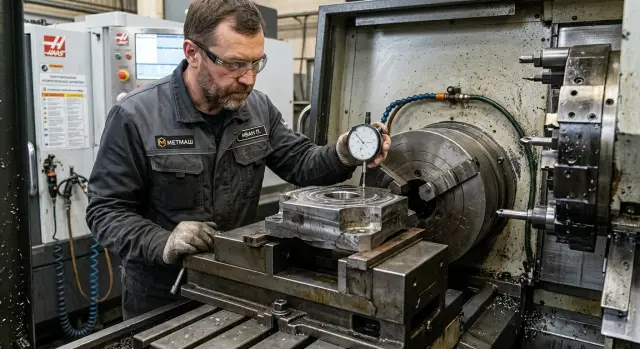
Where the problem starts
The problem doesn't start with the vise or the spindle. It starts the moment someone places the workpiece on the machine and thinks "that will do." When two visually identical parts come out different, the cause is often not the program but how the operator datumed the blank.
One part sits on a clean face, another on a burr, a chip or an uneven end. The eye barely notices the difference. To the machine there is always a difference. The tool will follow the path precisely, but from the wrong starting position.
Good vices do their job honestly. They hold the part rigidly, reduce movement under load and help keep the setup during a run. But vices don't fix a poor support surface and they don't "guess" the correct datum. If the blank sits skewed, the vise simply clamps it firmly in that skewed position.
The datum defines the entire machining geometry: which plane the part stands on, where zero comes from, and how the part is oriented in length and angle. If any of these points float, repeatability is lost immediately. One part may still be "almost in tolerance," while the next one drifts.
Fixturing errors are sneaky because a precise machine won't hide them. It repeats them. That's why people sometimes say the machine is "wandering," when in fact it is faithfully copying a different starting position each time.
A simple example: the blank is clamped in good vices, but the bottom face has a slight wave after cutting. The first part rests on one point, the second on another. Same program, same tool, same parameters. The result is already different.
What counts as a datum
A datum isn't just where the part touches the tooling. It's the surfaces and points that place the blank in the same position relative to the spindle and the tool every time. If the position changes, repeatability disappears even when the machine itself holds geometry tightly.
In the simplest scheme there are three clear elements:
- support — what the part sits on;
- stop — what prevents it from shifting;
- clamp — what holds the part during cutting.
The support sets height and tilt. The stop sets position along a side or axis. The clamp by itself doesn't create the datum. It only presses the part to the chosen support and stops.
People often confuse the drawing datum and the shop datum. The drawing datum is used to measure sizes, runout and concentricity. The shop datum is what you use to mount the part on the machine. Ideally they match. If not, the setup person must clearly understand how dimensions transfer between datums.
Problems start where a clear datum is replaced by a random contact point. A blank may sit not on a plane but on a burr, scale or small projection left after cutting. From the outside everything looks fine: the part is clamped and the machine runs. But one blank sits slightly higher, another slightly rotated, a third rests on a different spot. Dimensions begin to drift without an obvious reason.
A good fixturing scheme is almost always simple. Look for a wide support surface, a clear stop and a clamp that doesn't tilt the part. If a part can be mounted in several ways, the most reliable option is usually the one with fewer accidental contacts and fewer attempts to "force" the position by clamping.
With a batch of flanges this is obvious. If you support the blank on a clean end face and stop it on a machined diameter, the distance between holes and the face stays steadier than when you set it by the rough edge left after cutting. The machine isn't to blame here. What matters is where the part first sat.
How a poor datum ruins repeatability
A precision machining center repeats the tool path. But it cannot place the blank in the same position by itself. If the datum wanders, the machine honestly runs the program and the parts come out different.
Good vices are useful, but they hold only what you gave them. If the blank sat skewed, the tool will remove metal unevenly. One side will have extra material, the other will be cut more than expected.
A frequent small culprit that ruins a run is a burr or chip under the part. Sometimes it's just a few hundredths or a tiny single contact point. That's enough to change height and produce a different dimension after each cycle.
The same happens with the stop. If it's weak, short or the part contacts it insecurely, length begins to float. The operator may think they set the blank the same way, but the actual position is slightly different each time.
With thin blanks the issue changes. Too much clamping force doesn't improve accuracy — it bends the part in the vise. While clamped, the size looks normal. After release, the metal partially springs back and the plane or hole shifts.
Why the same cycle gives different results
The worst case is a floating contact. The part rests not on a stable plane but on random points. In the first cycle it lies on one pair of points, in the second on another. The program doesn't change, the tool doesn't change, yet the result is different.
For this reason fixturing errors are often mistaken for problems with the machine, vise or tool. People start hunting backlash, changing offsets and cutting data. The real cause can be simpler: the blank sits a bit differently every time.
Good repeatability starts not with clamping but with a clear datum. The part should rest confidently on clean surfaces, the stop should fix position along the length, and clamping force should hold without deforming. Without that, even a very precise center will consistently produce unstable results.
Why vices don't solve everything
Vices hold the blank, but they don't fix how it sat on the support. If the datum is chosen poorly, a precise machine will faithfully repeat that error from part to part.
The jaws press the metal with force. That's almost their whole job. If the bottom face of the part is wavy, has a burr or casting scale, clamping won't make it flat. It will just lock in the tilt, and the tool will treat that position as the correct part location.
Another common source of scatter is chips or dirt on parallels. Even a thin sliver can change the support by a few hundredths of a millimeter. On one part that may go unnoticed, but across a series the scatter quickly shows up in dimensions, step height or hole position.
When the clamp itself adds error
If the jaws grip the part too high relative to the support point, the clamp creates a moment. The part can rock or lift slightly during cutting. This is often visible on thin plates, housings and long blanks. From the outside everything looks normal, but after removal the size has shifted.
A simple case: the operator places a rectangular blank on parallels, doesn't remove small chips and clamps almost by the top edge. The first operation goes smoothly. Later, after flipping the part, height and parallelism shift, even though the dial on empty jaws showed almost perfect values.
Soft jaws don't fix a bad datum either. They help repeat the clamped shape and often reduce jaw marks. But if the datum itself is random, soft jaws will consistently reproduce the same error.
Vices work well only when the part rests clearly and cleanly. The correct order is datum first, then clamping. If you reverse that order, the vise will hold the part firmly, but the dimension will still wander.
How to choose the datum before the first part
Start with the drawing, not the vise. Look at which surfaces the dimensions and tolerances reference. If holes, a pocket and the contour are referenced to the bottom face and the end, those should become the working datum and the stop. Otherwise the machine will follow a precise path while the blank sits slightly differently each time.
Then check the support. A good datum is stable on three points and doesn't wobble. On a flat blank this is usually a plane on parallels or on supporting pads. For forgings, castings or roughly cut blanks it's common to make one clean face first. That's faster than chasing the dimension on every part.
After the support, set the position along the length. For that you need a stop at the face or on a prepared side. Without it the part can shift by fractions of a millimeter each clamp. For a one-off this may be acceptable; for a series such a small thing immediately hits repeatability.
Clamping can also be done wrong. If the force acts far from the support, a thin part will bend during clamping. While in the vise everything seems fine. After release the plane goes out and the size drifts. That's why you place the clamp so it presses closer to the support, not lifting or pulling the part sideways.
Before the first part it's useful to check a few things:
- datum surfaces are clean, free of chips and burrs;
- the blank doesn't wobble under light hand pressure;
- the stop contacts the part firmly, without play;
- the clamp presses over the support, not between support points;
- the dial indicator shows the same reading after re-setting the blank.
The last step is often skipped to the detriment of the run. Remove the blank, place it again and run the indicator over the datum and a control surface. Then machine a trial part and check the size again. If position and size return without adjustment, the fixturing is good. If not, redo the setup immediately instead of ruining the whole batch.
Where mistakes happen most often
Most scrap comes not from complex issues but from small things missed in a rush. The machine may hold dimensions and the vise may clamp very stiffly, but repeatability still fails if the datum is different each time.
A frequent mistake is to rely on a rough surface just because it's faster to set the first part. A rough crust has no stable geometry: on one blank it’s higher, on another lower, and on a third it may be tilted. In the end the dimension seems the same, but the part position changes by tenths.
Equally problematic are tiny things. The part is placed on a chip, a drop of oil or a rust spot. After heavy clamping they hunt for zero and assume the position didn't change. They switch blank batches without checking the new stock allowance. They reuse an old setup for a different part without a trial. They look at the vise jaws rather than at the real contact between the part and the datum.
Dirt between the part and the support often causes more deviation than tool wear in a shift. A single turn of a chip under a face can move a blank enough that the first part passes but the next ones show scatter.
Over-tightening is another frequent error. The operator clamps the part hard, then sets zero on the shifted blank. If the material is thin or not very rigid, the part will spring back after unclamping or re-setting and will sit differently next time.
A special risk appears when changing batches. Yesterday’s blanks had an even allowance; today’s batch is rougher by 1 mm with a different crust. If you don't revisit the fixturing scheme, not only the stock for machining changes but the part's behavior in the clamp changes too.
Usually two simple actions are enough: clean supports before each setup and check that the datum truly repeats, not just looks convenient. Those two minutes often save the whole run.
A simple example with a batch of flanges
Imagine an ordinary batch of flanges. The operator sets the first blank in the vise, clamps it to the stop, machines the face and the holes. The part comes in size. Inspection shows it’s good and the run continues.
After a few pieces the picture changes. Thickness still holds, but hole position and height begin to wander by 0.05–0.10 mm. The machine and program are the same and the tool wasn't changed. At that point people often suspect the CNC or the vise, since those are the most visible items.
But the root cause is often lower — in the actual support. One flange has a small burr on the bottom after cutting. Another has a chip stuck. A third has scale on the datum. These are tiny to the eye but enough to ruin repeatability.
When a blank rests on random points instead of a clean plane, the whole part lifts or tilts. Even a single burr under the flange changes the height for the whole batch. The vise only clamps harder; it doesn't correct the bad datum.
Because of this the first part can be good simply because it happened to sit correctly. Subsequent blanks sit slightly differently and the scatter grows. In practice this is fixed quickly: remove burrs from the bottom, wipe the datum and jaws, clear chips and check the stop's rigidity.
After a simple cleaning and a proper support the result usually returns. The same flanges, same program, same tool — but the scatter drops from 0.08 mm to 0.01–0.02 mm. The difference wasn't the vise or the machine. The difference was that the blank now sat the same way every time.
A quick check before starting a run
It's better to spend three minutes checking before a run than to review an entire batch later. Fixturing errors often begin with a small thing: a chip under the part, dirty parallels, a weak stop or excessive clamping force.
First check the support. Parallels, jaws and the part's datum must be clean. Even a thin chip changes seating by a few hundredths and then part-to-part scatter appears.
Then check seating. With a light clamp the part should rest on all support points and not wobble. If the blank "plays" under finger pressure, the vices won't help — they will only clamp the part in a random position.
A quick pre-run check looks like this:
- clean and blow out support areas;
- lightly clamp the part and check for wobble;
- ensure the stop provides the same position on each setup;
- watch whether clamping shifts a thin wall;
- verify that the drawing dimensions are referenced to this datum.
Pay special attention to thin and long parts. Strong clamping often feels secure, but it is exactly this force that bends a wall or slightly rotates the blank. After release the dimension drifts and it looks like a machine or tool issue.
A simple test: set two or three blanks in a row without machining and check the same spot with an indicator each time. If readings vary, the problem is in the datum, the stop or the clamping scheme.
This is even more visible on precise machines. The higher the equipment accuracy, the more obvious installation errors become. In practice, including when working with EAST CNC equipment, checking the setup order before a run yields more benefit than you might expect.
What to do next on your shop floor
Don't start with the vise or the program. Take one setup that has produced scatter and analyze it step by step. See where the part actually rests and what it hits, not just what the setup sheet shows.
Fixturing errors usually hide in small things: a chip under the support, a burr on the blank, an uneven end face, a weak stop contacting at a single point instead of a plane. The machine can hold precision, but the part sits slightly differently every time. Hence the "wandering" size.
Introduce one simple rule for every setup: before clamping the operator cleans the support, stop and the blank, then quickly checks seating by hand and eye. The rule should be short so it’s followed every time, not only after scrap appears.
Then do a small test:
- pick one part that shows a recurring deviation;
- record which surfaces are used as the datum;
- machine five parts in a row without on-the-spot adjustments;
- measure the same dimension on all five parts;
- compare the scatter and check whether seating in the vise changed.
If scatter appears already on five parts, the cause is usually obvious quickly. Either the datum is unstable, the part shifts during clamping, or the operator places it slightly differently each time. Such a test often saves more time than a week of arguing at the machine.
A good habit is to mark the real support points on the sketch, not only the size. Then the setup person, operator and inspector talk about the same thing and shop confusion falls.
If you are choosing a machine for a series, it's useful to discuss not only the model but the fixturing scheme in advance. EAST CNC provides selection, delivery, commissioning and service of CNC machines, so that conversation helps avoid many problems before the run starts.
FAQ
Why do identical cycles produce different parts?
The machine repeats the tool path, but it does not set the workpiece. When the part rests on different points because of chips, a burr or a rough end face, the program runs the same way but the size shifts.
Don't good vices solve the problem?
No. A vise only holds the workpiece in the position it settled on the support. If the datum is bad, the vise simply locks in the same mistake.
What should be considered the datum for a workpiece?
A datum is the support and stop that place the workpiece in the same position relative to the tool. Clamping itself doesn't create the datum; it only presses the part to the chosen support and stops.
How can I quickly tell if the part is sitting crooked?
Lightly press the workpiece and check by hand whether it wobbles. Then remove and re-set it, and run a dial indicator over the same surface. If readings vary, the setup is at fault.
What most often ruins repeatability in a series?
Small things: a chip on the parallels, a burr from cutting, rust, oil or a weak stop. They cause a tiny shift on each setup that quickly builds into a noticeable scatter in a series.
Does high clamping force help keep accuracy?
Not always. On thin or long parts a strong clamp can bend the metal. The size may look correct while the part is clamped, but after releasing the clamp the geometry springs back and the dimension changes.
How to choose the datum before the first part?
Start from the drawing: use the surfaces that dimensions and tolerances are referenced to. Then find a clean support and a reliable stop. If a rough blank wobbles, prepare one clean face first.
Why is the first part fine but the following ones show scatter?
The first part sometimes sits correctly by chance. Later blanks may have a different burr, scale or waviness on the support, so the position changes with each clamp. One good piece doesn't prove the setup is correct.
What to check before starting a series?
Clean the support, jaws and the blank. Set two or three blanks in a row without machining and compare the dial indicator reading at the same spot. This quickly shows whether the seating repeats.
What to do on the shop floor if sizes are already wandering?
Don't rush to change offsets or blame the machine. Break down one setup step by step: where the part actually rests, what it hits, and how the clamp distorts it. Then run several parts without tweaks and check whether the size returns.