
Fixture mass: how it affects the machine and part dimensions
We explain how fixture mass affects axis acceleration, tool access and dimensional stability, and what to check before launching a new operation.
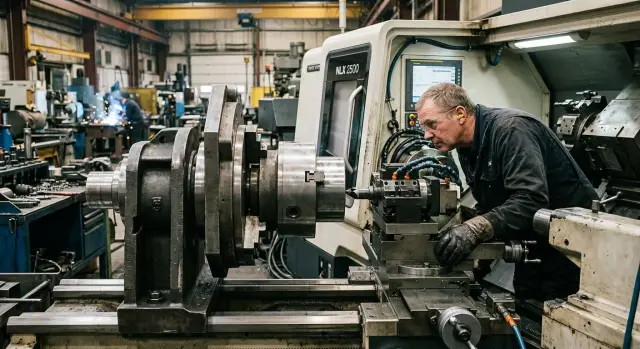
What's the problem
A heavy fixture often looks like a robust solution. In reality, extra mass changes machine behavior from the very first cycle. The machine struggles more to accelerate, brake and reproduce trajectories precisely on fast moves.
The issue isn't just cycle time. Extra weight increases load on the drives, the spindle and the elements that hold and move the workpiece. If the fixture places mass far from its support, the load grows even more, even when the part itself is small.
Machine overload doesn't always look like a failure. More often it starts quietly: the operation becomes harsher, a slight shake appears, and dimensions drift not immediately but after several consecutive runs. The first part can be fine, then deviations of a few hundredths appear.
There is a second problem. Large CNC fixtures often block the tool approach. The cutter, end mill or toolholder lacks direct access to the machining zone. Then you have to use a longer tool, change the entry angle or make extra re‑setups. That reduces stiffness and adds another source of error.
A chain reaction follows. A long tool deflects more easily, a heavy assembly excites vibrations more, and loaded drives and spindle heat up faster. As a result, the machine no longer cuts as calmly as with a light, compact fixture. Dimensions begin to wander, especially on finishing passes and in series production.
A simple shop example: a small part is clamped in a massive steel fixture "with margin." The part is held securely, but some surfaces end up deep inside the fixture. To reach them, operators use a long tool and reduce feed. From the outside everything looks safe, but results show taper, diameter drift or length scatter.
The most common mistake is checking only clamp strength. But weight, size and tool access are linked. If a fixture is too heavy or too large, the machine spends its power fighting the fixture instead of machining the part.
How mass changes machine behavior
The heavier the fixture, the harder it is for the machine to move the axes quickly and accurately. Drives expend more effort on acceleration and braking, and inertia resists sharp direction changes. This is especially noticeable on short moves: the axis should already be returning, but the heavy fixture still drags the system forward.
Because of this, the machine loses crispness. Program commands and cutting parameters don't change, but the actual motion becomes less precise. Sometimes you hear it before you see scrap: after stopping or reversing, an axis takes longer to "settle."
If the mass is offset relative to the rotation axis or the mounting base, the problem worsens. The machine gets not only extra weight but imbalance. Extra oscillations appear on the spindle and rotary units, and they grow at high speeds.
Usually this shows clearly: bearing and guide loads increase, a drive often operates near its torque limit, the machine needs more time to reach steady motion, and the cycle lengthens even at the same feeds and speeds.
Bearings suffer not only from cutting forces. A heavy assembly itself presses on supports, and if the center of gravity is far out, load transfers through a moment arm. Small vibration then quickly turns into noticeable runout, and overheating appears sooner.
Another common effect is a long warm‑up to stable operation. A cold machine with a heavy fixture behaves differently than it does after an hour. While components heat up, axis and spindle behavior changes, and the first parts are often different from later ones.
On CNC lathes this is obvious when a massive fixture is mounted for a single complex part. Cutting can stay the same, but accelerations, stops and positioning take longer. The batch slows down even though the technologist didn't change the cutting modes.
Fixture weight is useful only up to the point where it actually helps hold the part. Beyond that, additional mass no longer adds stiffness but reduces the machine's dynamic reserves and wears components faster.
Why tool access suffers
A large fixture almost always comes with extra metal around the part. Plates get thicker, posts taller, clamps bulkier. As a result, the tool lacks a free approach.
From the outside such a fixture may look robust, but in operation it interferes. If supports lift the part too high they block zones where the cutter should enter on a short, stiff path. This is especially critical for internal pockets, end faces near a wall and stepped features.
Clamps create the same problem. Instead of a direct approach, the tool has to go around them from the side or above. Often the operator uses a tool with a long overhang because a short one simply hits the clamp or the fixture body. Almost always this worsens cutting performance.
In practice it looks routine: the short tool can't reach the cutting zone, the long tool starts to spring, the holder runs close to the clamp, chips accumulate in a tight pocket, and setup drags on because of trial passes.
The problem is not only the tool itself. When there is little space around the part, chip evacuation gets worse. Chips pack between the wall, the tool and fixture elements. The operator stops the cycle, blows the area, changes the feed or tweaks the path. In a series this quickly eats up time.
There is also hidden loss. The tighter the access, the longer the setup. You need to check whether the tool clears the chuck, whether there is room for insert change, and whether a probe can be brought in safely. Sometimes a simple part requires an extra 20–30 minutes only because the fixture blocks view and access.
A good sign of a simple fixture: the tool makes short, direct entries to the work zone without detours. If a routine operation already requires large overhangs, tall spacers or moving clamps between passes, the fixture is too bulky. It is better to remove excess volume, lower the datum or move clamping points than to fight awkward access on every run.
Where dimensional instability comes from
Dimensions don't start to drift because of the program itself. Often the reason is how a heavy fixture behaves in use. The greater its mass, the more it stresses machine components and the easier the whole system departs from the intended geometry.
At first the drift comes from dynamics. A heavy fixture handles rapid accelerations and decelerations less well and sometimes even introduces its own oscillations. In turning this shows as a slight ripple on the surface and taper where the program calls for a cylinder. On milling a wall may come out wavy and diameter may vary by a few hundredths in the middle of the pass.
Long overhangs amplify the problem. If the part projects from the clamp and the tool cuts under load, the system deflects. The deflection may be small but enough to move the dimension up or down. On roughing this may go unnoticed, but on finishing the error becomes obvious.
Heat also changes results. The fixture heats from cutting, from the spindle and from the part itself. Metal expands, clamping forces change, and the part sits in the fixture differently than at the start of the shift. Sometimes a few cycles are enough for the datum to degrade: a tiny chip gets under a support, contact surfaces warm up, the clamp pulls the blank slightly to one side.
For example, when machining a long bushing the first part after setup may almost hit the target. By the fifth or sixth piece the fixture warms up and the ID shifts by 0.02–0.04 mm. The program is unchanged, but the result is different.
Usually the pattern repeats: early parts are within tolerance, then the dimension slowly drifts; after a pause measurements shift again; one surface looks clean while another shows ripple; reclamping changes the result more than expected.
Such scatter is often blamed on offset settings or tool wear. Those also matter, but not always first. If the same program gives different results, it's useful to check the whole chain "machine — fixture — part." In practice that often leads faster to the real cause than constantly tweaking offsets.
How to evaluate a fixture before running
Before the first run look not only at the part but at the entire assembly: chuck, fixture, adapter plates, fasteners and the blank. This total mass is what loads the spindle, table or turret, not a single element in isolation. So first compare the actual weight with the machine's rated limits.
If the number is close to the limit, don't guess. For both CNC lathes and machining centers the rule is the same: you need margin not only to support the mass but also for acceleration, braking and direction changes.
Next check where the center of gravity lies. If it is far from the support base, the fixture will behave worse even at a normal total weight. The machine struggles more with such a load, and dimensional deviations appear sooner.
The next point is overhangs. Too long a part overhang increases the lever and adds vibration. A large tool overhang also hurts: stiffness drops, access worsens, and it's harder to follow the path without detours or risk of collision.
Before cutting run a dry test through the whole program. Do it on the full trajectory including tool changes, rotations, approaches and retracts. It's easier to spot where the fixture blocks the tool path and where the holder, spindle or guards come dangerously close.
Then run a short trial batch in a soft mode. Usually feeds and accelerations are reduced slightly to observe assembly behavior without a hard shock to the machine. If at this stage you already hear a hum, see vibration marks or detect dimension drift, fix the problem now rather than after a full batch.
Measure the first parts not immediately after the first cut but after a short warm‑up. When machine components, fixture and tool reach working temperature the picture becomes more honest. Check three things: how the first part differs from the warmed‑up part, how repeatable several parts are in a row, and whether there are vibration signs where the tool has limited space.
This routine takes little time but often saves scrap and extra re‑setups. If a fixture is heavy and complex, a calm check before the series is almost always cheaper than troubleshooting after the shift.
A simple shop example
A turning shop machined a batch of steel bushings on a CNC lathe. Previously they used standard jaws, but for a new batch they mounted a heavy special fixture. It solved the datum problem but sharply increased load on the clamping unit.
The issue didn't appear immediately. The spindle took longer to spool up, and the operator had to pick gentler start parameters. That was a sign: fixture mass affects not only rated payload but also how the machine accelerates, brakes and holds steady without extra oscillation.
Then a second nuance surfaced. To reach one surface the cutter had to be used with a long overhang because the fixture body blocked the normal path. The first parts were acceptable—dimensions and roughness were fine. But after a few dozen parts the machine and fixture warmed up, the cutter worked less stiffly, and the dimension drifted by a few hundredths.
At first the operator looked at the insert and offsets. The setup technician checked backlash, coolant feed and even the blank batch. The real cause was simpler: the heavy fixture added extra load and the long overhang introduced elastic deflection. Separately these factors are tolerable; together they created instability that is hard to catch on a single part.
They simplified the fixture: removed unnecessary metal, opened the approach to the problematic surface and reduced tool overhang. Weight didn't fall dramatically, but the machine reached speed more calmly and dimensional scatter stopped.
This case shows a simple truth: machine overload rarely looks like an obvious fault. It hides in small things. The cycle stretches slightly, tool approach becomes awkward, early parts still pass, and then dimensional stability slowly degrades.
Common mistakes
Problems usually start not with the part itself but with how people inspect the fixture. Many look only at mass and think the check is done. But the machine senses not only weight but also inertia: where the center of gravity is, how far the assembly protrudes and how it behaves during acceleration and braking.
A heavy fixture mounted close to the spindle can sometimes run calmly. A lighter but long assembly may give worse results. So overload often appears where the rated kilograms seem acceptable.
Another common mistake is excessive part overhang from the chuck or datum. This is done to simplify clamping or free the cutting zone. In practice overhang increases lever arm, which amplifies deflection and vibration. Then dimension drifts and the cause is blamed on the cutting tool.
Extra clamps also harm. They are often added as a precaution to prevent movement. But each additional element increases assembly weight, blocks the tool approach and sometimes deforms the part. This is especially noticeable with thin‑walled blanks, where strong clamping changes geometry even before the first cut.
Tool access errors come from checking only the first position. If the fixture operates with rotations, side changes or different tool lengths, you must inspect the whole cycle. Otherwise the cutter may clear one position but hit a clamp or the fixture body on the next.
Check basic things: where the assembly's center of gravity is, how much the part and fixture overhang, whether the tool path stays clear in all positions and whether several parts in a row keep the same dimension.
Control mistakes are common too. Judging the process by one part is risky. The first part can be good on a cold machine with a new tool and fresh clamp. By the third or fifth part the fixture's mass effect on heating, datum repeatability and dimension becomes visible.
A proper check is simple: assemble the fixture, run the toolpath dry, make a small batch and compare dimensions at the same points. This approach usually reveals problems before the shop loses a shift chasing the cause.
Quick check before a series
Before a series verify the fixture in the exact assembly you'll use on the machine: adapter plates, spacers, fasteners and everything that stays in place during the cycle. This total weight creates the real load and is often larger than memory suggests.
Start by weighing the assembly and comparing the result with your calculations. If the number already looks large for the chuck, table or turret, stop now rather than after the first emergency stop.
Do a short check run. Give an idle cycle at low and operating speeds and watch for obvious shaking. Check runout and balance, especially if the fixture is offset from center. Run the toolpath without cutting and ensure it reaches all part zones. Listen to the spindle during acceleration and deceleration: hum, ringing or a harsh response often indicate excess mass or poor balance. Also time the cycle and note where the machine loses time—indexing, acceleration, position changes or tool approach.
Checking tool access may seem trivial, but it is often where the problem lies. On screen the path may look fine, while in the real assembly the cutter hits a clamp, plate or a tall fixture body. If the tool must approach at an awkward angle or use a long overhang, dimension normally starts to wander.
After the first run don't limit yourself to one part. Measure the first and the tenth in the same points. If the tenth drifts while modes didn't change, the heavy fixture often loads components differently during repeated accelerations and decelerations.
A simple sign: the first part is within tolerance, then the machine slowly adds a few hundredths to the same dimension. In that case, don't argue with the measurement—check assembly mass, balance, tool overhang and the real step‑by‑step cycle time.
What to do next
If a fixture turns out heavy and bulky, simplify it first. Remove everything unnecessary for reliably clamping and machining the part. Extra plates, adapters, tall posts and long overhangs often harm more than they help. Only after simplification does it make sense to change cutting modes.
Many do the opposite: immediately reduce feed, cut accelerations and stretch the cycle. That can save the first trial part but doesn't fix the real issue. If the assembly mass is too large, the machine will still accelerate worse, load components harder and give dimensional scatter.
For a new part compare several parameters at once. Overload rarely shows up in a single number. Compare total fixture weight with machine and chuck limits, see how mass affects axis acceleration and braking, check whether the fixture blocks tool approach and identify where extra tool overhang or a long cutter becomes necessary.
A separate topic is buying a new machine. Fixture mass and dimensions should be discussed before ordering, not after installation. On paper a machine may fit by swing and axis travels but fail the real workflow: heavy chuck, massive fixture, frequent accelerations and strict dimensional requirements.
In practice compare spindle, chuck and acceleration limits. If one node works at the edge, a margin elsewhere won't save you. This is most noticeable in series where the machine repeats the same cycle many times per shift.
If the project is just starting, raise these questions with the supplier in advance. EAST CNC, the official representative of Taizhou Eastern CNC Technology in Kazakhstan, supplies CNC lathes and assists with selection, commissioning and service. So it's sensible to discuss fixture mass, overhangs and tool access at the equipment selection stage.
A good solution is usually simple: a lighter fixture, shorter overhang, clear tool access and a small margin in load capacity. That margin often brings more benefit than long tuning of cutting modes on an already overloaded machine.