
A Fixture for a Family of Parts Without Losing Accuracy
A fixture for a family of parts needs some size allowance, but it must not disturb locating. Let’s look at stops, reference surfaces, and repeatability checks.
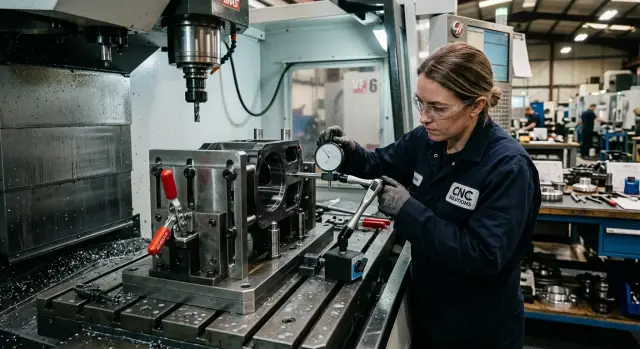
Where accuracy gets lost
One fixture for several sizes seems convenient until changeover begins. At that stage, accuracy is most often lost not because of the machine, but because of tiny shifts inside the fixture itself.
The most common cause is trying to make the setup too universal. When stops can move across a wide range and the locating surfaces fit several parts at once, there are more places where the operator can end up off by hundredths. For roughing, that can sometimes be acceptable. For finishing, it usually is not.
The zero point is lost the moment a stop is changed, a pin is moved, a shim is added, or a different reference surface is chosen. In theory everything is in place, but in practice the part is already seated differently. It is enough for a new stop to sit slightly short, or for a locating pad to pick up a chip only a few microns thick, and the size starts drifting.
Small play hurts repeatability more than it seems. If a pin has even a little side movement, the part sits in a slightly different position each time. On one blank this may create a 0.02 mm deviation, on the next a 0.05 mm one. When there are several such points, the errors add up.
Usually accuracy is lost in four places:
- at the contact between the part and the locating surface, if there is swarf, a burr, or wear
- at the interchangeable stop, if it seats with clearance or without a rigid lock
- in the clamps, if they pull the part sideways on different lengths or shapes
- in zero setup, if after a changeover it is accepted "from memory" without verification
There is also a less obvious issue. When the size changes, not only the part position changes, but also the way it reacts to clamping force. A longer part may flex slightly, while a shorter one may seat more tightly against the locator. The setup looks the same from the outside, but its behavior is different.
Fixture setups that rely on manual fine-tuning work worst of all. If the operator has to "move the stop a little" every time or chase the position with calipers, repeatability quickly falls apart. That approach eats time and does not produce stable results.
A good sign is simple: after a size change, the fixture should return to the set position without trial and error. If that requires turning a screw by eye, tapping it lightly through a spacer, or re-setting it against the part, the accuracy margin is already gone.
Which parts can be grouped into one family
Only group parts into one family when they sit securely on the same locating surfaces. If the locating scheme changes from size to size, you will not get stable geometry after changeover. In that case, it is better to make two fixture versions than one compromise version.
On CNC lathes, this is especially noticeable with parts that look similar in shape but differ in how they are supported. Two flanges may look almost identical, but one is located by the bore and face, while the other is located by the outside diameter and a shoulder. Formally that may be one group, but in practice it is not.
What must match
The first thing to check is the reference surfaces. If parts share the same set of references and the same clamping logic, they can be treated as a family. If the references change, the setup becomes another one entirely.
How to choose locating surfaces without extra adjustment
If you are building a fixture for a family of parts, use the surfaces that barely change from size to size as your references. Usually that is a machined face, a seating diameter, a center bore, or the same plane. Do not rely on casting skin, chamfers, ribs, or areas that receive a different machining allowance each time.
A good reference gives the part the same position without readjustment. A bad one forces you to turn screws after every changeover. In the end, time goes not into cutting, but into chasing dimensions.
The number of adjustable points is best reduced right away. Every movable support, screw stop, or eccentric adds its own variation. If you can keep three rigid support points and one interchangeable stop for length or diameter, do that. It is almost always more accurate than five adjustable elements that the operator resets each time.
The locating surface and the clamp should not do the same job
When locating parts, the same mistake is often made: the part is both positioned and tightened by one and the same element. After that, the part creeps a little as it is tightened, and the size wanders after every changeover. The locating surface should set the position, and the clamp should only press the part against those references.
For a flange, this may look like this:
- the face rests on a rigid support plane
- the center bore or seating diameter centers the part
- the interchangeable stop sets the projection length
- the top clamp only holds the position
This setup is easier to work with and holds repeatability better after changeover.
Mark the surfaces that will be checked. The operator should know, without guessing, what to measure on the first part after a size change: face to stop, diameter from the reference axis, height from the support plane. If these points are not set in advance, people start measuring "where it is convenient", and that becomes another source of error.
In shops using CNC lathes, this is especially noticeable on parts with different outside diameters but the same seating bore. The logic is simple: keep the main reference constant and change only the element that defines the new size. Then the fixture for CNC machines changes over faster, and the result is calmer and more predictable.
When you need interchangeable stops and when adjustment is enough
If a size must repeat without operator judgment, use an interchangeable stop. It gives the same position every time and does not ask to be "turned a bit more." For a family of parts, this is usually the best choice for both accuracy and setup time.
A screw adjustment is useful in a different role. It is handy for bringing an element into position roughly, removing clearance, setting the initial position during fixture assembly, or compensating for slight wear. But leaving the screw as the working way to set an exact size is risky. One operator will turn it a quarter turn too far, another will under-tighten it, and repeatability will be lost.
In a good fixture for a family of parts, screw adjustment usually stays in the background: it is set once, then locked, and the size between variants is defined by interchangeable parts. That is easier to control. If there are three sizes in the series, it is better to have three stops than one screw with marks and a hope for careful handling.
A normal setup looks like this:
- the interchangeable stop sets a fixed size;
- the reference surfaces remain common to the whole family;
- the screw only brings the part into position or supports it, but does not define the size every time;
- after changing the stop, the operator checks one control value.
Labeling solves more problems than it seems. A note like "small" or "type 2" quickly becomes confusing. It is better to use a clear marking: part code, size, mounting side. If a stop works only in one position, that position should be labeled just as clearly as the stop itself.
Similar elements should not fit in "almost right." If two stops differ by 2 mm and have the same mounting holes, sooner or later someone will swap them. To prevent that, build error-proofing into the hardware itself:
- different spacing between mounting holes;
- a locating pin that exists only on one size;
- different seating diameters;
- clear engraving on the stop and on the mounting position.
On CNC machines, this approach pays off quickly. Changeovers become calmer, and there are fewer unclear situations: either the right stop is installed, or it is not. That is better than chasing size with a screw each time and then trying to find where those extra two hundredths went.
How to change over the fixture step by step
When the operator changes size by eye and from memory, accuracy disappears quickly. Most often the reason is simple: swarf in the seating area, a mixed-up stop, or a different tightening order.
A proper changeover follows one rule: every time you do the same actions in the same order. Then the fixture for a family of parts works predictably, not "if you are lucky."
A convenient changeover sequence is:
- First, take the kit for the required size. It is better when interchangeable stops, pins, and shims are kept in one labeled case instead of scattered across different drawers.
- Then clean the locating surfaces, seats, and fasteners. Even a thin chip under a support can shift the position by tens of microns, and that is already visible in size and runout.
- After cleaning, install the interchangeable elements exactly according to the changeover sheet. If the sheet gives a position number and mounting side, do not change the sequence and do not substitute a "very similar" part.
- Tighten the fasteners in the same order every time. If a stop is held by two screws, first snug both, then tighten the first, then the second, and only then bring them to final torque.
- Before starting the batch, use a control part. It is easier to see right away whether the size sits against the references, whether the stop shifted, or whether any tilt appeared.
In practice, the biggest problems come not from the replacement itself, but from small bits of haste. The operator removed one element, put a similar one nearby, got distracted, and then put back the wrong part. That is why markings on fixture parts and a short changeover sheet beside the machine save a lot of time.
If you have a CNC lathe or machining center, add one more simple step: after changeover, do a dry fit check without cutting. The part should seat in the references without force, but also without play. If you have to "press it in," find the cause immediately.
A good changeover usually takes a couple of minutes longer than a rushed one. But it does not eat half a shift while you search for the reason behind scrap after the first five parts.
How to check repeatability after changeover
After changing stops or references, you cannot judge by one good part. Repeatability only shows up across a series of identical setups. To check it, take one part, set it up, measure it, remove it, and repeat the process three times in a row.
The idea is simple: you are not checking the geometry of the part itself, but the behavior of the fixture after changeover. If the part sits slightly differently each time, the machine will not fix that.
It helps to follow the same order each time:
- Install one part in the first cycle and clamp it as usual.
- Measure the axial position and the face dimension.
- Place the indicator at the same control point each time and check the shift.
- Repeat the setup two more times without changing the clamping mode.
- Record all values separately for each stop set.
Axial position shows whether the part is seating against the reference in the same way. The face dimension helps you quickly see whether the seating moved along the axis. An indicator at one point is needed to monitor side shift. Do not change the point, or the comparison loses meaning.
If you changed the fixture for a different size, do not mix the results in one table. For each interchangeable stop set, keep its own record: which set was installed, which part was checked, and what three results were obtained. A month later, that record will save a lot of time.
Look not only at the average, but also at the spread. Suppose that before the changeover, the face dimension varied within 0.01 mm, and after the changeover it grew to 0.04 mm. Even if all parts still pass tolerance, the fixture has already become less predictable. Usually the reason is something simple: the stop did not seat in the right place, the reference got dirty, or the fastener pulls the assembly out of square.
A good practice is this: first compare the spread before and after the changeover, then check where exactly it grew — along the axis or on the indicator. If the axis shifted, look for the problem in the face reference or the stop. If the indicator is drifting, side supports, seating surfaces, or the tightening order are more likely to blame.
When three setups in a row give similar results, the changeover can be considered workable. If the values spread apart, do not start the batch until you find the cause.
Example with flanges of different diameters
A good example is one flange type in three diameters: 120, 160, and 200 mm. The holes, seating, and machining sequence are the same; only the outer size and projection length change. In that case, you do not need three separate fixtures. One body covers the whole group if you keep a common set of references and use interchangeable stops for each size.
It works simply. The locating surfaces hold the flange seating and place the part in exactly the same position along the axis and against the plane every time. The interchangeable stop sets the length, so the operator does not have to chase the size by hand or turn a manual adjustment screw.
For flanges, this is more convenient than a screw-adjustable stop: there is less risk that someone will leave it in an intermediate position and end up with a drifting dimension.
Such a fixture for a family of parts shows well where the error hides after a quick changeover. Suppose the technician removes the stop plate for the 120 mm flange and installs the plate for the 160 mm one. On the trial part, the length dimension shifts by 0.06 mm. At first it looks like the new stop or a worn reference is to blame. But reinstalling the same plate gives the same shift immediately. That is useful: the weak point is no longer the part geometry, but the seating of the interchangeable piece itself.
Most often the cause is simple — a tiny chip or dirt under the stop plate, sometimes a thin film of oil mixed with abrasive dust. From the outside everything looks clean, but even a small speck changes the plate position by several hundredths. For a flange, that is already enough to push the size out of tolerance.
In such a setup, it is not complicated adjustment that helps, but the assembly order. The surface under the plate needs to be wiped, blown off, the pins checked, and only then should the fasteners be tightened. After that, it is worth doing a repeat installation: remove the plate, put it back, and measure the trial part again. If the size repeats, the scheme is suitable for production. If not, look for play in the mounting, a burr on the plate, or wear on the support surface.
In practice, repeat installation is the fastest way to see whether a changeover can be trusted. If the size is stable after that, the references are holding the seating and the interchangeable stops are doing their job properly.
Mistakes when changing size
Most scrap during changeover does not come from the new part itself, but from the small actions around it. People change the size and at the same time touch things that should not be touched. After that, the fixture assembles the part differently, and accuracy drifts in batches rather than all at once.
A common mistake is to change the locating scheme together with the part size. The size may be different, but the locating logic should stay the same if you want a predictable result. When the operator moves both the stop and the reference surface, they are effectively building a new fixture. Then the old setup values are no longer helpful.
The second problem is trying to replace an interchangeable stop with an adjustable screw. A screw seems convenient: turn it and get the needed size. In practice, it adds too much freedom, shifts after tightening, and holds repeatability worse. For a family of parts with clear variants, a set of interchangeable stops with fixed seating is usually more reliable.
Another simple but costly mistake is not cleaning the seat for the interchangeable element. A thin chip, an oil film, or a burr is enough for the stop to seat crookedly. You often cannot see it by eye, but later the parts show size drift and batch instability.
Fasteners are also often tightened however people feel like it. One bolt is tightened all the way at once, the second is left for later, the third is not tightened fully at all. That can make the stop body or reference element turn slightly. For precision tooling, that is already enough. You need the same tightening order and the same force every time, not by eye.
The last trap is looking only at the first part. The first part sometimes comes out fine simply because everything is still sitting in a fresh position after assembly. You need to check repeatability: remove the part, set it again, run several cycles, and compare the result. If the size shifts after re-clamping, the problem is not in the machine program, but in the fixture changeover.
In CNC machining, these mistakes happen even in good shops. They usually do not look serious on their own, but together they quickly eat up accuracy. If something has drifted after a size change, first check the locating surfaces, the seating of the interchangeable elements, and the tightening order, and only then look for the cause in the machine.
Short checklist before starting
Before a production run, it is worth going through five simple points. For a fixture for a family of parts, this often solves more than another half hour of measurements after scrap. The mistake before startup is usually small: a stop was mixed up, chips were not blown off, or the clamps were tightened in a different order.
The check takes only a few minutes:
- Match the stops against the setup sheet. Numbers, positions, and height must match, with no "almost fits."
- Inspect the locating surfaces. They should be free of chips, marks from the previous part, dirty oil, and small burrs.
- Tighten the fasteners in the same order each time. If today you go around from left to right, tomorrow the order should be the same.
- Install the control part twice in a row. Measure after the first setup, then after the repeat setup. The difference will show right away whether there is a locating issue.
- Record the result. The date, fixture number, size after repeat setup, and operator name are enough.
In practice, the simple things usually cause the trouble, not the complicated ones. For example, the interchangeable stop is in the right place, but a thin chip got under it. You cannot see that by eye, but the part shifts by several hundredths. For one part that may still be acceptable; for a batch, it is not.
The logbook is not just for formality either. If repeatability after changeover has drifted, the notes help you find the cause quickly: who changed the fixture, which part was used as the control, and which dimension shifted first. On CNC machines, this saves time just as well as a good setup template.
If one point is not passed, it is too early to start the batch. First fix the cause, then check the setup again on the control part.
What to do next
After the first successful changeover, do not rush to consider the job finished. First look at the facts: how many minutes it takes to change size, where the operator spends the most time, and after which action the size most often drifts. Usually, the time loss is hidden not in the stop change itself, but in re-alignment, the trial part, and unnecessary shims.
If you already have a fixture for a family of parts, put together a simple table for 5–10 changeovers. Record the time for element replacement, the time to the first good part, and the number of corrections to zero shift or the reference surface. In a week, it will become clear where the bottleneck is.
After that, the decision is easier. Sometimes a new set of interchangeable stops and a couple of clear setup marks are enough. But if you have to re-find part locating for every size, change the support height, and make two trial parts, the old scheme has reached its limit. In that case, new tooling will cost less than the constant losses from changeovers and scrap.
A good rule of thumb is:
- if changeover takes only a few minutes and the size repeats from the first part, keep the current setup;
- if only the outer support points change, add a set of interchangeable stops;
- if the locating logic changes, design a new fixture;
- if the part mix grows every month, split the parts into two groups instead of trying to fit everything into one fixture.
Separating a family often saves accuracy. For example, the parts may be similar in shape, but one group is noticeably longer or heavier. On paper that is one family, but on the shop floor it becomes two different clamping modes, two different reactions to deflection, and different repeatability after changeover.
There is one more practical step: check whether you have reached the limits of the machine itself. Even a good fixture for CNC machines will not fix weak rigidity, an awkward loading zone, or slow axis changeover. If the job involves a series of similar parts, it is better to consider the machine and the fixture together.
In such cases, the experience of the EAST CNC team can be useful. The company works with CNC machines for metalworking and helps with selection, commissioning, and service. That matters especially when you need to answer a simple question: do you need another set of stops, or is it time to change the whole fixture concept for the real flow of parts.
If, after that decision, the changeover became shorter and the first part consistently comes in size, then you chose the right direction. If not, do not make the old design more complicated. Split the family, review the locating surfaces, and measure the time again.