
Finishing cast parts: what to consider during setup
Finishing cast parts demands careful setup: account for casting skin, allowance variation and datums to reduce first-run scrap.
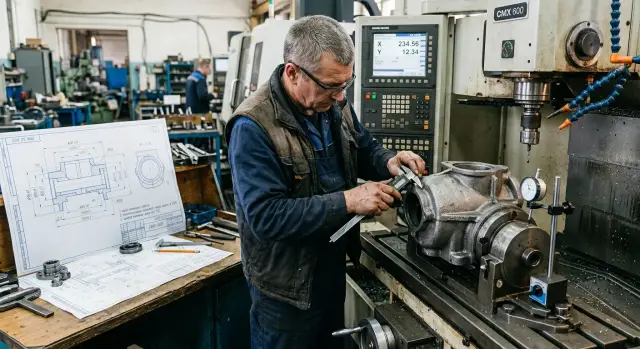
Where problems begin
Problems don't start with the program or the tool, but with the casting itself. Even within one batch two castings rarely match in shape, riser height and surface condition.
Because of that, setting up for an “average” part often gives a false sense of control. The first blank may be fine, but on the second you already see the face seating differently, a wall moved, and the dimension after roughing varies more than expected.
The casting skin is the biggest trouble. It is uneven in thickness and density. In one area the cutter removes metal easily; nearby it first rubs on a hard skin, then suddenly plunges deeper. That changes cutting load, sound and the actual material removed.
A common cause of scrap is allowance variation. On paper it looks like there's material everywhere, but on the real casting one side can have a good allowance while the other is almost “empty.” The operator then has to decide what to save first: the dimension, a clean surface or the position relative to other features.
A raw datum adds another problem. If you clamp the part on an unmachined cast face, it seats slightly differently each time. Skin, slope, a local pit or uneven flash can shift the fixturing by a few tenths. For a housing that’s enough for bores and faces to drift between operations.
In practice it looks simple. The housing is placed on the machine, zeroed, the first pass is done and everything seems to match. Then you take the next casting from the batch, and after roughing one face is clean while the other still has skin, and the height dimension suddenly changes. The machine is not at fault — it repeats the path exactly, but the blank is a bit different each time.
So at the start you must look not only at the drawing but at how the casting behaves. If you ignore that variation before the first run, mistakes cascade: wrong datum, extra cut, undercut and dimensional shifts already on the first parts.
What to check before putting the part on the machine
Before the first setup it’s better to spend 20 minutes inspecting the casting than to hunt for the source of scrap later. This is where you usually either create future problems or prevent them.
First compare the drawing with the casting itself. Look not just at the overall contour but at allowances on surfaces that will be finished. If a dimension on the drawing is tight but the casting's allowance varies, the risk of scrap exists before running.
Pay special attention to the dimensions with the tightest tolerance. They usually indicate which surfaces should define the fixturing. If a housing must hold a precise distance between a bore and a reference face, you cannot choose a datum only because it’s convenient to clamp.
Before mounting, check a few things:
- sprue remnants and their cut marks
- flash along the parting line
- areas warped by cooling
- zones with thick casting skin
- surfaces that already look weak for fixturing
Casting skin often causes more trouble than it seems. It can be hard, uneven and varying in thickness even on the same part. If you pick such a surface as a datum, the part will seat skewed and the first pass will give a false picture. Then the operator starts changing cutting parameters, while the real issue was the setup.
Allowance looks similar: visually it may seem fine, but at the first touch you see there's almost no metal on one side and much more to remove on the other. So before starting, measure several points for height and width and at planned bore locations. Even a simple template check reveals the general situation.
Mark bad datums immediately, either on the setup sheet or directly on the part with a marker. These are usually areas with flash edges, shrinkage marks, pits, sprue remnants and visible distortion. If there are many such surfaces, it’s wiser to do a rough setup first, obtain stable reference faces and only then move to precision operations.
This inspection saves more than minutes — it can save the first batch, especially for housings where one wrong datum immediately shifts several dimensions.
Where to expect allowance surprises
Not all surfaces cause trouble — usually a few typical zones do. If you skip them before cutting, the program looks fine but the first part goes to scrap.
Corners, pockets and areas near ribs often have extra skin. There the casting surface is usually thicker and the transitions rougher than on an open face. On the machine you notice it immediately: the tool enters heavier, the sound changes, chips come irregular. If you cut such an area with the same parameters used on a nearby clean face, the load quickly rises.
Watch areas near the sprue and feeders separately. Metal often remains there with extra allowance, and the actual allowance can be noticeably larger than calculated. On housings the difference is sometimes visible without measuring: one side is almost to size while near the feed there is clear excess. If you use an average from several points, this area is easy to underestimate.
On large planes the opposite can happen: the surface looks even from the outside, but in spots there is underfill or too little allowance. After the first pass islands of skin remain that you cannot remove without cutting into size. This often happens on lids, flanges and support pads where the process looks simple and control is relaxed.
Thin walls mislead too. While the part lies freely, allowance may seem acceptable. After clamping the wall is slightly pulled and at one point metal seems to “disappear” while at another it increases. Then people search for program errors when the cause is clamping deformation.
A simple check helps: measure not one convenient point but several zones with different risk. Usually an angle, an area by a rib, a location near the sprue and a wide plane suffice. This quick check before the first run often saves more time than reworking after two ruined parts.
How to choose datums
A cast part rarely offers a “pretty” datum at first sight. The surface may have skin, local slope, flash and variable allowance. If you rest the part on such areas, it will seat randomly and the whole dimensional plan will drift on the first setup.
First look for the calmest support points, not the most convenient ones. These are areas where the surface varies least in height and the part doesn't rock under light pressure. Often three small contact spots on a rough face are better than trying to rely on one large but uneven pad.
Casting skin almost always interferes with accurate seating. It can be hard, brittle and inconsistent in thickness. Flash also gives false support. If a clamp bears on these places, the part first seems stable, but then shifts after the first pass or even during clamping.
Before the setup do a quick test: place the part on the supports without force, check for rocking, mark contact points and immediately remove skined, flashed and obviously pitted areas from the support. Then repeat the placement 2–3 times and compare whether the blank seats the same way.
Also check how clamping changes the part position. A cast blank does not always behave rigidly. A clamp at one point can rotate the housing, press a wall or make the part rest on a different area. So the setup technician first checks the seating without full force, then tightens the clamp and re-measures the datum points. If the readings change, the issue is the fixturing, not the machine.
For housings it's common to choose rough datums so that the first setup produces one or two clean faces for the next stage. This is a stable working approach: fix the part by the most stable spots, machine faces that will become working datums, then continue.
It’s useful to plan a backup fixturing scheme. Casting variation can be greater than expected and some parts in the batch may seat differently. If an alternative is ready before running, setup won't stop over a few problematic parts.
Setup before the first run
Before the first setup take not one, but at least 3–5 castings from the batch. One part's allowance may look fine while the next shows offset, thick skin or a sagging datum. Such differences quickly break even a carefully prepared program if it was written for a single sample.
First measure the blanks at the points that will become datums and working faces. Check not only overall size but minimum allowance, flash marks, skew, boss and hole offsets. If the spread is significant, build the program not for the smoothest part but for the one with the smallest allowance.
Usually you immediately note four things: where allowance is minimal, where skin is thicker and harder than normal, which surfaces don't repeat between parts, and how the blank sits in the fixture when re-mounted.
Make the first tool approach cautious. A safe lead-in, increased clearance and a gentle first cut often save the part and the tool. If you start with aggressive depth, the cutter may hit a hard skin and the machine will feel the extra load.
After roughing don't jump to the final dimension. Leave a control allowance on faces where the datum is still uncertain or a wall may move after stress relief. This isn't overcautiousness — it's protection against early scrap.
Then measure the part again between operations. Check dimensions, concentricity, the position of machined faces relative to datums and, on thin housings, wall thickness. It's easy to end up with an acceptable outer size while an internal cavity has shifted by fractions of a millimeter that a final pass cannot fix.
Only after this check does it make sense to run finish passes. If the first 2–3 parts show the same pattern, offsets are compensated and allowance is stable, close the dimension. If not, rework the fixturing or roughing regime instead of risking the whole batch.
On CNC machines this routine seems slow only on paper. In practice it often saves several blanks, tools and setup time.
Example with a housing
Take a cast pump housing with a support face, a side wall and a bore for a bearing. On the drawing the bottom face has 3 mm allowance, but the castings arrive uneven: one corner is almost 1 mm higher, another lower, and the top still has casting skin. From the outside the part looks normal, but for setup that alone is enough to create a problem.
If you put such a housing on the first setup by an unmachined surface, it almost always tips. The supports bear on random skin protrusions rather than the geometry. Clamping pulls the housing down and the part assumes a position that will not remain after metal removal. Everything looks normal on the screen, but the error is already rooted in the datum.
Roughing reveals this quickly. On one side the cutter barely touches the surface, while on the other it removes noticeably more. After the first pass the remaining metal is unequal: on one side there's less than a millimeter left for finish, while on the other more than two. If you continue with the same datum you can easily shift the height and misalign the bore and face.
In that situation stop and re-fixture. A simple sequence usually helps:
- rough one stable pad
- check remaining allowance at several points
- move the datum to the machined face
- set a second orientation by the bore or side wall
After changing datums the housing lies predictably. Now the machine rests on a machined surface, not on random casting relief. That lets you meet tolerance for the face and the bore even if incoming castings vary in height.
This example shows a simple truth: the result depends not only on the program. More often the first logic of the setup decides everything. If the datum is unstable at the start, the machine will faithfully follow the path but the part geometry will still drift. Changing fixturing after roughing usually makes dimensions predictable on the very first sample housings.
Start-up mistakes
Most scrap comes not from cutting parameters but from a wrong initial reference. A common error is setting zero on a cast surface because it “looks fine.” In reality the skin is uneven: thicker somewhere, worn elsewhere, and the machine just repeats that randomness.
Then strange offsets appear: bores shift, faces come up short, dimensions wander even though the program is correct. The operator starts changing feed or tool, while the datum is the real cause.
Another extreme is trying to reach finished size immediately. Cast allowance rarely behaves uniformly even within one batch. The first part may be calm, and on the next the cutter cuts skin in one place and air in another.
Roughing is not a formality. It shows where metal truly exists, where allowance is minimal and how similar the casting is to the modeled part. Without it finish machining often becomes a lottery.
Measuring only one part and making decisions for the whole batch is a frequent mistake. For cast blanks that's insufficient. Two adjacent castings can differ in allowance, datum shape and how they sit in the fixture.
Another specific problem is pits at the datum. From the outside the pad may look normal, but after clamping the part slightly sinks or tilts. On a housing this quickly causes failure: the first side was machined correctly, but after re-fixturing bores no longer line up.
Clamping errors are common too. With a thin wall, strong clamping doesn't stabilize the part — it bends it. During machining the size may be within tolerance, but after unclamping the wall springs back and geometry shifts.
At the start it's better to be a bit slower and steadier. Check several castings, inspect support zones before setup, don't zero on raw skin and don't rush the finish pass. Five extra minutes before the first run usually cost less than rebuilding the whole setup after two scrapped parts.
Quick checks before the series
Before a series spend 20 minutes on checks rather than getting a pile of scrap. Small errors add up quickly with castings: skin varies, allowance disappears and parts may seat differently in the clamp.
Start with at least three castings from the batch. No need to measure everything — focus on spots where allowance is usually most fickle: the datum plane, bore areas, places near ribs and sprue traces. This reveals the real spread, not the average.
Immediately note where allowance is minimal. That point shows whether you can start the run with current offsets and first-cut depth. If one point has 0.8 mm spare and another 2.5 mm, tune the program for the worst case.
Then check repeatability: remove a part, mount it again and remeasure 2–3 control points. If dimensions shift, the cause is usually the supports, clamping or skin on the datum, not the CNC program. A good clamp shouldn't move the part between setups.
Operators need concrete control points at the run start. Typically check the datum plane after the first pass, the area with minimal allowance, the bore position relative to the datum and the dimension that often shifts after re-fixturing.
When the first good part appears, don't immediately resume normal rhythm. Remove it, let it cool, mount it again and re-measure the same points. This step often catches a skew or shift invisible right after machining.
One repeated measurement at the start usually saves more time than urgent corrections after the tenth part, when the batch is already running.
What to do after the first parts
After the first 3–5 parts don't immediately ramp up to full speed. At this stage you see how the casting behaves in real machining, not just on the drawing or in the setup plan.
Record measurements at the same points. Watch not only the finished dimension but how the part seats on datums and the allowance left after roughing. If you don't write these numbers down, later you'll search for the cause of deviations blindly.
Usually log four items: deviation on reference faces, actual allowance on different sides, dimension after each operation and tool condition after the first parts. This quickly shows recurring problems and one-offs.
Also note where the casting skin stresses the tool most. That is visible by rising forces, a changed cutting sound and early dimension drift. In such spots don't wait for scrap — adjust cutting parameters, split roughing and finishing between tools, or add an intermediate pass.
If a dimension shifts after clamping, don't rush to change the program. First check the tooling and fixture. A casting easily skews if a support sits on rough skin and the clamp pulls on a thin wall. Changing the clamp point, support or using gentler clamping often solves it.
A typical example: a housing whose one face consistently comes out thinner. Often the cause isn't allowance but a slight rotation on an uneven datum. After moving the support point and re-measuring the size usually evens out on the next part.
If after early adjustments it becomes clear you need a different machine or a more stable start-up scheme, EAST CNC can help with selection, supply, commissioning and service for CNC turning and milling machines. The company east-cnc.kz also publishes practical materials on the topic: industry news, equipment reviews and metalworking tips in its blog.
FAQ
Why does the first casting come out OK, but the second is out of tolerance?
Because the machine repeats the same toolpath while the castings are different. One casting may have a thinner skin, another a higher flash or less allowance, and after the first pass those differences immediately show up in dimensions. For a reliable start, don't base decisions on a single “good” blank — inspect several parts from the batch.
What should I check on the casting before putting it on the machine?
Inspect the datums, sprue remnants, flash, warpage and areas with thick skin. Then measure a few points where you need accurate dimensions or where the allowance looks questionable. This way you can predict where the part will sit skewed or where there is almost no metal left.
Where does allowance most often vary?
Corners, pockets, areas near ribs and zones next to the sprue usually cause trouble. There the skin is often thicker and transitions are rougher than on open faces. On big planes you can also find local underfill where allowance is too small, leaving islands of skin after the first pass. These spots are the usual culprits when allowance doesn’t match the drawing.
Can I set zero on a raw cast surface?
No — not if you need consistent dimensions. A cast surface rarely repeats from part to part: the skin, local slopes and small defects shift your zero by tenths. Get a machined datum or another stable reference first, then establish the final geometry.
How to choose datums if all surfaces are still raw?
Choose the calmest support points, not the most convenient. The part should sit without rocking and the contact points should avoid flash, pits and thick skin. Often three small stable spots are better than one large but uneven area.
Why measure several castings instead of just one?
One tidy blank can deceive you. The next casting may have different allowance, another skew on the datum, or different clamping behavior. Checking 3–5 parts before the run usually saves more time than reworking after scrap appears.
When is it safe to move to finish machining?
First cut a rough layer, check the remaining allowance and see how the part holds the datum between operations. If the allowance is stable and the machined faces don't shift after re-fixturing, then move to finish. When in doubt, leave a small machining allowance for control — it's cheaper than chasing an undercut or an out-of-size finish.
Why does clamping itself shift the size?
Clamping often deforms a casting rather than fixes it. A thin wall bends, a housing twists on an uneven support, and you measure a stressed blank. After unclamping the part springs back and the geometry shifts. Change the support or clamping point before altering the program.
Which dimensions should be checked at the beginning of the series?
At the start of the run, control the machined datum after the first pass, the area with the smallest allowance, the bore or reamed feature position relative to the datum, and the dimension that most often shifts after re-fixturing. Also take the first good part out, let it cool, refixture it and remeasure the same points to catch hidden skew.
What to do if one side is already clean after roughing and the other still has skin?
Stop and don’t continue with the same setup. Measure the remaining allowance at several points, move the datum to the machined face and then proceed. This step usually evens out the geometry and removes the randomness introduced by the raw casting.
What to do after the first parts are made?
Record measurements at the same points. Track not only the finished dimension but how the part sits on datums and the allowance left after roughing. If you don't record these numbers, later you'll search blindly for the cause of deviations. Log datum deviations, actual allowances, dimensions after each operation and tool condition — this quickly shows repeating issues versus one-offs.