
Finishing after shot blasting and tool wear
Finishing after shot blasting needs a simple check: residual abrasive speeds up insert wear in the first minutes and ruins part size.
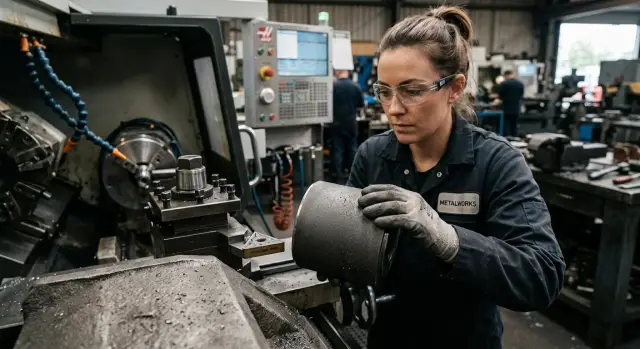
What changes immediately after shot blasting
After shot blasting, a part often looks cleaner than it really is. The surface is even, matte, and free of obvious dust. That makes it easy to assume the workpiece is ready for the finishing pass. But abrasive often remains in the top layer, pores, grooves, and small recesses.
That changes how cutting starts. In the first seconds, the tool meets not only metal, but also hard particles. They act like fine sandpaper and quickly dull the cutting edge. From the outside, the process may look calm: the sound is almost normal, the chips look familiar, and the machine gives no clear warning. But the edge is already wearing faster than normal.
Usually, the insert tip suffers first. Then friction increases across the whole working area. If the allowance is small, the size margin disappears very quickly. On turning finishing operations, this is especially noticeable: the insert does not yet look destroyed, but the dimension is already starting to drift by hundredths.
The problem after shot blasting rarely begins with obvious scrap. Much more often, the process quietly goes off track without warning. Today the first part passes normally, then after a few pieces the tool needs more frequent adjustments and the surface quality drops sooner than usual.
There is a second effect as well. After shot blasting, the surface changes how it contacts the tool. The insert does not enter a smooth metal layer, but a mix of metal, work-hardened traces, and random hard particles. The most unpleasant wear often appears right in the first minutes. The cutting may then settle down, but part of the insert life is already gone.
On the shop floor, this looks very simple. A fresh insert is installed, the finishing pass starts, and normal tool life is expected. Instead, surface quality drops early, adjustments become more frequent, and tool consumption goes up. The reason is often not the cutting mode or the insert. The part simply was not cleaned well enough after shot blasting.
Where residual abrasive stays
After shot blasting, abrasive almost never disappears completely with the first blow-off. Large particles are easy to spot, but fine dust stays where it is easy to miss.
Most often, the problem is not on the open flat surface, but in the surface texture. If the metal has pores, scratches, sharp internal corners, diameter transitions, or narrow grooves, grains catch there and stay until the tool makes first contact.
Most abrasive usually remains around holes and countersinks, at thread roots, on shoulders, in slots, grooves, internal corners, and on the end face near the edge. That is exactly where dust often comes out after the part is installed and goes straight into the cutting zone.
Oil and moisture make the situation worse. Fine abrasive dust mixes with coolant, preservative oil, or ordinary condensation and sticks to the surface like paste. Air does not remove everything, and a rag can sometimes just smear the mixture around.
There is also a source that is often underestimated: the fixtures. Chuck jaws, soft jaws, supports, prisms, and even the operator’s gloves can easily carry abrasive back onto an already cleaned part. So a workpiece that looks clean can sometimes enter the machine with a dirty base.
In practice, it looks familiar. The operator cleans a shaft, mounts it in the chuck, clamps it with the center, and starts the first pass. If dust remains on the jaws, it transfers to the seating diameter and then goes under the tool together with the fine chip.
For turning, the first millimeters of travel are especially unpleasant. The tool has not yet stabilized thermally, and the edge is already rubbing against a mix of metal and abrasive. Extra wear starts right away, even though the cause is hidden in small things: poorly cleaned locating surfaces, dirty jaws, and missed corners.
How abrasive wears the tool in the first minutes
In finishing, the tool works very delicately. The allowance is small, the load seems low, and many people expect smooth cutting. After shot blasting, that expectation often fails. Even fine dust can damage the edge on the very first pass.
Residual abrasive acts like emery cloth between the part and the insert. Some grains sit on the surface, some are trapped in pores, radii, and grooves. When the tool enters the metal, these grains do not move away gently. They rub, scratch the surface, and sometimes get pressed into the metal.
The first sign appears quite quickly: a dull strip shows up on the working edge. The insert looked fresh a minute ago, and after the first pass it already loses its shine. That is early abrasive wear. It does not always look serious, but the edge cuts worse already.
Small chips may appear next. They are easy to miss with the eye, but in a finishing operation that is enough to ruin the result. A grain gets under the edge, the load jumps, and the thin cutting zone starts to chip away little by little. The smaller the feed and depth of cut, the more frustrating this wear is. The tool should remove a thin, even layer, but instead it keeps hitting hard spots.
The part surface changes right away too. Instead of a clean tool mark, you get a scratch pattern: short, irregular, or almost continuous. On a cylindrical surface, it looks like a rough band even though the settings are correct. At that point it is easy to blame feed or insert geometry, but the reason is often simpler: abrasive is still on the part.
The sound also helps identify the problem. Normal finishing cutting sounds even. If there are residual abrasive particles on the surface, a dry rustle, crackling, or a light grinding sound appears on the very first pass. That is a good reason to stop before the edge loses its geometry.
On a CNC machine, this wear can seem random. In reality, the cause often repeats batch after batch: a few remaining grains shorten tool life far more than the part’s appearance would suggest.
What to check before mounting the part
Before installation, it helps to look not only at the workpiece surface itself, but also at every contact point with the fixtures. That is where the source of early wear is most often hiding.
First check the locating surfaces and clamping areas. If dust remains on the support, the part may sit slightly higher or at a slight angle, even by fractions of a millimeter. For roughing, this sometimes goes unnoticed, but for finishing it immediately adds extra load to the edge and hurts size repeatability.
A simple test takes less than a minute. Wipe the locating surface, end face, and clamping area with a white cloth or light rag. If the cloth shows a gray mark, there is still abrasive on the part or a mix of dust and fine scale. The eye often misses it.
Then blow out all areas where abrasive likes to stay: holes, threads, pockets, internal corners, and radius transitions. Blind holes are especially often forgotten. When the chuck clamps such a part, some dust comes out and goes straight into the cutting zone.
The fixtures deserve just as much attention. Before installation, clean the jaws, prisms, supports, and other contact surfaces. Even a thin layer of dust between the part and the jaw worsens clamping and can leave dents on the locating surface.
Also check whether the part has a mix of abrasive and coolant. That film works like lapping paste. The tool meets it right at the start of the pass, and the edge loses sharpness faster than usual. Sometimes that happens on the very first part of the batch.
If everything looks fine after mounting but you still have doubts, do not go straight to the final size. It is better to first remove a thin layer on an area with allowance and watch the tool mark, sound, and first chip. That short test often saves an insert better than any adjustment after scrap.
How to prepare the part before machining
After shot blasting, it is better not to rush. Five minutes of preparation usually cost less than an early insert change and a repeated size setup.
The work order is simple. First wash fine dust off the surface. Liquid removes the fine fraction better than air alone. Then use air on the hard-to-reach spots: blind holes, grooves, threads, and internal corners.
Then clean the locating surfaces separately. Do not mix this step with the general washing of the part. One grain on the support surface or at the stop point is enough to change the seating and create an angle in the clamp.
After that, check the setup without rushing. Mount the part, tighten the clamps, and make sure the locating surface sits flat and nothing is left between the part and the fixture. If the part sits unevenly, abrasive will show up not only as wear but also as runout.
A good practice is a short trial cut in a zone with extra allowance. There is no need to go straight to size. It is enough to remove a thin layer and see how the tool behaves in the first seconds. If the insert quickly loses its shine or the sound becomes harsh, stop and check the cleanliness again.
Only after that does it make sense to start the finishing pass. When the test cut is smooth, size control is much more stable, and the risk of damaging the surface is lower.
This order is especially useful on parts with complex geometry. On a flat plate, contamination is sometimes visible right away, but in a housing part, grooves, and internal cavities, abrasive stays longer and behaves worse.
A simple example from the shop floor
A shaft came into the shop after shot blasting. At first glance, it seemed completely ready for work: matte surface, dry metal, no visible dust. The operator inspected it quickly, saw no obvious contamination, and mounted it in the machine.
At first, everything looked normal. He set the usual parameters, installed a new insert, and started the finishing pass. The first rotations raised no questions: the sound was even, the chip looked normal, nothing seemed suspicious.
After a couple of minutes, a thin scratch appeared on the surface. Then the size started to drift. At first the deviation was small and easy to dismiss as a random fluctuation or an insert characteristic. But the wear progressed too quickly. The edge lost sharpness early, and tiny longitudinal scratches began to appear on the part.
The reason was simple. Abrasive had remained on the shaft after shot blasting. Not on the open areas, but in a groove near the shoulder, near the end face, and in small transitions. After clamping and cutting started, those particles entered the contact zone.
The machine was stopped, the shaft was removed, and it was cleaned again. The part was thoroughly blown out, washed, brushed through the transitions, and wiped with a light cloth. Then a new insert was installed and the same pass was repeated with the same settings.
The difference was visible immediately. The scratch disappeared, the surface became smoother, the size stopped drifting, and insert wear returned to normal. The cutting parameters were not changed. The only issue was part preparation before mounting.
Cases like this are a quick reality check. If a shaft looks clean and dry, that does not mean it is actually clean. When the size starts drifting in the first minutes of cutting, the first thing to check is residual abrasive, not the cutting speed and feed.
Mistakes that wear out the tool fastest
The most common mistake is assuming a matte surface means a clean part. A matte finish only says the part was blasted with an abrasive medium. It does not say the abrasive has already been removed.
The second mistake is blowing off only open areas and skipping grooves, internal corners, threads, and blind cavities. That is where the grains stay the longest. Then they come out on the machine and go under the cutting edge at the worst possible moment.
The third mistake is starting the finishing pass immediately without a short check. If you do not make a trial cut, do not look at the first chip, and do not wipe the base with a cloth, the tool takes the full hit. You may not hear it right away, but the edge quickly gets tiny chips and the part surface gets rougher.
Another expensive habit is mounting the part on dirty jaws. Residual abrasive remains not only on the workpiece, but also on the fixture. As a result, the part sits unevenly, and grains get trapped between the metal and the support surface. In the end, the tool cuts under extra load, and the size starts drifting on the very first pass.
When the edge dulls too quickly, many people immediately change feed and speed. Sometimes the cutting mode really should be adjusted, but it is not worth looking only there. If abrasive remains on the part or in the clamping zone, even well-chosen settings will not save the tool from extra wear.
The usual picture looks like this: a new insert, a normal program, a short cycle, and after a few minutes the edge already looks tired. In many cases, the problem is not the insert or the machine. The part was simply considered clean too early.
Quick checks before the first pass
Before the first finishing pass, it helps to compare not only the part, but also how the process itself behaves. If possible, compare the first part after shot blasting with the same part before that operation. Even with the same settings, the difference is often visible right away: the sound is harsher, the tool mark looks duller, and the edge dulls faster.
First inspect the areas where scratches usually appear earliest. These are usually locating surfaces, sharp edges, transitions, and zones near holes. That is where abrasive stays longer and then gets under the tool or into the clamping area.
Then check the jaws, prisms, supports, and clamps. If they still have a gray film after mounting, part of that dust will almost certainly end up on the locating surfaces. Then the workpiece will sit worse, and the tool will take extra load on the first pass.
Another good indicator is the first chip. If it is darker than usual, with dust and tiny hard inclusions, and the tool mark gives a matte band instead of a clean shine, it is worth stopping and checking the preparation again. That often looks like the start of cutting when the tool is first removing residual abrasive instead of a stable layer of metal.
If you still have doubts, do a short check on the same area. First machine it after the usual preparation, then after a more careful cleaning of the part, locating surfaces, and fixtures. If the mark becomes smoother and the sound softer after repeated cleaning, you have found the source of the extra wear.
How to keep machining stable
Stability starts with the same preparation for every part after shot blasting. If one workpiece is clean and another still carries dust in grooves and on locating surfaces, the tool will wear differently even within the same batch.
It is better to set a short, clear order and repeat it on every shift: remove dust from open surfaces, brush and wipe hard-to-reach areas, check the locating surfaces with a light cloth, clean the jaws and the entire clamping zone, and only then mount the part in the machine. It sounds simple, but this routine is usually what solves the problem.
It makes sense to add two regular checks. At the start of the shift, the operator inspects the machine’s locating surfaces and clamping elements: jaws, soft jaws, stops, chuck, and places where dust tends to collect. Before the first run, the prepared part is checked with a white cloth. If the cloth shows a gray mark, the part is cleaned again.
One more simple rule works almost every time: keep cleaned parts separate from the ones that have just come from shot blasting. If they sit together on the same pallet, dust quickly gets back onto the locating surfaces, into holes, and onto seating areas.
If tool wear still changes noticeably from batch to batch, then it is worth looking wider: at machine rigidity, ease of access to the setup area, and how the fixture holds the part during finishing. In such cases, it helps to review not only the process but also the capabilities of the equipment itself. EAST CNC has materials on metalworking and machine reviews in the company blog, and for selecting a CNC lathe, commissioning, and service, you can contact them directly. This is especially useful when the problem is no longer part cleaning, but the stability of the whole operation.
FAQ
Why does the insert get dull almost immediately after shot blasting?
Most often, the cause is residual abrasive on the surface and in small recesses. In the first seconds, the tool cuts not only metal but also hard grains, so the insert edge loses sharpness quickly, even when everything looks calm from the outside.
Where does abrasive usually remain after shot blasting?
Usually the abrasive is not on the open flat surface, but in grooves, threads, blind holes, internal corners, diameter transitions, and near the ends. Dust also often remains on the locating surfaces and then gets under the tool after clamping.
How can I quickly check a part before installation?
Wipe the locating surface, end face, and clamping area with a white cloth or light rag. If you see a gray mark, the part needs another cleaning.
Is one air blow enough?
No, one blast of air is often not enough. Fine dust mixes with moisture or oil, sticks to the metal, and stays in pores, so it is better to wash off the contamination first and then blow out the hard-to-reach areas.
Do the chuck jaws and fixtures need to be cleaned separately?
Yes, absolutely. If dust remains on the chuck jaws, prisms, or supports, it will transfer to the part’s locating surfaces, spoil the fit, and speed up tool wear on the very first pass.
Can I go straight to the final size?
It’s better not to rush. First, take a thin layer on an area with extra allowance, then check the tool mark, sound, and the first chip.
How can I tell from the cutting process that residual abrasive is the cause?
Most often you’ll hear a dry rustling or slight grinding, and the part will show a dull scratch instead of a clean, even track. Sometimes the insert still looks usable, but the size already starts drifting faster than normal.
Why does the size start drifting even though the settings have not changed?
Because the edge loses sharpness earlier than expected and starts rubbing more than cutting. With a small allowance, that is enough for the size to drift by hundredths after just a few parts.
What is the most reliable part preparation order?
First wash off the dust, then blow out holes, grooves, and corners, then clean the locating surfaces and fixtures separately. Once the part is in the machine, make a short trial cut and only then start the finishing pass.
What should I do if wear is still unstable after cleaning?
Then look broader: check batch cleanliness, clamping repeatability, runout, setup rigidity, and the condition of the fixtures. If the problem remains, it makes sense to review the whole process and the equipment; in such cases, EAST CNC can help with machine selection, commissioning, and service.