
Finished-Parts Buffer Beside the Machine Without Manual Stops
A finished-parts buffer beside a machine helps eliminate manual stops. We’ll look at how to choose the bin, unloading step, and surface protection.
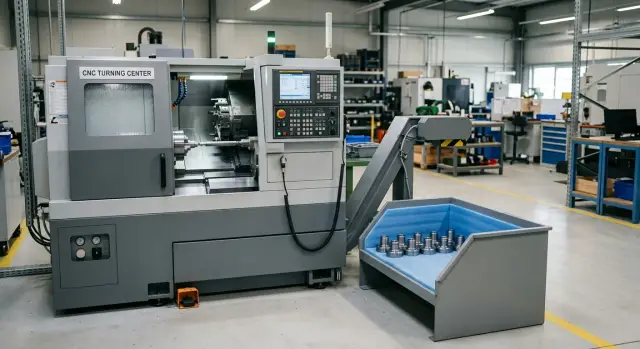
Why a small bin slows the cycle
A bin that is too small next to the machine rarely looks like a serious problem at the start of a shift. The first parts come out normally, the operator takes them almost by reflex, and it seems like everything is going as usual. But the rhythm is already breaking: the person has to walk to the unloading area more and more often and leave other tasks unfinished.
On a turning department, this shows up especially fast. One part falls where it should, the second lands beside it, and the third is already hitting the wall or catching on the output chute. After that, the drop is no longer clean. The part lands crooked, gets stuck, or strikes the previous one.
The worst loss here is not one big stop, but dozens of short pauses. The operator adjusted the bin for 20 seconds, then removed an overfilled box, then put a new one in place. Each one on its own is minor. Over a shift, they add up to a noticeable amount of time when the spindle is not cutting.
A small bin does not just slow the rhythm, it also affects the whole workflow. While the operator is watching the parts come out, they change the tool later, check the size later, and bring raw stock later. One inconvenient container pulls a chain of delays behind it.
There is also a hidden loss. When there is too little room for finished parts, people start forcing the process by hand: they move parts around while the machine is running, push them with a hand, or place temporary boxes nearby. At that moment, unloading is no longer really automatic. A person keeps interfering, gets tired faster, and makes more mistakes.
A simple example: the machine produces one part every 90 seconds. If the bin needs attention every 10 minutes and each change takes 30–40 seconds, the shift loses not just a couple of minutes, but a meaningful amount of working time. And that does not even include the moments when the machine is simply waiting for an empty container.
A small bin slows the cycle not through one obvious stop, but through many short interruptions. They are easy to underestimate, but they are what stretch the shift and reduce the real output of the equipment.
How to tell that the bottleneck is in the unloading area
The problem is usually easier to see in the people around the machine than in the machine itself. If the operator goes to the output chute too often, changes the box, adjusts parts by hand, or clears a stuck part, the time is already being lost there.
It is better not to guess, but to take a simple measurement over one shift. Count how many times the container is changed near the machine and how many minutes each change takes. Even 2–3 minutes repeated several times a day can noticeably reduce output.
Then look at the unloading area itself. If parts pile up at the exit, sit in two layers, catch on each other, or press against the wall of the bin, the cause is often not the machining program, but a container that is the wrong shape or an unsuitable unloading step.
It also helps to compare the pure cutting time with all the pauses after a part is finished. If the spindle cuts for 50 seconds and then the machine waits another 6–8 seconds for the part to clear, the tray to empty, or the operator to change the bin, losses grow quickly.
For this check, four observations are usually enough: how often the bin is changed per shift, whether parts build up at the output chute, how long the pauses are between the end of machining and the next cycle, and how often the operator steps in by hand.
Another clear sign is extra inspection after unloading. If parts are inspected again, wiped, or set aside after dropping into the box, the department is paying twice: first with time, then with quality. Scratches, dents, and impact marks rarely appear on their own. More often, they come from the wrong container, too much drop height, or hard metal-on-metal contact.
If you see frequent container changes, short stops, buildup at the chute, and more repeat inspection, the bottleneck has already been found. Next, all that remains is to calculate the right volume, choose the unloading step, and check surface protection separately.
What kind of container to place next to the machine
The container next to the machine is chosen not by liters, but by how the part leaves the machining area and what happens to it immediately after unloading. A bin that is too small fills up quickly, and the operator has to change it. A bin that is too deep creates a different problem: parts fall on top of each other, hit with their edges, and mark the surface.
Usually the choice comes down to a few clear options. For short and simple parts that do not need exact placement, a box works well. If the parts should stay in a single layer, a tray is more convenient: it is easier to avoid scratches, tangling, and extra hand sorting. A cart is needed where the full container is taken away right away for washing, inspection, or the next operation. A cassette is useful when it is important to preserve the part’s position after machining.
There is a simple rule of thumb. A short, heavy part without a finished surface can usually go into a box. If the surface can be marked easily, it is better not to pour the parts into a pile and switch to a tray or cassette. If the department works without long pauses and the full bin is moved on right away, a cart is almost always more convenient than a separate box on the floor.
The difference is easy to see with a simple example. A 40 mm shaft after cutoff can be collected in a box with a soft insert at the bottom. A thin bushing after a finishing pass is better placed in a tray, where the parts lie separately and do not rub against each other by their sides.
Pay attention to loading height as well. If the operator has to bend down or lift a heavy box from the floor, the cycle slows down even with good automation. The container should sit where it can be replaced, moved out, and brought back quickly, without unnecessary motion.
How to calculate the container size and unloading step
It is better to start not with the bin, but with output. Calculate how many parts the machine really produces in 15, 30, and 60 minutes. Use the actual cycle, not the specification, including door opening, part drop, and short pauses. If the cycle is 90 seconds, 10 parts will come out in 15 minutes, 20 in 30 minutes, and 40 in one hour.
Then turn the output into the load on the buffer. If one part weighs 1.8 kg, the machine will produce 72 kg in an hour. For light parts, the volume usually becomes the limiting factor; for heavy parts, it is the allowed weight of the container and how easy it is to change. Both limits need to be checked at once. Otherwise, the box seems fine by volume, but it can no longer be moved safely.
The buffer should have enough reserve for the time when the operator is busy elsewhere. If they come to the machine every 20–30 minutes, the container should not be full by the time they return. A reserve of another 30–50% of the calculated volume usually helps. If one person serves several machines, it is better to stay closer to the upper end.
The calculation is simple: work out the real hourly output, multiply it by the weight of one part, add a reserve for the operator’s absence, and compare the result with how many times the container will need to be changed during the shift.
That last step is often eye-opening. Suppose the machine makes 40 parts per hour and the shift lasts 8 hours. That is 320 parts. If the bin holds 50 pieces, the operator will have to change it six times and once more at the end of the shift. If the container holds 120 parts, the number of changes drops to two or three. The difference for the department’s rhythm is very noticeable.
The unloading step is set so the part lands calmly, without hitting neighboring parts or bouncing too much. A step that is too large creates a pile in one spot. A step that is too small needlessly runs the mechanism. If the part is 50 mm long, the tray step is usually made slightly larger, around 55–60 mm. For finished surfaces, it is best to test the setting on a trial batch of 20–30 parts and immediately check whether dents, marks, or rub spots appear.
How to protect the surface of the parts
Even a properly chosen container does not solve the problem by itself. If the part falls too far after machining, slides on bare metal, or hits the edge of the bin, marks appear on the surface very quickly. Most often they are small dents, scratches, and rub marks that are only noticed during inspection.
First, reduce the drop height. The shorter the distance from the exit point to the bottom of the container, the more gently the part lands. Sometimes it is enough to raise the bin on a stand or add an intermediate tray to remove an extra 100–150 mm. For finished parts, this often has a bigger effect than sorting out rejects later.
Soft inserts are useful at contact points. Dense rubber, polyurethane, or smooth plastic works well, as it does not catch edges and does not collect dirt too quickly. You do not need to cover everything, only the places where the part first touches the surface and where it may roll after unloading.
If the parts catch on each other, one shared container will quickly create scrap. This often happens with shafts, rings, bushings, and parts with sharp chamfers. In that case, it is better not to make the bin deeper, but to divide it into sections. Simple dividers reduce side impacts and keep the parts from gathering in one spot.
Also check the edge of the bin separately. In practice, the part hits that edge more often than the bottom. A small shift in the path is enough for the finished surface to take an impact before it even gets inside. Watch several cycles in a row. If the part even sometimes touches the side, the edge needs a soft cover or the exit angle needs to change.
For a quick check, just answer four questions: does the part fall gently or hit after leaving the machine, is the first contact point covered with a soft insert, do the parts lie separately, and is the edge of the container out of the path.
If a trial batch of 20–30 pieces shows no fresh marks, the setup is already working. If marks remain, do not change everything at once. First remove the hit against the edge, then reduce the drop height, and only after that choose a different container.
Example for a turning department
A department is turning a bushing, and the machine produces one part every 50 seconds. On paper, the cycle looks steady. In practice, a regular box next to the machine throws it off.
If the box holds about 12 bushings, it fills up in roughly 10 minutes. The operator has to walk over, stop the cycle, remove the full bin, and put in an empty one. Even if that takes only 1.5 minutes, the lost time adds up to about 9 minutes per hour. For the department, that is no longer a minor issue, but lost output.
The problem is not always obvious right away. People usually look at machining time, the tool, and the program, even though the bottleneck is in the unloading area. The machine itself is ready to keep working, but the buffer will not let it run without pauses.
In this situation, one measure is not enough. A simple combination works better. The box is made larger so it can hold at least 45–60 minutes of output. The unloading step is set so the bushings do not pour into one spot. Between the machine and the bin, a soft tray or a short chute with a coating that does not scratch metal is added.
After that, several things change at once. The operator comes by less often. The machine does not wait every 10 minutes. The bushings land more gently and hit each other less.
What changes in the numbers
If the same machine produces 72 bushings per hour, a small bin forces up to 6 stops in that hour. With a larger bin, you can reduce it to one change or eliminate stops entirely if a spare container is waiting on rollers nearby.
The surface also benefits. When a part falls from height onto a hard bottom, marks appear quickly on the finished turning surface: small dents, scratches, and rub marks. A soft tray and a lower drop height reduce that risk. This is especially noticeable on bushings that go straight to assembly without extra grinding.
The conclusion is simple: a small bin takes time away twice. First during the machine stop, then during sorting out parts with scratches. It is much cheaper to choose a proper container and a careful unloading setup once than to keep putting out small fires by hand every hour.
Where mistakes happen most often
It is usually not the machine itself that causes the failures, but the unloading area next to it. On a small batch, the problem is barely visible. On a long shift, small choices quickly turn into stops, extra operator trips, and surface defects.
The first common mistake is simple: the bin is chosen based on the free space next to the machine. People look at where the box can fit, not how many parts will come out in a shift. As a result, the container fills up before the operator has time to get there.
Calculating only by volume causes just as many problems. Parts may take up little space but weigh a lot. A small batch of steel parts can quickly make the bin too heavy for a cart, a forklift fork, or hand transport. Then the box seems suitable, but it is awkward to move, which means it stays near the machine longer and gets in the way of work.
Another mistake happens when people want to approach the equipment less often and set the unloading step too large. For a fragile edge or a finished surface, that is a poor choice. The parts fall from a greater height, hit each other, and get chips, dents, or small scratches. Later, people look for the cause in the tool, cutting conditions, or chuck, even though the problem was in the container and the unloading path.
People also often get the placement wrong. The box is put where there is room, not where it is easy to take away. If the cart cannot come from the right side, the operator starts pulling the bin toward themselves, turning it by hand, or removing it from the area for a while. These extra movements repeat dozens of times in a shift.
The check here is simple too: size the bin by shift output, not by the empty corner next to the machine; look not only at volume, but also at the weight of the full batch; reduce the drop step if the edge or finished surface is affected; place the container so the cart can come up without turning or hand maneuvering.
If the buffer does not block access, can handle the batch weight, and does not удар the part during unloading, the operator has to step in much less often. For serial work, that brings more benefit than it seems at first.
A short check before startup
Even a good unloading setup will not save you if it was assembled by eye. Five minutes of checking often removes the short stops that eat away at the shift in little pieces.
First, place the full container in working position and open the machine door through its full travel. Check whether the container gets in the way of the door, chuck, guard, or operator access. With an empty bin, this is harder to see, because the size and behavior under load can be different.
Then make a few trial unloads and watch the part’s path. If it hits the edge every time, dents, coating damage, and extra noise will appear quickly. Often it is enough to move the bin a few centimeters, reduce the drop height, or add a soft insert in the receiving area.
After that, it is worth imitating a container change at real speed. The operator should roll in the empty bin, remove the full one, and not touch the machine area. If this operation requires a stop, it is better to see the problem before the batch starts, not in the middle of the shift.
And one more simple thing: the next bin should already be waiting nearby. When the empty container is already in place, the shift runs calmly, without rushing and without trying to “make it between cycles.”
A useful test is to run 10–15 unloads in a row and not step away from the receiving area. If the part lands the same way each time, the bin does not drift, and the operator changes the container without fuss, the setup is ready for work.
If even one point fails, it is not worth hoping that it will somehow work in production. On a long batch, a small issue quickly turns into a stop, scratches on the part, or extra manual work.
What to do next
First, measure the real situation at the machine instead of relying on impressions. One hour of video often gives more value than a week of arguments on the shop floor. The recording shows how often the operator comes to the unloading area, how many seconds each pause takes, and at what point the bin starts getting in the way of the normal cycle.
After that kind of measurement, decisions become easier. Often the problem is not the machine itself, but a small container, an awkward tray, or the fact that there is simply nowhere for the cart to come up without extra movement. Even 15–20 seconds for one manual stop per shift turns into a noticeable loss of output over time.
The practical order of actions is this. First, record one hour of operation on video and count only the pauses related to unloading. Do not mix them with setup changes, measuring, or tool replacement. Then, before the batch starts, agree on the whole chain next to the machine: container, tray, unloading step, and space for the cart. After that, check surface protection on real samples. If the part hits the bin wall, slides on metal, or falls from extra height, scrap will show up quickly.
If you are only choosing a CNC lathe, it is better to discuss the unloading area right at the selection stage. Later, changing the part-removal logic is harder and more expensive. With EAST CNC, the official representative of Taizhou Eastern CNC Technology Co., Ltd. in Kazakhstan, you can discuss not only the machine itself, but also the entire path of the part after machining. This helps you plan unloading, commissioning, and service before production starts, instead of fixing failures once the machine is already running.
FAQ
How can I quickly tell that the bottleneck is in the unloading area?
Look at how the operator behaves during the shift. If they often go to the tray, adjust parts by hand, change the bin, or clear a jam, the time is being lost in the unloading area. For a quick check, simply count how many times the container is changed and how long each pause lasts after a part comes out.
How much spare capacity do I need next to the machine?
Usually you want enough reserve so the bin does not fill up before the operator comes back. In practice, a buffer of about 30–50% above the calculated volume helps. If one person runs several machines, it is better to stay closer to the upper end.
What is better next to the machine: a box, tray, cart, or cassette?
For simple, short parts, a box is often enough. If the surface scratches easily, a tray or cassette is better so the parts do not rub against each other. A cart is useful when the full container is moved right away to washing, inspection, or the next operation.
How do I calculate the needed container size?
Start with the real output per hour, not the rated cycle. Then multiply the number of parts by the weight of one piece and check two limits at once: volume and the weight of the full container. If the box can hold the parts but is too heavy to move, the calculation is not right.
How often should the bin be changed so the cycle does not slow down?
Too frequent replacement almost always cuts output. It is better to choose a container that the operator changes not every 10–15 minutes, but much less often, at least every 45–60 minutes or at a rhythm that suits the shop. Then the machine is not waiting for an empty bin every few cycles.
How do I set the unloading step without impacts or parts piling up?
Make the step slightly longer than the part so it lands calmly and does not pile up in one spot. If the step is too large, the part hits neighboring pieces or the bottom harder. Test the setting on a short trial run and look right away for marks and dents.
How do I protect the finished surface during unloading?
First reduce the drop height. Then cover the first contact point with a soft insert and remove the hard удар against the edge of the bin. If the parts catch on one another, divide the container into sections instead of making it deeper.
Can a container that is too large also get in the way?
It can, if you choose it only to reduce how often you change it. A deep container often creates extra drop height, edge impacts, and awkward handling, especially when the full box becomes too heavy. You need not the biggest box, but the one that handles output without damaging the part.
What should be checked before starting a batch?
Set the full container in working position and make 10–15 trial unloads in a row. The part should land the same way each time, the bin should not drift, and the operator should change the container without rushing or adding an extra stop. If the part even occasionally hits the edge, move the container or change the drop angle.
When should we discuss the unloading area if we are only choosing a machine?
It is better to discuss it right away, while you are choosing the machine and planning the part’s path after machining. Later, changing the discharge setup, container, and cart position is usually harder and more expensive. With EAST CNC, you can discuss not only the machine, but also unloading, commissioning, and service for your shop in advance.