
Energy meter on a machine: when you need it in the shop
A machine-mounted energy meter helps understand where kWh go: cutting, idle running or downtime. We explain when to install one and how to read the numbers.
Why the overall electricity bill doesn't answer the question
The total on the electricity bill shows only one thing: how much the shop spent in a month. It doesn't say which machine was cutting under load, which was switched on without doing work, or how much energy compressors, pumps, lighting and ventilation consumed.
So the overall bill is nearly useless if you want to understand the real consumption of a specific machine. Different processes are mixed into a single number, and conclusions are then made by feel.
The total consumption includes the machines themselves, auxiliary equipment and the whole shop infrastructure. Even if an area produced the same volume of parts, consumption may have risen for reasons other than cutting. The extraction fan ran longer, the compressor cycled more often, or a machine sat powered on for a whole shift.
This happens all the time. One machine cuts metal for 3 hours, while the others wait for the operator, setup or parts for 7–10 hours. You won't see that from the shop-level bill. On paper the equipment looks well utilized, while in reality a lot of energy is spent idling and standing by.
Without separate measurements the discussion quickly turns into feelings. The foreman says the machine almost never stands idle. The process engineer is sure the problem is the cutting mode. Management looks at the total bill and thinks it's a tariff issue. There's nothing to check because there are no numbers for the specific machine.
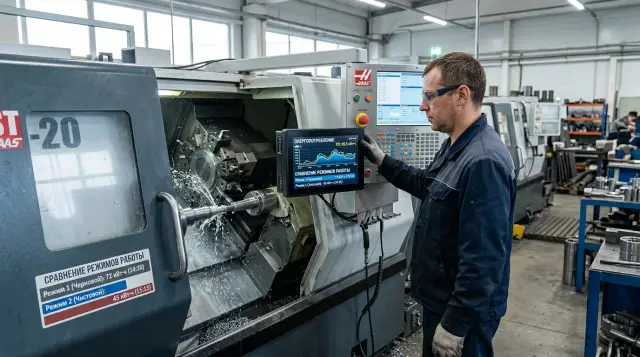
A machine-mounted energy meter removes such arguments. It shows how many kWh were used during cutting, how many during waiting, and how consumption changes by shift or by part. Then you see not only total consumption but also the equipment's behavior.
Separate metering often gives a more accurate conclusion than trying to simply lower the overall bill. Sometimes the issue isn't heavy cutting but that the machine is powered on half a shift without work. Other times there are almost no downtimes, but a single operation consumes too much energy per part. Those data help prioritize where to look for losses.
When it's already time to install a meter
If the electricity bill rises while production stays nearly the same, guessing is pointless. You need numbers for a specific machine, not the whole shop. In such a moment a meter quickly shows where excess consumption appears.
A common situation in metalworking: two similar machines make the same part, but one uses noticeably more kWh. You can't see that by eye. The difference hides in warm-up, idle running, pauses between cycles, worn tooling, or how the operator starts a batch.
Another reason to add metering: a machine takes long to reach operating conditions in the morning and then spends a lot of time waiting for the operator. The shift report may show the machine busy all day, while energy data reveal: cutting takes, for example, 4 hours, and the rest is warm-up, waiting and empty spindle rotation.
A meter is especially useful if you notice repeated signs:
- shop consumption rose while production remained the same;
- the same part on two machines shows different kWh per piece;
- the machine warms up for a long time in the morning and often stands idle between cycles;
- you want to understand real utilization before buying another machine;
- you need to compare shifts, batches or different cutting modes.
This metering is especially valuable before investing. A manager sees an order backlog and thinks it's time to buy new equipment. Measurements often show the issue is not lack of capacity but downtime. Sometimes a new machine isn't needed. First remove waiting losses and standardize modes.
Small example: two CNC lathes process the same batch of bushings. The first uses 3.8 kWh per part, the second 2.9. After measuring they find the simple cause: the first warms up longer, has more frequent pauses and greater idle time. Without a meter it would look like “that's just the machine.”
Install metering not when the problem has already grown large, but when you see the first odd discrepancies. One month of measurements often helps more than arguing by feel for a quarter.
How to collect data step by step
If you're installing a machine energy meter for the first time, don't try to cover the entire shop at once. Take one machine and one typical part that is made often and follows a clear process. This way you'll more quickly see where consumption rises and what affects it.
A good starter is a CNC lathe that produces the same bushing or shaft for several days. Don't mix small runs, urgent single-piece jobs and long stable batches in one table. Otherwise the numbers will be noisy and conclusions weak.
Next, split the shift into clear time segments. You need not only minutes of cutting but also start-up, waiting, idle running and stops. On many machines idle consumption takes a noticeable share, and without that breakdown it remains invisible.
For a basic log, a few columns are enough: machine on/off times, cutting time per program, waiting time between cycles, stops for setup or lack of stock, and the number of finished parts per shift.
Record kWh readings by shifts for at least 5–7 working days in a row. One day almost always misleads: on Monday a machine may be warmed longer, another day the operator changes tooling more often, and on Friday a run may finish early. A week gives a living picture.
Record anything that deviates from the routine separately. Spindle warm-up, tool change, setup after adjustment, test passes, chuck cleaning — put these in a separate column. That way you won't mix extra kWh with working on parts.
Combine consumption with output. If the machine used 84 kWh in a shift and made 42 parts, you get 2 kWh per part. That number is more useful than daily consumption because it shows real utilization and helps compare shifts.
If your shop has similar lathes or machining centers, collect data using the same scheme. Then you can honestly compare modes, idle running and output instead of arguing on impressions.
Which modes to compare
Looking only at the whole shift, the final number explains almost nothing. The same machine can consume differently in the morning, during cutting and in pauses when the part isn't being turned but kilowatts are already used.
A meter makes sense only when you divide work into clear segments. Then you see where energy goes to producing parts and where the shop pays just for waiting.
Where to start comparing
The first mode to measure is the morning warm-up before the first part. On a CNC lathe this period may use lubrication, hydraulics, cooling and sometimes the spindle at low speed. There's no part yet, but consumption is noticeable.
Measure idle running separately. Not just "machine on," but work without cutting: spindle turning and hydraulics running. This quickly shows the baseline: how much the machine draws simply to be ready.
Then compare roughing and finishing of the same part. Roughing usually has higher load but may take less time. Finishing draws less power but can last longer. Looking only at peak power can lead to incorrect conclusions.
Where extra kWh hide
Many people miss pauses between batches. The machine waits for stock, the operator changes tooling, the first part is inspected — equipment remains powered. Over a day such intervals may cause more losses than you expect.
Another useful test is comparing short and long runs. In a 10-part batch warm-up, setup and initial idle minutes significantly affect kWh per part. In a 500-part run the same preparation almost disappears into the total. Equal hourly consumption doesn't mean equal per-part cost.
A good practice is simple: take one typical part and split the shift into five modes that repeat daily. Then it's clear what to change first. Sometimes the issue is not cutting but the machine spending 40 minutes per shift in costly waiting.
Example with two similar machines
Two CNC lathes in one shop turn the same bushing from the same blank. On paper the machines are similar and peak cutting power is almost the same. Looking only at peak loads you'd think there's no difference.
But the meter shows otherwise. The first machine cuts a bit longer but works almost without pauses. The second processes the part slightly faster but then often waits for new blanks, the setup technician or confirmation for the next run. From the outside both appear busy most of the day.
After a week of measurements the foreman saw this:
- machine A made 92 bushings per shift and used 168 kWh;
- machine B made 81 bushings per shift and used 161 kWh;
- peak power for both stayed roughly the same;
- by kWh per part machine A looked better: about 1.83 kWh, while machine B was about 1.99 kWh.
The difference wasn't due to the motor or machine age. The second machine spent too much time idling: spindle, hydraulics, pumps and control were on while no cutting happened. Energy was consumed without increased output.
When the foreman looked not only at shift kWh but also at pauses between cycles, the fix was simple. He rearranged blank feeding so the second machine no longer had long waits. He also changed the startup sequence: prepare the feeding area first, then the machine. This removed 15–20 minutes of empty work at the beginning and end of shifts.
A few days later machine B produced 89 bushings while using 158 kWh. The machine wasn't swapped, drive not replaced, and the CNC program barely changed. They only changed work order around it. Often it's more useful to look at kWh per part and idle time rather than peak power. That's where extra costs usually hide.
Which numbers are useful
kWh alone tell little if you look only at the shift or month total. Shops need figures that link to part output and machine operating modes. Then you see real consumption, not just a bill amount.
When installing a meter don't try to collect dozens of metrics at once. In practice a few indicators suffice to compare shifts, batches and identical operations.
The clearest indicator is kWh per part. It's the total consumption for a batch divided by the number of good parts. It quickly shows where per-piece consumption rises: due to extra pauses, tool wear, scrap or too-long cycles.
Consumption per hour of cutting is also useful. It helps separate real work from waiting. If this metric is stable while total shift consumption rises, the problem is usually downtime, not cutting.
Also track the share of idle running in the shift. In many shops this share consumes a noticeable portion of energy, especially if the machine waits for the setup technician, blanks or the first-part check.
Two more telling numbers: warm-up consumption and consumption during pauses between batches. During these periods the machine may produce nothing but still draw energy for hydraulics, pumps, cooling and CNC. These periods are often underestimated.
Simple example: a machine used 48 kWh in a shift and made 24 parts — 2 kWh per part. A week later, with the same item list, it becomes 2.5 kWh. A 0.5 kWh increase per part quickly adds up for large batches.
Another useful view is comparing cutting time to total powered time. A machine can be on for 10 hours but cut for only 4. In that case arguing about spindle power is premature. First remove long pauses, revise warm-up and understand what happens between batches.
A good set of numbers answers one simple question: did energy go into producing parts or into waiting? For daily work that's enough.
Where people most often go wrong
A meter gives useful numbers, but mistakes begin not at installation but when comparing results. People see first kWh data and quickly conclude: this machine is “more efficient” and that one “eats more.” Most often those conclusions are based on incomparable shifts.
The commonest mistake is comparing different parts. One run may be from soft material with short cycles; another requires more passes, tooling changes and inspection time. Consumption will differ even on the same machine. Compare the same part, the same program and similar batch sizes. It's even better to use kWh per part rather than only shift totals.
Warm-up is another trap. In the morning the machine reaches operating temperature, systems start and consumption is often higher during that period. If you record warm-up together with working cycles, the average becomes blurred. Then it seems the machine works harder than it really does.
Data from two shifts can also confuse. A day shift may run almost without stops, while an evening shift waits for blanks or tools. Merging them in one table removes meaning. You see total consumption but not causes.
People also often forget to log downtimes. Setup, waiting for blanks, first-part inspection, tool pauses — all affect machine consumption. Without notes a downtime looks like “bad mode” when the real issue isn't cutting.
For a measurement log five fields usually suffice: part or batch number, shift, warm-up separated from working time, reason for downtime and number of finished parts.
Another seemingly small but harmful mistake is looking only at instantaneous power. Peaks at spindle spin-up or pump start are noticeable, but the bill counts total energy, not peaks. If you don't look at summed kWh per cycle, shift and part, the picture will be fragmented.
Good data are always less exciting than you'd like. But they clearly show where the machine cuts metal, where it waits, and where it just runs idle.
Quick check before installation
Don't install a meter just for the numbers. First decide what question you want to answer: kWh per part, shift consumption or compare idle and loaded work. One goal gives a clear measurement plan. Trying to achieve three goals at once usually causes confusion.
If the goal is clear, choose one machine and one typical part. Don't take the whole area at once. For the first cycle use 5–10 working days to see the usual picture without noise. If you have a CNC lathe that does the same operation every day, start with it.
Before installation check a few things:
- you understand what you're comparing: a part, a shift or a specific mode;
- the machine, SKU and observation period are chosen;
- you have a simple log: date, start time, downtime, number of parts and kWh readings;
- an electrician has inspected the cabinet and selected a mounting point without rework or risk;
- one person is assigned to take readings at the same time each day.
The log shouldn't be complex. A paper table often suffices at the start. If an operator or foreman spends more than two minutes per shift recording data, they'll soon stop. Record only what will actually be used in calculations.
Separately check downtime accounting. Many shops log only cutting time and forget warm-up, waiting for tools, setup and pauses between batches. That makes consumption look lower than reality and skews comparisons between similar machines.
Another common failure is nobody being responsible for data collection. Readings taken on Monday, forgotten on Tuesday, a new foreman on Wednesday — in a week you can't tell idle from production. One responsible person fixes this better than any complex form.
If these points are covered, first measurements usually provide a usable picture rather than fuel for guesses.
What to do after the first measurements
The first numbers are not for a big overhaul but to calmly check shop habits. Monitor one machine for two weeks. That's usually enough to see differences between shifts, downtimes and real loaded work.
Keep metering simple. If the meter already gives kWh, put them into a simple table by shift and by part. The simpler the form, the more likely it will be filled consistently.
Initially five columns are enough: date and shift, part or batch, cutting time, waiting and idle time, total consumption and kWh per part.
Then it's easy to see where money goes. Often the issue isn't the equipment itself but how it's used. The same machine can show similar part output but consume noticeably more energy because of long pauses, warm-up, waiting for setup or running small runs at awkward times.
After first measurements don't rush to replace the machine. First adjust schedules and downtimes. Sometimes moving setup to the end of a shift or grouping similar orders yields a bigger improvement than an expensive machine replacement.
It's useful to look not only at total consumption but at kWh per part. Nameplate power helps understand the machine class, but for the shop it doesn't always solve the question. When choosing a new machine compare how many kWh are used per part or per batch under similar modes and material.
Example: two lathes can have similar nameplate specs, but one makes a part in 7 minutes and rarely idles, while the other often stands between cycles. Over a month the difference becomes apparent despite similar specifications on paper.
If measurements show the bottleneck is the equipment rather than organization, discuss selecting a CNC lathe, commissioning and service with EAST CNC. That conversation is easier when you have your own kWh data, not only a sense that a machine “eats too much.”
Sometimes a single meter on one machine changes how you view the whole area. Not because the meter itself reduces consumption, but because it finally shows where energy goes into production and where it is spent waiting.
FAQ
Why install a meter on a single machine if there is already a general electricity bill?
The facility-wide bill shows the shop's total consumption. It doesn't tell you how much energy went to cutting, how much to idling, or how much compressors, pumps and lighting used.
When is it time to install a separate energy meter on a machine?
Install one when shop consumption rises without increased output, when similar machines show different kWh per part, or when a machine stays powered on for long periods without work. At that point guesses only get in the way.
What exactly will the machine meter show?
It shows not only total kWh but also the machine's behavior over a shift. You can see warm-up, idle running, pauses between cycles and consumption during actual machining.
How many days of data are needed to make a conclusion?
Start with one machine and one typical part. A week of measurements is usually enough, because a single day can distort results due to warm-up, setup or an early end of a run.
Which operating modes should I compare first?
First split the shift into warm-up, cutting, idle running and waiting between cycles. Then compare rough and finish passes, and short versus long runs.
How do you correctly calculate kWh per part?
Take the total consumption for the shift or batch and divide it by the number of good parts. That gives a clear per-part kWh figure for comparing shifts, batches and similar machines.
Why can two similar machines consume different amounts of energy?
Usually the cause is not the motor but the workflow around the machine. One machine may warm up longer, wait more often for stock, an operator or inspection, which raises kWh per part.
What mistakes most often spoil measurement results?
Common mistakes are comparing different parts, merging two shifts into one table, or not separating warm-up from working time. Another frequent error is looking only at peak power instead of total kWh per cycle or part.
Do I need to install meters across the entire shop right away?
No. If you start with the whole shop you'll drown in data and soon stop measuring. It's much better to begin with one well-loaded machine, set a simple log, and expand later.
What should I do after the first measurements?
First identify where energy is spent waiting, not producing. Often it's enough to remove long pauses, rearrange stock feeding or combine similar runs, and consumption drops without buying a new machine.