
Electronic Instructions at the Machine: Tablet or Paper?
Electronic instructions at the machine help speed up updates, but paper is simpler in dirty areas. We compare speed, reliability, and convenience.
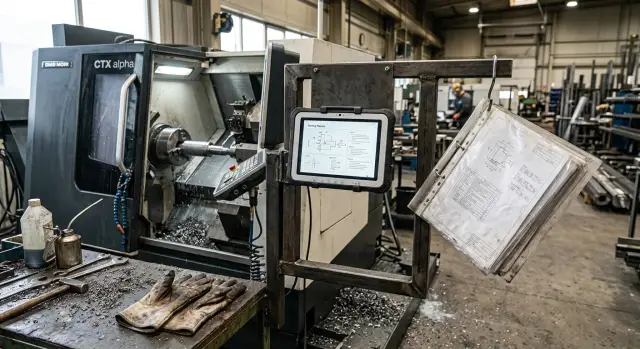
Why the debate comes up in every area
The operator needs one simple thing: an up-to-date instruction right next to the machine. Not in the technologist’s office, not in a shared folder, and not “somewhere on the server.” When a batch is running, there is no time to search for the latest file or guess which sheet was left at the control panel after the last changeover.
An instruction rarely stays unchanged. The technologist adjusts the feed, adds a step, and clarifies a tolerance after checking the first part. That can happen in the morning or in the middle of a shift. Paper is convenient because it is always in front of you. But as soon as a new version is released, the old copy at the machine becomes a source of error.
On the shop floor, the real environment decides everything. Oil gets on the pages. Chips stick to files and pockets. The operator flips through the instruction in gloves, and after a couple of days the sheet is dirty, wrinkled, or lost. A tablet has its own problems: the screen gets dirty quickly, the touchscreen responds worse, and the body needs protection. So the debate is not about fashion, but about which format holds up better during a normal shift.
A version mistake immediately hits quality and time. If the operator uses an old sheet with the previous chamfer size or the old operation sequence, the part is scrapped. Then the supervisor stops the machine, looks for the right file or a new printout, and the setter checks the settings again. Losing 15–20 minutes for one correction is unpleasant. Losing a shift because of a batch of parts is expensive.
You can see this clearly in a lathe area with frequent order changes. In the morning the technologist changes a tolerance, during the day the operator is still working from yesterday’s sheet, and in the evening quality control finds a deviation. Formally, the instruction exists. In practice, the wrong version is lying next to the machine.
That is why people are not really arguing about paper or tablets by themselves. They are arguing about version control, update speed, and convenience near the machine. On one line, paper wins because it is simple. On another, an electronic instruction removes confusion and gets changes to the operator faster, especially where CNC machines often switch from one part to another.
Where paper is still more convenient
Paper is still useful where every minute counts. The operator walks up to the machine, takes the sheet from the folder, and starts work right away. There is no need to log in, search for a file, or wait for a screen to wake up.
This is especially noticeable for short tasks. If you need to quickly issue a one-off instruction for a single changeover, a trial batch, or an unscheduled adjustment, a printout is often easier than any device. The sheet can go with the blank part, and after the shift it can be put away or thrown out.
On a CNC machine area, paper also works because it does not depend on battery charge, a network connection, or the state of a program. If the tablet is dead, frozen, or cannot access the file, work stops. A sheet in a clear pocket sits nearby and does not create extra problems.
In a dirty area, that matters more than it may seem. Oil mist, dust, chips, and gloves make screen work awkward. On paper it is easier to quickly circle a dimension, tick a completed step, or write by hand: “tool T3 leaves a mark,” “check after the 5th part,” “remove allowance in two passes.” These notes appear during the work, without menus or buttons.
Paper is also handy for temporary remarks. Not every adjustment needs to go into the electronic version right away. If the technologist is testing a new setting or the supervisor gives a one-day clarification, a single-use sheet solves the task without unnecessary fuss.
A good example is a lathe area with a short run. You need to make 12 parts, and the first batch is still being checked for surface finish. The supervisor prints one sheet with a sketch, a control dimension, and a couple of handwritten notes. The operator takes it right away, works the shift, and returns the sheet with comments. After that, it makes sense to update the permanent version.
If the instruction lives for one day, gets dirty often, and needs quick notes, paper is still more convenient.
Where a tablet saves time
A tablet wins where instructions change often. If the technologist adjusts a dimension, tool, or operation order, the operator sees the new version immediately. Paper slows things down in that situation: the file has already been updated, but the old printout is still on the shop floor.
On CNC machines, that is felt especially quickly. Before starting a new part, the operator does not need to flip through a folder and look for the right sheet. They enter the part number, open the routing or operation, and immediately see the needed screen.
Photos and diagrams are usually easier to read on a tablet than on paper. The image can be enlarged so the setup, measurement point, or part position is clear without guessing. If the drawing is dense, that does not save seconds only; sometimes it saves 10–15 minutes on one changeover.
An electronic instruction is also convenient before startup. The operator sees the revision number, update date, and short change history in one place. There is no need to guess which sheet is current, and no need to call the supervisor just to ask whether this operation was changed yesterday.
The difference is especially noticeable on lines with a wide range of parts. When dozens of parts go through the same lathe, search by number removes many small pauses during the shift. Each one is almost invisible on its own, but over a week they add up to hours.
A simple example: the operator is preparing to restart a part after a small correction. On paper, they look for the new printout, compare signatures, and check whether an old sheet is still in the folder. On a tablet, they open the part card, see that the feed on the finishing pass was changed, zoom in on the setup photo, and start the batch with more confidence.
This format is especially useful where technologists and the service team often make small clarifications. If the line gets current instructions for CNC machines quickly, there is less confusion at the start of the shift and during changeovers.
What gets in the way of a tablet in a dirty area
Near the machine, a tablet quickly runs into ordinary dirt rather than theory. Oil mist, dust, fine chips, and fingerprints make the screen less convenient within the first hours of use.
With paper, it is simple: if the sheet gets dirty, you flip it or replace it. In this environment, a tablet needs more attention. If the operator is constantly wiping the screen, they spend time not on the job, but on a surface where dimensions, notes, and tolerances are hard to read.
Usually, the same things cause trouble:
- the screen quickly gets covered with oil and dust, and small text starts to blur;
- gloves make it hard to hit small buttons, especially if the interface is overloaded;
- glare from lights or a window hides numbers and notes;
- a weak bracket vibrates or shifts while the machine is running;
- charging, the power supply, and cables take up space where there is already little room.
In practice, it looks very simple. The operator on a CNC lathe opens the operation card, wants to quickly check a dimension or the sequence of steps, and instead has to adjust the viewing angle, wipe the screen with a sleeve, and remove a glove just to tap once. If that happens many times during a shift, the electronic instruction becomes annoying, even when the data is current.
What usually irritates people during the work
The problem is rarely the tablet itself. Usually it is a collection of small things: a glossy screen, an awkward mount, tiny text, and a cable near the controls. Each of these is tolerable on its own. Together, they slow down reading.
Another common problem is charging by leftover attention. If the tablet is plugged in whenever someone remembers, it can run out of battery in the middle of the shift. Then the shop goes back to printouts, and the version control breaks down again.
On the shop floor, a tablet works well only when its placement, screen protection, mounting, power supply, and interface size are planned in advance. Otherwise, paper, despite its own downsides, feels calmer and clearer in a dirty area.
How to test the option on your own line
It is better to compare paper and a tablet not in general, but on one repeatable operation. A task the operator does often works well: tool change, first-piece inspection, correction entry, or changeover to a similar part. A rare emergency instruction is not a good test, because there are too few real actions in it.
Prepare two versions of the same document. The paper and electronic versions should match in text, photos, step order, and warnings. If you add video, large hints, and search to the tablet, but leave only text on paper, you are comparing not the format, but different amounts of support.
Give both versions to two shifts for the same task. A convenient setup is this: for the first two days, one shift works with paper and the other with the tablet, then they switch. That way, the habits of a specific shift distort the result less.
Do not look only at the total operation time. Measure the two points that usually break the debate. First, how many seconds it takes to find the needed step when the operator is already standing at the machine and does not want to flip through extra pages. Second, how many minutes it takes to replace a version if the technologist changed one item or added a new photo.
Record not only errors, but also complaints. In a dirty area, small things matter: the screen does not respond well in gloves, paper gets dirty quickly with oil, the tablet reflects light, a sheet with an important step folds over, or the device runs out of battery by the end of the shift. If the operator says it is “inconvenient,” ask for the exact reason and the time lost.
It also makes sense to track simple details: how many times someone asked the supervisor again, how many times they picked up the document with dirty hands, and how many minutes were spent looking for the new revision. On a lathe area, these delays quickly turn into visible downtime.
After a week, you will have not opinions, but your own numbers. Sometimes the test leads to a very simple conclusion: keep a one-page paper reminder at the machine, and store the full instruction and fresh versions on the tablet. This mixed option is often more honest than trying to choose one format for everything.
A simple example for a lathe area
This happens all the time in a lathe area: the part is already in series production, and the technologist changes the cutting conditions after the first few hours. Let’s say the tool started heating up more than expected, and the feed for one operation needs to be reduced slightly to remove marks on the surface.
If the shop relies on paper, the supervisor prints new sheets and distributes them to the stations. On five machines, that is still manageable. On ten, it is easy to lose half a shift, especially if one sheet is forgotten and replaced, while another operator takes an old copy from the folder.
The problem is not only time. The paper version often spreads unevenly across the area: one machine already has the new correction, another still has the old one. As a result, the same part is run with different settings, and then people argue about where the mistake is — in the tool, the blank, or the operation card.
With a tablet, the picture is simpler. The technologist edits one version, publishes it, and within a few minutes the operator sees the new values on the screen. If the system shows the version number, there is noticeably less confusion.
But in a dirty area, the screen does not solve everything. When chips, coolant, and oily gloves are everywhere, it is inconvenient for the operator to open the full instruction every time just to check one line. That is why a short paper sheet is often kept next to the machine.
Usually, four points are enough on it: part and operation number, current tool, updated cutting settings, and the size tolerance that most often drifts. The full route card, drawing, notes, and revision history are more convenient to keep on the tablet. The short summary stays on paper by the machine, where it can be checked in a second.
For a lathe area, that is often the calmest option. The screen provides fast updates to work instructions, while paper covers the last meter at the machine, where hands are dirty and time is short. A purely paper approach loses on speed today. A purely tablet-based approach is not always convenient by the spindle. A combination of the two formats usually works more smoothly.
Mistakes when switching to a tablet
A common mistake is simple: a shop buys a tablet, but leaves the work process unchanged. The file still sits with the technologist, someone still sends out the new version manually, and the operator learns about changes too late. In the end, there is an electronic instruction, but version confusion remains.
The second problem is obvious right away. Instead of a convenient work instruction, the tablet gets a long PDF with dozens of pages, tiny text, no search, and almost no large photos. At the machine, such a file becomes irritating within a minute: the operator flips through pages with dirty hands, zooms in on the drawing, and still searches for the needed size longer than they would on a printout with one diagram.
On a lathe area, that becomes noticeable especially fast. If the setter needs one tolerance, one clamping sequence, or one photo of the correct setup, they do not need the entire documentation archive on the screen. They need a short, readable document without extra noise.
Another mistake is placing the tablet where chips, coolant mist, and abrasive dust fly. Even a good screen gets dirty quickly, the touchscreen starts working worse, and the mount loosens. Then employees say the tablet is inconvenient, even though the problem was the installation location.
Failures usually start with the same things: there is no single owner for versions, old files sit next to new ones, the screen is too close to the cutting zone, the photos are tiny, and if the device breaks, work simply stops.
People often try to save on version ownership, and that is a mistake. If nobody is responsible for updates, someone will definitely open an old operation card. For a CNC line, that is not a small issue. One outdated feed parameter or an old setup diagram can easily lead to scrap and lost time.
You also need a backup option. If the tablet runs out of power, the mount cracks, or the network disappears, work should not stop. Usually a simple setup is enough: an up-to-date paper copy with the supervisor or quick access to a second viewing point.
The move should start not with buying a device, but with changing the update process, assigning one person to versions, and shortening the instructions into a convenient format. Only then does the tablet truly help.
Quick check before you choose
The decision is usually visible not in the office, but next to the machine. Look at who changes the instruction after a program edit, a tool change, or a new tolerance. If the supervisor or technologist updates the document several times a month, the electronic version gets rid of old copies faster. If updates are rare, paper may be calmer and cheaper.
Then look not at the carrier, but at the operator’s habits. Some people read the steps at the CNC panel, others at the bench where the part, gauge, and setup card are lying. On a short cycle, even an extra 10–15 seconds spent walking to the instruction starts to feel annoying. If a person returns to it five times per shift, the reading location is often more important than the format.
The conditions on the shop floor also quickly reveal weak points. Oil mist, chips, wet gloves, and overhead lighting bother the screen no less than paper. Paper gets dirty and tears, while the screen catches glare and needs protection. That is easy to check in real work, without long arguments.
Before choosing, it is enough to answer a few questions. Who makes the changes and how many minutes should it take for the new version to reach the operator? Where does the operator open the instruction most often — at the machine panel or at the nearby table? What is happening on the workstation during a normal shift: coolant splashes, dust, oil, bright light? Do you need large photos, drawing zoom, setup video, or is one sheet of steps enough? And what do you do if the screen goes dark, the network fails, the sheet gets wet, or it disappears?
If the answers pull in different directions, do not try to choose one option for the whole shop. For instructions on CNC machines, a simple combination often works better: a tablet with the current version and a short paper sheet with backup actions next to the machine. That way the operator does not waste time searching for the right file and is not left without guidance if the equipment fails.
A test on one shift is more useful than a long debate. Take one repeatable operation, give the operator both options, and measure two things: how much time is spent looking at the instruction and how many times the operator calls the supervisor for clarification. After that trial, the choice usually becomes clear.
What to do next
Do not change the whole shop at once. Take one machine and one part that is made often and follows the same process. In that spot, it is easier to see the difference between paper and a screen without extra noise.
Run a short test for one week. Give the shift its usual task and decide in advance exactly what you will compare. The debate about whether electronic instructions at the machine are needed quickly loses its meaning when ordinary numbers appear.
It is enough to record a few things: how many minutes it takes to update the instruction after a change, how many times the operator asks the supervisor or setter about the same thing, what condition the medium is in by the end of the week, and where employees most often pick the wrong version.
That is already enough to see the picture. Sometimes the tablet wins right away: the new revision appears within a couple of minutes, photos and large drawing sections are easier to see, and version confusion is lower. But in a dirty area, paper often holds up better, especially near coolant, chips, and oily gloves.
After a week, do not try to choose one option for the entire shop. In practice, a mixed setup is usually more honest. Paper stays where the operator needs to quickly check two steps with dirty hands. The tablet goes where parameters change often, setup photos are available, or the latest version needs to be opened quickly.
If you are launching a new machine, it is better to define this from the start. Who makes the changes, where the current version is stored, who prints the backup sheet, and what to do if the tablet is out of battery or the network fails. Otherwise, the shop will invent its own rules, and then you will have to sort out the mistakes.
These questions are especially useful to settle before the equipment starts up. EAST CNC supplies CNC lathes and machining centers, and also handles commissioning and service, so at this stage it makes sense to agree right away where the current instruction is stored and who is responsible for version control.
A good test result looks simple: you know exactly where paper is needed, where a tablet is enough, and who updates the instruction.
FAQ
Which is better at the machine: a tablet or paper?
If instructions change rarely and the operator needs quick notes right at the machine, start with paper. If the technologist often changes dimensions, settings, or setup photos, use a tablet. On many lines, the best setup is a combination: a short sheet beside the machine and the full up-to-date version on the tablet.
When is paper more convenient than a tablet?
Paper is more convenient for short tasks, one-off changeovers, and trial batches. The operator takes the sheet and gets to work right away, without logging in or searching for a file. Paper also helps when hands are oily, chips are flying around, and the screen gets dirty quickly. It is easier to circle a dimension, add a note, and hand comments back to the supervisor.
When does a tablet really save time?
A tablet gives a clear advantage when the shop changes jobs often and the technologist makes updates during the day. The operator opens one current version and does not need to look for a new printout. It also helps when you need setup photos, enlarged drawings, and part-number search. That is especially useful on CNC machines with a wide range of parts.
What is most annoying about a tablet near the machine?
The most common problems are oil on the screen, glare, tiny buttons, and a weak mount. The operator spends time wiping the screen, hunting for the right viewing angle, and taking off gloves just to tap once. If you want it to work properly, use a protected screen, a rigid mount, and a large interface. And do not place the device where chips and coolant are flying.
How do you eliminate version confusion in instructions?
Assign one person to release and update instructions. Usually that is the technologist or the supervisor, but the responsibility should belong to one person, not the whole shift. Show the revision number and update date in the document. Remove old copies from the stations and folders right away, otherwise the operator may still take the wrong sheet.
Do you need a backup option in case of a failure?
Yes, you need one. If the tablet runs out of battery, the mount breaks, or the network goes down, the line should not stop. Keep an up-to-date paper copy with the supervisor or provide a second viewing point. That backup prevents downtime and keeps the version control intact.
What should stay on paper if you already have a tablet?
Keep a short summary at the machine: part number, operation, tool, current settings, and the dimension that is checked most often. The operator can glance at that sheet in a second. Store the full route card, drawing, setup photos, and change history on the tablet. That way the screen handles updates, and paper covers the last meter at the machine.
How can you honestly test both options in your workshop?
Take one repeatable operation and give paper to one shift and a tablet to the other. After a couple of days, switch the formats. Do not look only at total time. Measure how many seconds it takes to find the right step, how many minutes it takes to replace a version, and how many times the operator calls the supervisor for clarification.
Why does a long PDF on a tablet just get in the way?
Because nobody wants to flip through dozens of pages at the machine just to find one tolerance or setup photo. The operator needs a short, readable document, not an archive on the screen. Break the material down by operation, add search, and use large photos. Then the tablet helps instead of slowing the work down.
Where should you start when moving to electronic instructions?
First, set up the update process, assign someone to manage versions, and prepare a convenient document format. Then buy the device and choose where it will be installed. If you are launching a new machine or line, agree on this from the start. That way the shop does not make up rules on the fly and does not collect mistakes from the first week.