
Dual Stop on a Housing Part: How to Stop Rotation
A dual stop on a housing part helps stop workpiece rotation at first contact. We look at the setup, adjustment, mistakes, and quick checks.
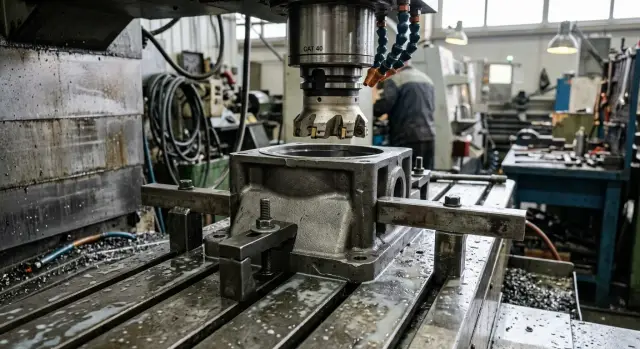
Why the part rotates on first contact
The problem starts the moment the clamp or pusher first touches the part. The force rarely comes exactly through the center. Usually it arrives with a slight side offset and pushes the part not only forward, but also sideways.
If the part rests on only one stop, that stop holds just one point. That is enough to stop straight movement, but not enough to stop rotation. The part begins to turn around the contact point, like a door around a hinge. Outside, it looks like a small thing, but the size is already off.
Because of this, it often seems that the clamp is too weak or the blank is inaccurate. But the reason is usually simpler: the locating scheme does not absorb the moment at the very first contact. One stop does not prevent rotation. It only creates an axis around which the part can easily turn.
Even a tiny gap between the stop and the part makes the situation worse. While the part takes up that gap, it can move by fractions of a millimeter and rotate slightly. For a housing part, that is already enough for the next setup to sit unevenly. Then the operator sees that the size sometimes stays in tolerance and sometimes drifts toward the edge, even though the cutting conditions did not change.
Usually you can spot this by a few simple signs: a fresh shiny mark appears on only one edge, the size varies from part to part, the position changes a little after repeated setup, and the clamp has to be pulled tighter to make the part "settle down."
A good example is a rectangular housing fed against one side stop. The pusher touches the part closer to the far corner, and the part immediately tries to turn. If there is even a small gap between the stop and the side wall, that corner makes contact first, while the other end is still moving. The base is there already, but each time it ends up slightly different.
On a CNC line, this is often noticed not during setup, but after machining. The mark on the edge, the spread in size, and the different sound of the first clamp all point to the same thing: at first contact, the part does not seat; it rotates. That is why a dual stop on a housing part so often solves the issue without a new fixture. It removes the freedom to rotate around one point.
What a pair of stops changes
One stop holds the part at one point. At that moment, the housing can still turn a little around it, especially if the first contact comes with side loading or the part is fed in slightly unevenly. Because of that, the part has already hit the stop, but it did not settle where expected.
When two stops are installed, the part gets two contact points on the same base. It becomes much harder to turn. The housing almost immediately takes the right position and does not keep searching for it after the first touch.
That is the whole point of the dual-stop method. You do not need to rebuild the entire fixture. In many cases, a pair of standard adjustable stops is enough, if they are placed in the right spots and set along the same locating line.
The difference is visible quickly. The operator feeds the housing to the setup, and the part touches not one point, but two. The turning moment is absorbed right away, so the housing does not swing by the nose or corner. Even on the first operation, the risk of shifting drops, and repeatability improves along the rest of the route.
There is another benefit too. The load is spread more evenly. One stop often takes the full side impact, which can make the part spring a little and wear the stop faster. Two stops share the force, and the contact becomes calmer.
In practice, it looks simple: the part seats faster in the same position, the first clamp works more smoothly, the chance of skew at cycle start becomes lower, and the size spread after the first setup often shrinks.
A typical example is a housing part with a long side wall. If you rest it against one adjustable screw, the far end can lag by fractions of a millimeter, and when clamped the part will turn. If you add a second stop closer to the other end of the wall, that freedom almost disappears. The part touches the base in two places and does not have time to rotate.
But two stops only help when they work as a pair. If one sticks out too far and the other barely touches, the setup turns back into a one-stop scheme. So the setter cannot just add another element. Both stops must be adjusted so the housing confidently touches them at the same time.
For many housing parts, that is already enough. In turning and machining departments, where you do not want to order a new fixture because of one problem, this approach often solves the issue faster and at lower cost.
Where this method works, and where it does not
A pair of stops works best on housing parts that have a long and fairly even support side. In this setup, the part does not have time to turn around the first contact point. It reaches the second point almost immediately and seats more calmly, without a small twist.
The method usually helps where the turn is small, but repeats in almost every cycle. The operator sees the same pattern: the part first touches the stop, turns a little, and only then takes its final position. If that happens every time, two stops usually solve the problem without a new fixture.
The approach is especially convenient in production runs, when you need to remove instability quickly and do not want to stop the shop for a long fixture redesign.
The setup usually fits if the housing rests on a long side rather than a short protrusion, the rotation is small but visible in the contact marks or drifting size, the feed comes in without a hard удар, and the part itself is stiff enough not to spring from a light push.
But the method has limits. If the part has a thin wall, weak ribs, or a long flexible flange, the second stop can have the opposite effect. Instead of stable seating, you get a local deflection. From the outside everything looks normal, but the base has already shifted, and the size drifts later.
The setup also works poorly when the cause is not rotation at all. For example, if the blank is crooked, chips remain on the support surface, or the clamp pulls the housing to one side, two stops will not remove the cause. They only hide it for a short time.
It is also not enough for heavy cutting. With a large depth, a hard cut-in, or a strong side load, you need proper rigid workholding. A pair of inexpensive stops helps during locating of the housing part, but it does not replace a full clamping scheme.
The check is simple. If the part seats more confidently, repeatability improves, and the housing does not deform, the method is worth keeping. If you see clamping marks, skew, or unstable size after setup, it is better to look for another solution.
How to install two stops step by step
The two-stop setup only helps in one case: the part already sits properly on the base plane. If the bottom rocks, sits on chips, or rests at an angle, rotation will remain. First make the base seating repeatable, and only then install the stops.
Before installation, wipe the base plane, the supports, and the part itself. On housing parts, tiny chips can easily create a tilt of several hundredths, and then it seems like the stop is at fault. In reality, the problem often starts from below.
- Choose the plane that the part lands on the same way every time. The best choice is an already machined base. If there is none, take the flattest and stiffest side, one that does not spring under clamping.
- Set the first stop as the main reference. It sets the part position on one side and takes the first contact. It is usually more convenient to place it where the operator can clearly see the contact.
- Place the second stop on the same side or on the adjacent one, but as far from the first as possible. It is the distance between them that removes rotation on first contact. If the stops are too close together, the part will still have time to turn.
- Bring the part to the stops smoothly, without impact. First seat it on the base, then gently bring it to the first stop and continue to the second. Both contacts should appear without visible skew and without forcing the part into place.
- Apply a light clamp and check the contact again. After clamping, the part should not move away from either stop. A quick check is simple: a thin gauge or strip of paper should not pass freely in one place if the other already has firm contact.
It is better to set the two stops with enough access. If the operator has trouble loading the part, they will start pushing it sideways, and the whole setup will lose its meaning. A simple rule is this: the part should reach both stops by hand, not by impact.
A typical shop-floor example is a rectangular housing with a long side wall. One stop at the front edge sets the direction, and another at the far end prevents the housing from turning around the first. As a result, the part takes the same position every time, even while the clamp is still being brought in.
If one contact disappears after clamping, do not rush to remake the fixture. First check three things: cleanliness of the base, stop height, and clamping force. In many cases, it is enough to move the second stop 20-30 mm farther or slightly reduce the side pressure.
A simple example with a part
Let us take a common steel rectangular housing, 220 x 140 x 60 mm, with a long side wall. The part sits on supports, is clamped from the side, and is brought to one stop along that long side. On paper, the setup looks fine. On the machine, it often creates a small but annoying turn.
The problem is visible at the first touch. The housing rests with its front corner against one stop, while the back end is still moving by fractions of a millimeter. The side clamp keeps pressing, and the part turns slightly around the contact point. The shift is small, but for the first dimension it is already enough.
On such a part, the front corner can easily drift by 0.05-0.12 mm. Sometimes the operator does not even notice it, because the housing already looks seated. But the first machined size starts to drift: on the test part it lands in tolerance, and on the next one it moves toward the upper or lower limit.
A second stop at the far end of the same long wall usually solves the issue without a new fixture. A good distance appears between the contact points, and on first touch the housing can no longer freely turn around one corner. The rotation is absorbed almost immediately, even before full tightening.
In practice, it looks very simple. There was one stop at the near end. A second one was added at the far end, along the same locating line. The clamp brought the part in, the housing touched two points at once, and the rotation on first contact disappeared. Even on the first test part, the dimension from the base to the first hole stopped wandering.
The difference is usually visible in three signs: the contact mark appears on two stops, not on one corner; the feeler gauge does not show a gap at the far end; and the first size on several parts in a row stays within a narrow spread.
This is especially useful when the part is longer than it looks on the drawing. If the side wall runs far enough, one stop almost always leaves the part room to rotate. A pair of simple stops for a housing part often gives the same effect that used to require a more complex fixture.
The point is not clamping force. The point is to remove the freedom to rotate right away. When that works, locating a housing part becomes predictable from the very first touch.
Mistakes that make the setup fail
A pair of stops only solves the problem when it truly controls the part position. In practice, the setup usually fails not because of the idea itself, but because of small installation details. They are easy to miss: the part seems to be seated, the clamp has engaged, the cycle starts. But by the first part, you can already see that the size drifted or the housing turned slightly.
The most common mistake is placing the stops too close together. Then the setup barely creates the lever arm needed to absorb the turn. The part touches two points, but behaves almost the same as with one stop. If the housing is long and both stops are near one corner, the whole point of the method is lost.
The second mistake is setting the second stop above or below the working base. At first glance it seems minor, but the part immediately starts resting in a different way than intended. One stop catches the plane, while the other pushes the housing with a skew. Then the clamp adds force, and the part either lifts or turns slightly again.
The feed itself often creates a problem. The operator loads the part with a bump to seat it faster. After that first touch, the housing bounces, springs, and reaches the stops in the wrong position. For this setup, a calm, smooth approach works better.
Another basic cause is chips on the plane or near the stops. One thin chip is enough to lose repeatability across the whole batch. This is especially noticeable on housing parts with a large support area: from the outside everything looks fine, but in reality the part is sitting on debris, not on the base.
The clamp is worth checking separately. If it is tightened too much, it again shifts the housing after it has already touched the stops. Then, formally, there are two stops, but in practice the clamp controls the part position. This is a common reason why the rotation remains even though the setup seems correct.
Before startup, a short check is usually enough: make sure there is a proper distance between the stops, verify their height, remove chips from the base and clamping zone, bring the part in without impact, and reduce clamping to the level where it holds instead of pushing.
If the housing still rotates after that, the cause should be sought not in the stops, but in the part base itself, the blank geometry, or the clamping sequence.
A quick check before starting a batch
Before a run, a couple of minutes for a dry check is enough. It is faster than later chasing the first-size drift and trying to figure out why the setup sometimes works and sometimes does not.
First, bring the part to the stops without strong clamping. Watch the contact, not the force: both points should meet the part at once, without a visible gap. If one stop touches earlier, the housing will turn slightly right at first contact.
Then check the part by hand. A light push to the side and down is enough to tell whether it rocks. If the part barely moves, the setup is alive. If you feel a roll or a click, it is better to find the cause right away: a tilted stop, dirt under the part, or chips in the contact zone.
It is useful to do a short trial seating before cutting:
- Place the part on the base and clamp it the way you will work in production.
- Remove it and look at the contact marks on both stops.
- Reinstall the part once more and repeat the check.
The mark does not have to be wide, but it should look similar on both stops. If one stop shows a stable mark and the other only a faint line, the part is coming to a different position each time. With that kind of locating, the first size will start drifting even if the clamp itself is fine.
After that, it is worth checking three parts in a row. Not one, but three. If the first size stays steady without drifting, the setup is usually ready for the batch. If the size moved on the second or third part, do not rush to adjust the correction. First go back to the stops and see why the part comes in differently at first contact.
The cause is often small: chips got to one stop, a burr remained on an edge, the operator loads the part with skew, and the clamp pulls it in only after the rotation has already happened. Because of that, rotation on first contact can look like a random mistake, even though the explanation is usually simple.
A good shop-floor rule is this: if three blanks in a row seat the same way, do not rock by hand, and give the same first size, the batch can be started more calmly. If even one of those points does not match, it is better to stop for five minutes and find the cause.
What to do next on the shop floor
Do not move this method to the whole batch right away. First test it on one operation and one part. That is the fastest way to understand whether the pair of stops removes rotation at first contact or whether the problem is somewhere else.
It is best to test under the same conditions. Keep the same clamp, the same tool, and the same cutting mode. Otherwise, you will be comparing not the locating scheme, but several changes at once.
It is most useful to watch the first size, since that is the one that usually drifts when the part rotates. Take several measurements before installing the stops, then repeat the same series after installation. Look not only at the average value, but also at the spread. If the size no longer varies from part to part, the pair of stops worked.
For this check, a simple routine is usually enough: measure 5-10 parts with the old setup, install the stops without changing anything else, measure another 5-10 parts, and compare the spread along with how the part behaves at first contact.
If the method works, do not leave it at the level of "the foreman remembers how it was set." Record the distance between the stops, the height of the support point, and the loading order of the part. It is also useful to write down small details: which stop the part is fed to first, where the contact is checked, and when the clamp is engaged. Those are exactly the details that are later forgotten, and the setup starts working only part of the time.
If the rotation at first contact remains, do not try to fix everything only by moving the stops. Check the base, the clamping force and direction, the stiffness of the support, and the part itself. Sometimes the housing does not sit as firmly as it seems, or the clamp pulls it sideways. And sometimes it is even simpler: the stops are placed correctly, but one of them is higher by fractions of a millimeter, so the part seats differently each time.
A good sign is when the operator can repeat the setup without instructions, and the size stays stable not on one part, but across a small run. Then the method can be rolled out further: to another shift, a neighboring machine, or a similar housing part.
If these problems keep repeating on the shop floor, it is useful to look not only at the stops, but at the whole package: the machine, the fixture, the locating sequence, and service support. EAST CNC works with exactly these kinds of metalworking tasks, and on east-cnc.kz the company has a blog with equipment reviews and practical advice. When the issue is no longer about one method, but about starting a shop or choosing a machine, that often helps you find a workable solution faster.
FAQ
Why does the part rotate on first contact?
The part rotates when the pusher or clamp presses off-center and one stop holds only one point. At that moment, the housing does not just shift; it also turns around the contact point. Even a small gap at the stop makes this effect stronger. The part takes up the clearance, changes its angle a little, and the first dimension is already off.
How can I tell the problem is with one stop?
Look for simple signs: a shiny mark appears on only one side, the size varies from part to part, and after reinstallation the position changes slightly. Often the operator also notices that more clamping force is needed to keep the part from moving. If adding a second stop immediately reduces the spread, the cause was almost certainly rotation.
When do two stops really help?
Yes, if the part rests on a long, flat side and makes a small but repeatable turn at first contact. Two stops quickly kill that movement and help seat the housing in the same position every time. This approach is especially useful in production runs, when you do not want to remake the whole fixture because of one unstable point.
Where is the best place to put the second stop?
Place the second stop as far from the first as possible along the same locating line. The distance between the contact points is what keeps the part from turning around the first stop. If both stops are placed close together, the setup will barely change. The housing will still have room for a small turn.
What should I check before setting up two stops?
First check the base surface. The part must sit flat on the supports without rocking, and chips, burrs, or dirt should not get under the base. Then check the height of the stops and the way the part is fed in. If one stop is higher than the other or the operator brings the housing in with a bump, the setup will be wrong before clamping starts.
How do I know the two stops are set correctly?
After a light clamp, the part should touch both stops at the same time. A feeler gauge or a strip of paper should not pass easily at one stop if the other already has firm contact. An even simpler check is to test three parts in a row. If the first size stays steady and the housing does not rock by hand, the setup is usually fine.
Can too much clamping force ruin the setup?
It can. If the clamp pulls the housing to the side after it touches the stops, it will rotate the part again and ruin the whole idea. Keep the force at a level where the clamp holds the part instead of dragging it across the base. First get even contact with the stops, then add clamping.
When won’t two stops help?
They will not solve it if the problem is elsewhere. A crooked blank, chips under the base, a thin wall, a weak flange, or a tilted support will give the same drifting size even with two stops. For heavy cutting, two stops are not enough either. You need a rigid clamping scheme, not just careful locating.
Can I add a second stop without a new fixture?
Often, yes. Many housing parts only need a pair of adjustable stops if you place them in the right spots and line them up correctly. Check the result first on one operation and on several parts. If the spread drops, you can keep the solution without a major fixture redesign.
How can I quickly check the setup before starting a batch?
Make a dry fit without cutting and without a hard bump. Bring the part to the stops smoothly, apply a light clamp, remove the part, and check the contact marks on both points. Then repeat the setup twice more and check the first size. If three parts in a row seat the same way, you can run the batch with more confidence.