
Digital setup cards vs. operator memory: which is more accurate?
We’ll explain how working from memory differs from on-screen standards, where variation between shifts comes from, and how digital setup cards help reduce it.
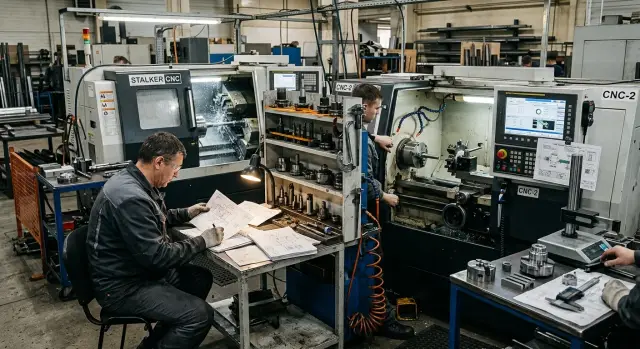
Why relying on memory gives inconsistent results
Memory helps an experienced setup operator work fast, but it doesn't produce the same result every time. One operator keeps the sequence of steps in their head and barely checks notes. Another remembers only the general scheme and adds habitual steps.
On the machine it becomes obvious immediately. One operator first checks the tool extension, then the offset and the workpiece datum. Another changes the order because they used to do it differently. Both are sure they’re doing the right thing, but small differences accumulate and lead to different starting conditions after a changeover.
The problem becomes more visible across shifts. People dig for old sheets, ask the foreman, compare dimensions from phone photos or margin notes. That takes not five seconds but 15–20 minutes. During that time the machine isn’t cutting metal.
Most often the first part suffers. After each changeover the shift clarifies offsets, touch point, check order and cutting modes on the spot. So the first part is corrected, sometimes the second as well. The task is the same, but everyone starts it slightly differently.
The foreman sees the outcome, not the path to it. On paper everything looks identical: same machine, same tool, same material. But one shift starts calmly while another spends more time because part of the know-how lives in a person’s head, not in the standard.
In metalworking this is especially noticeable in serial production and when parts change often. If one shop turns the same part on two similar machines, shift-to-shift differences quickly show up as numbers: more adjustments, more trial parts, longer downtime before the first acceptable part.
Memory is useful for quickly recalling a detail. For stable work, it’s not enough. You need a shared, visible sequence of actions that everyone understands the same way. That’s why digital setup cards reduce variation between shifts: at the critical moment—the start—they remove guesswork.
What on-screen standards change
An on-screen standard changes more than the form of the instruction. It changes behavior on the shop floor. When every shift sees the same sequence of actions, setup stops depending on an individual’s habits.
When working from memory, one operator loads tools in one order, another in another. Someone checks the datum immediately, someone after the first part. On CNC lathes such details quickly affect dimensions, increase changeover time, and then the argument becomes not about the cause but about "how each person always does it."
An on-screen standard removes that variation. The operator opens the card and follows a single scenario without extra guessing. This is especially useful where different shifts run the machine or where part of the work is done by new employees.
A good card clearly shows the sequence of operations, tool numbers, required extension, datum and the checkpoints before starting. If there are photos of the tooling and the part’s position during setup, there is little room for free interpretation.
Photos are often more useful than long descriptions. If the card includes pictures of the chuck, jaws, stop or the assembled setup, the operator can compare the actual setup to the standard. They won’t have to guess which holder was used last time or how far the tool was extended.
Another important point is document versioning. Paper sheets and old notes have a life of their own: one copy stays at the machine, another in a drawer, a third was photographed six months ago. A digital card solves this if the shop uses only the latest version. Then the shift won’t pick up an old record with an incorrect extension or an outdated datum.
In practice it’s simple. The day shift sets the machine for a new batch and a week later the night shift repeats the same work. If both shifts look at the same screen with identical steps, tooling photos and current parameters, results generally come closer. There are fewer errors, starts are calmer, and the first acceptable part appears faster.
Where variation between shifts appears
Variation between shifts rarely comes from one big mistake. More often it’s the small things that one shift takes "for granted" and another does slightly differently. On a CNC machine this quickly affects dimension, surface finish and cycle time.
One common source of difference is machine warm-up before start. One setup operator lets the spindle and axes reach operating conditions; another rushes and runs the first part almost immediately. With a tight tolerance, that difference changes the result right away.
A second problem is leftover offsets from the previous batch. Someone clears the tables and zeros the offsets, another leaves some values because "it worked yesterday." The new shift ends up with the machine in a state different from what the standard expects.
The tool story is similar. A cutter may be put into a different pocket, with a different extension, or clamped slightly differently after a quick change. On paper the operation is the same, but in reality the geometry has changed. That leads to a different first run, extra trimming and on-the-spot corrections.
Variation often appears where a step exists in practice but not in the record. An experienced operator remembers that it’s better to check the clamp, make one idle pass or visually inspect the first approach point before the operation. A new employee wasn’t told that and follows the general template.
Paper charts are also a weak point when they are not kept at the machine but in the foreman’s folder. By the time someone finds and verifies the version, some actions have already been done from memory. If the sheet is old, the shift uses outdated data and repeats a past mistake.
Usually differences between shifts show up at the same points: different warm-up routines, uncleared offsets from the previous run, tools placed in different pockets or with different extensions, verbal steps known only to experienced operators, and working from paper that sits away from the machine.
A digital card helps not because "digital" is inherently better, but because it records a single state for everyone: what to warm up, what to zero, which tool is in which pocket, what extension is required and what to check before the first part. When the standard is right at the machine, people are less likely to invent steps.
What a digital setup card should include
A good card removes guesswork. The operator doesn’t need to remember how the part was "usually mounted" last week. They see one consistent standard and perform the work the same way on day and night shifts.
Such a card is useful only if it contains specific data about the particular part, not general advice. The less room for interpretation, the lower the variation.
Essentials to include
Start with identification. Write the part name and program number in full, without abbreviations or internal tags understood only by part of the team. If the shop has similar items, one extra letter in a short name can point you to the wrong program.
Next, show the setup visually. Text alone isn’t enough, so add photos of the chuck, jaws, stop and the actual assembled setup. The photo should show the real position of the part, not a schematic. That way even a new employee sees exactly where the blank seats and how the jaws are oriented.
Keep the tooling section simple and specific: turret pocket number, actual extension, insert type, any required offset note and the date of the last replacement if tooling has been changed. Without these lines, one shift might put the same cutter with a different extension and the first part’s dimension will already be off.
Clearly indicate where to measure the first part. Not "check the main dimensions," but specify exact measurement points and tolerances for each. If the card instructs to measure the diameter after the first cut, the length from the datum and the groove width, there’s nothing to argue about. Everyone measures the same points.
Add a short block of actions after a tool change and after machine idle time. For example: check extension, make a trial pass, re-measure the first dimension, confirm part seating in the chuck. After a long break domestic mistakes appear most often in these steps.
On a turning shop floor this is straightforward. The screen opens the changeover card and nearby are tooling photos, a tool table and first-part checkpoints. This document doesn’t replace an experienced setup operator, but it prevents memory from replacing the standard.
If a company runs different machine models, a unified approach is especially handy. Both experienced staff and newcomers read it the same way. For these tasks, materials from the EAST CNC blog are useful: the company writes about metalworking, equipment and practical shop-floor techniques, not just the machines themselves.
How to adopt digital cards without a big project
It’s better to start not with a large project but with one frequent changeover. Take an operation the shop repeats almost every day—for example, switching a batch on a CNC lathe with the same fixturing. This way you can see results quickly and avoid drowning in exceptions in the first week.
Cards work best when created at the machine. Not from old notes and not from the foreman’s memory after a shift, but from the real actions of a capable setup operator. One person sets the machine, another documents the steps, times, settings and places where people usually get confused.
The approach can be:
- Choose one recurring changeover with a stable program.
- Record only the actions that are essential for getting the setup right on the first try.
- Add photos of the CNC screen, tooling and the first acceptable part.
- Give the card to another shift and see where people ask the same questions.
- Assign one person responsible for versions so the card doesn’t scatter across chats and paper.
The most common mistake at this stage is trying to explain everything. Long paragraphs by the machine are rarely read. Keep short steps: which tool to load, which offset to check, which dimension to take on the first part and which tolerance should trigger attention.
Photos also save time. A screenshot helps verify the correct window and parameter. A tooling photo removes debates about which holder was used and how it was mounted. A photo of the first good part isn’t decorative—it verifies the result.
After the first run the card is almost always edited. That’s normal. If another shift trips on the same point, the wording is weak or a step was missed. That’s when the card becomes a working standard, not a neat note.
An example from the shop
On a typical turning line they used to change a batch of bushings to flanges in about 40 minutes during the day. An experienced operator kept the sequence in their head: which cutter to fit first, where to set the stop, and which correction the first part usually requested. While one person ran it, the scheme seemed convenient.
At night the same changeover took longer. The second operator didn’t do anything grossly wrong—just slightly differently. They loaded tools in a different order, set the stop differently and applied their own corrections after measurement. As a result the first part rarely hit size immediately; there were extra trial runs and risk of scrap at the start.
For CNC turning this is common: same machine, same drawing, but different results between shifts. The reason isn’t the people, it’s that everyone’s memory is different. One remembers the last successful setup, another remembers a past problem and overcompensates.
After that they introduced on-screen cards. Both shifts were shown the same sequence: which tool goes into which position, which stop is needed for the flanges, what offset values to start from and what to check on the first part. Guesswork decreased.
The change was simple but noticeable. Both shifts began installing the same tool and setting the datum the same way. The first part more often hit size after one check instead of several attempts.
The foreman began to look not at phrases like "it runs easier in the day" or "the machine acts up at night," but at numbers: how many minutes each shift spent on the changeover, how many trial parts before the first good one, what the deviation in diameter and length was on the first part, and what corrections were made after the first measurement.
With these data the argument ended quickly. Before the card the night shift might spend 15–20 minutes more on the same changeover. After the card the difference nearly disappeared because both shifts followed the same standard rather than personal habit.
What breaks the standard
A standard stops working not when it doesn’t exist, but when the shop keeps multiple "correct" versions. One operator opens a file on a USB stick, another looks at a photo in a messenger, a third grabs an old paper sheet from a folder. Formally everyone has a card. In practice everyone builds their own variant.
A common mistake is copying an old card and carrying someone else’s mistakes forward. If a past sheet had the wrong tool number, stop height or check order, the error travels on and gradually becomes accepted as normal.
Old photos cause no fewer problems. The tooling has changed, the chuck is different, the stop moved, but the card still shows a picture from a past run. A new employee looks at the screen, compares it to the machine and starts guessing what the author meant. For CNC setup this is a bad scenario: the more guessing, the higher the shift-to-shift variation.
Vague text also fails. If an engineer writes "mount the blank and check the datum," everyone interprets it differently. One will check extension, another only the clamp, a third will skip checking the first part. A standard works only when a step can’t be interpreted two ways.
The usual culprits are copying a card without verifying current tooling, generic wording instead of specific actions and tolerances, storing versions across messenger, USB and paper at the same time, lack of a single owner and old photos remaining after tooling changes.
If you want consistent results, a document needs one owner. They make edits, remove old versions and approve a new variant after a trial run. Otherwise even a good card quickly becomes an archive of habits.
The rule is simple: one source, fresh photos, precise steps and one responsible person. It’s boring discipline for the shop, but it’s what usually saves hours over a series and reduces disputes between shifts.
A short check before start
Five minutes before a run often solves more than a half-hour of corrections at the machine. When a shift starts with the same short checklist, variation between shifts drops noticeably.
A card is useful not as a file but as a working support before the first cut. If the operator and the setup technician look at the same current screen, there’s less chance someone will recall an old scheme or mix up a similar part.
A pre-start checklist is enough:
- Open the current card for this exact part, not for a similar past batch.
- Compare the tool numbers on the screen with what’s actually in the tool magazine.
- Check tool extension and the datum.
- Measure the first part at the points specified in the card.
- If you made an adjustment after start, record it immediately in the card or the shift log.
In practice this is straightforward. In the morning they mount a repeat batch that the night shift ran a week earlier. By feel everything seems familiar. But the current card might show a different extension, a different tool number or a new measurement point for the first part. One small detail can be enough for the size to be wrong from the start.
A simple habit: check first, then the first part, then record actual adjustments. For CNC setup this is not bureaucracy but a way to make results repeatable.
What to do next
Don’t try to document the entire shop at once. Pick one part that causes the most disagreements between shifts. Usually it’s an operation where the first good part takes too long and the size has to be chased with several adjustments.
One good card is more valuable than ten raw templates. Choose a regularly launched part and build a clear on-screen standard for it: the sequence of actions, base offsets, tooling, first-part checks and typical corrections.
Then compare results with numbers. Look at how many minutes pass from the start of setup to the first acceptable part, how many adjustments a shift makes before a stable result, how the same part behaves with memory versus the card, and what a week of work shows rather than one lucky run.
Don’t just watch average time. If one shift starts in 18 minutes and another in 42, the problem is visible. The card exists not for a pretty file but to remove that spread.
Leave a short field for shift notes in the card. Don’t turn it into a half-page log. One or two lines are enough, for example "after warm-up dimension shifts by X" or "check tool extension again on the second part."
Such notes quickly show what needs changing in the standard and what was a one-off mistake. If the card isn’t updated for months, people stop trusting it. So one person should at least weekly review notes and update the version.
Then the standard stays aligned with what actually happens at the machine. In a month you’ll have numbers, not opinions: how long it takes to start and how many adjustments each shift makes.
If the shop is also updating equipment, it’s convenient to link the standard to the actual machine right away. EAST CNC supplies CNC lathes for metalworking and helps with selection, commissioning and service. In that setup a changeover card is easier to build around the real startup sequence, tooling and inspection points rather than rewriting it after the machine is in service.