
Coolant Temperature and Part Size: Where the Variation Comes From
How coolant temperature and part size are linked in practice: overheating of the emulsion, foam, geometry drift, quick checks and steps for the shop.
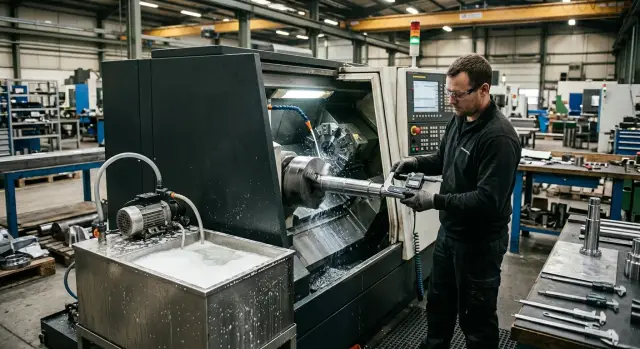
Why part size starts to drift
Usually it begins without alarm: the first part measures within tolerance, the machine cuts cleanly. Then after 15, 30 or 50 parts the size slowly moves. First by a couple of hundredths, then more. The operator looks at the insert and thinks of wear, while the cause is often different.
This pattern appears more often in long runs than on a trial part. At the start the machine, tool and coolant haven’t reached operating conditions. After some time the system heats up, coolant delivery changes, and cutting behavior shifts.
Put simply, size begins to “drift” for three common reasons: the coolant temperature rises, foam appears, or coolant delivery to the cutting zone becomes uneven. These factors often occur together. The coolant heats up, foams, pressure drops, and each small effect adds its own hundredth of a millimeter.
When temperature rises, it’s not only the liquid that changes. The tool, part and machine components heat up too. Metal expands slightly, cutting conditions change, and the size no longer stays as it did on the first part. So the link between coolant temperature and part size is usually broader than it first appears.
Foam is just as disruptive. The pump can draw a mix of air and coolant instead of a solid flow. One part cools well, the next gets a weaker jet. The tool works under different conditions and the part geometry becomes unstable.
Uneven coolant delivery often gets mistaken for tool wear. The size drifts, the operator changes the insert, and for a few parts the problem seems gone — then it returns. The new edge truly cuts easier for a while, but the root cause remains.
In the shop you usually see a few signs together: first parts are stable, then size slowly drifts; variation is worse on long cycles or heavy cuts; after a pause the machine produces a normal part again, but only briefly; changing the tool helps only temporarily.
The most common error is simple: looking for a single cause where there are two or three. If you focus only on the tool, you can spend a long time fixing the wrong thing.
How coolant heating changes geometry
Warm coolant doesn’t remove heat like cold coolant. It can even deliver heat into the cutting zone, warming the tool, the part surface and everything near the cutting edge. If tolerances are microns, this shift becomes noticeable quickly.
Metal expands with temperature, and large heating is not required. A steel shaft 80 mm in diameter will change by roughly 7 µm if temperature rises by only 8 °C. For roughing that’s negligible. For a precise fit, that’s enough for the part to measure one size in the morning and another by the end of the shift.
So a thermal problem rarely looks like a sudden defect. Far more often the size creeps away slowly. The operator sees that the first series after startup is fine, then the diameter begins to drift; after a correction the size returns briefly and then creeps again.
Where temperature rises the fastest
Coolant heats up fastest not in the tank, but right in the cutting zone. There it absorbs heat from the chip, tool and workpiece in seconds. The hot flow then goes to the sump and from there the heat returns to the tank.
Because of this, a tank reading doesn’t always tell the full story. In the tank the liquid mixes and the average temperature looks acceptable. But near the nozzle and in the return line the coolant can already be noticeably warmer than in the morning.
On CNC lathes this is especially visible during long runs. First the cutting zone heats, then the holder and chuck, then the splash pan and tank. If the shop is hot and the pump runs with few pauses, temperature rises even faster.
How that shows up in part size
When a part heats unevenly, geometry changes in different ways. If the whole diameter warms, the size simply drifts up or down depending on when it’s measured. If one section gets hotter than another, a taper appears along the length.
Ovality is often linked to heat too, especially under variable load. One part of the circumference receives more heat, another less, and the part leaves the cutting zone with a few microns of shape change. On inspection this looks like a “strange” measurement that sometimes passes and sometimes doesn’t.
On long parts the effect is more pronounced. The area near the chuck may remain slightly cooler while the free end heats more. The size then varies along the length: in one section all is within tolerance, in another there is deviation.
A simple sign of a thermal cause is this: after a break or at the start of a shift the size returns closer to nominal. That means the cause isn’t only setup or tool wear. The machine, tool, part and coolant have reached different temperatures and the geometry immediately reflects that.
Why foam disrupts steady delivery
When the coolant stream contains a lot of air, the cutting zone sees a mixture of liquid and bubbles rather than a solid jet. That mixture transfers heat poorly. The tool, workpiece and chip heat in bursts, and size drifts because of small fluctuations throughout the operation.
The issue isn’t limited to cooling. Pumps are designed for liquid flow, not whipped emulsion. With heavy foam the pump alternately draws proper volume and then air. The jet becomes uneven: strong one moment, weak the next, then strong again. On a finishing pass that’s enough to produce unstable part geometry.
Foam also hinders chip evacuation. Instead of a clean washout you get a sticky mix of fine chips, coolant and air. Chips can stick near the cutting edge, get pulled back under the tool and mark the surface. After this it’s easy to blame the tool or feeds and speeds.
Typically you can spot the problem without instruments. The pump noise becomes irregular, the jet spits with white bubbles, the part shows signs of dry cutting or local discoloration, and chips don’t clear the zone as well.
The tie to temperature is direct. Foam reduces actual cooling even if the tank is full and the coolant’s spec looks normal. In the cutting zone temperature rises faster than the tank reading suggests. The same cutting mode that held size in the morning can produce drift an hour later.
On CNC lathes and machining centers the pattern is familiar: the first parts in the batch are fine, then the jet turns white, pump noise changes, and size starts to wander. If you also have a clogged filter, low tank level or a nozzle missing the cutting zone, foam only makes the problem worse.
So don’t dismiss foam as a small issue. A weakened jet means worse cooling and chip washout. Size variation is then only a matter of time.
What to check, step by step
When size drifts in waves, looking only with your eyes is nearly useless. You need simple time-based checks. Then it becomes clear whether heating, foam or supply issues are at fault.
Look at a series, not a single part. Compare the first part of the shift, a part after the machine has warmed, and a part after a short pause. If the size changes after a stop, the cause is often in coolant behavior and the supply unit rather than in the program.
Keep the order of checks consistent.
- Measure tank coolant temperature at the start of the shift and then every hour. Feeling the fluid by hand tells you little. Even a few degrees can shift part size.
- Record measurements for the first part, a part after 40–60 minutes of running, and a part after a break. Note both the deviation and the measurement time.
- Watch the nozzle stream during cutting. A steady, solid jet cools and washes away chips. If the jet is intermittent, bubbly or hissing, the pump is moving a liquid/air mix.
- Check the tank and supply: coolant level, concentration, filter cleanliness, pickup condition and pump operation. Low level or a dirty filter often cause both heating and foaming.
- Note when foam appears. Sometimes it follows refilling, sometimes it appears at high spindle speeds, during heavy return flow to the tank, or near the end of the shift when the coolant has warmed.
If you record data in a simple table the pattern usually becomes clear in a day. In the morning the tank might be 21 °C, the jet steady and size stable. Three hours later the coolant is 28 °C, foam appears at the nozzle and the diameter has drifted a few hundredths. After lunch the machine stood idle, the temperature fell slightly and the first part measured differently from the run.
A log like that is more useful than saying “the machine drifts.” It helps separate a thermal issue from a delivery issue. For CNC lathes this is crucial: in a long run a small drift first looks random and then becomes a steady source of scrap.
If there’s a clear link between time, temperature and foam, don’t change cutting parameters right away. First restore proper coolant delivery and a stable temperature. After that, a repeat measurement will usually show where the variation begins.
A simple shop example
A shop was turning a run of shafts 40 mm in diameter. In the morning everything was fine: the first parts stayed in tolerance and variability was small. After lunch the diameter began to creep upward, first a few hundredths, then a bit more.
The usual reaction is to tweak the X correction. The operator did that. A couple of parts came back into tolerance, but then the size drifted again. That misleads you into thinking the tool or setup is at fault when the tank was already the root cause.
When they checked the coolant they found the tank temperature had risen during the shift. It was about 22–23 °C in the morning and approached 30 °C after lunch. This example clearly shows how coolant temperature affects part size: warm coolant removes heat less effectively, the part and components heat more, and size stops holding.
But there was more. Before lunch someone topped the tank up with water to raise the level. After that foam appeared on the surface. It seemed minor, but in practice coolant flow became uneven. One moment the jet was solid, the next it contained air and bubbles. Cooling in the cutting zone varied and the diameter wandered not only over the shift but from part to part.
At first the team blamed insert wear. Then they checked the filter and found another issue: it was clogged and the pump struggled to draw coolant. That reduced flow and prolonged foaming.
They fixed things without complicated steps. They cleaned the filter, corrected the coolant concentration rather than just adding water, removed excess foaming and started monitoring tank temperature in the morning and after lunch. Size returned to normal and constant adjustments were no longer needed.
This case shows a simple truth: if size drifts slowly, don’t immediately blame the insert. Check the tank, temperature, concentration and coolant stream first. Often causes of size variation start there, not in the program.
Common mistakes
The most frequent mistake is trying to chase size with corrections after every second part. The operator removes the symptom but not the cause. If size steadily drifts during a run, don’t reach for the correction table first — observe coolant behavior: temperature changes, foam, and whether the nozzle keeps a steady jet.
Many notice the temperature link too late. While the machine is cold everything looks fine. After an hour the coolant warms, heat removal changes, the tool runs under different conditions, and the size drifts slowly without a sudden jump.
Another error is topping up the tank with any water at hand. If the water is warm, concentration and tank temperature change faster than you expect. On a long run even a few degrees make a different cooling regime.
People argue with the micrometer even though it’s not to blame. If drift appears only in long runs while the first parts are fine, measurement is rarely the issue. It’s far more helpful to compare three points: the first part, the tenth and the thirtieth, while recording coolant temperature and checking for pressure drop.
Dirty filters and weak jets are also underestimated. Visually it may appear that coolant is supplied, but the tool actually receives less cooling. If foaming is present, flow is even less steady. Foam carries air, not liquid, and cutting stability is lost quickly.
Foam killer is often used too hastily. It’s poured as soon as foam is seen. Sometimes that helps briefly, but the root cause stays in the tank: wrong concentration, old mixture, air ingress or dirty system. Foam returns and the shop concludes the chemistry “doesn’t work.”
The wrong order of actions usually looks like this: size drifts, add a correction, top up the tank without checking temperature or concentration, add defoamer, and only then check the filter and nozzle. It’s more logical to do the reverse. First check coolant temperature, concentration, filter, pressure and nozzle position. Then measure how size changes through the run. Only after that touch corrections.
In practice it’s simple. You turn a shaft, the first six parts are in tolerance, then the diameter slowly grows by 0.02–0.03 mm. The operator adjusts correction three times, but a few parts later the problem returns. After inspection they find a clogged filter, a weak jet and that warm water had been added to the tank. Until those issues are fixed the size will keep wandering.
Checks before a batch
Before a new batch don’t rely only on the first part. It can be in tolerance at cold start and then drift after 15 minutes because the machine and coolant haven’t stabilized.
First measure the coolant temperature at startup and record it. Even a 2–3 °C difference between shifts can cause a noticeable size shift, especially on finishing operations. If coolant temperature and part size change together from day to day, it’s not random.
Then check the actual delivery. The jet should be steady, without bubbles, dips or short air “spits.” If the pump draws air or the coolant foams, the cutting zone is cooled intermittently and geometry will drift.
After that verify concentration and tank level against your procedure. Low level often causes air ingress, and wrong concentration alters cooling and lubrication. Both factors quickly affect repeatability even though the machine may look to be running normally.
Don’t skip filter and return inspection before starting the run. A clogged filter chokes the flow and a dirty sump impedes circulation and overheats the bath. If the tank already has foam, fine chips and cloudy coolant, deal with that before starting the batch rather than later trying to find the cause in finished measurements.
Make the control part not from a cold start but after the system has warmed. Let the spindle, pump and axes run at normal pace so heat distribution matches the run. In practice drift of 0.01–0.03 mm often appears only after warm-up.
Keep a short checklist by the machine: temperature, level, concentration, jet condition, filter. It takes a couple of minutes and makes it much easier to see where size variation comes from.
What to do if size keeps drifting
If size still drifts after basic checks, don’t change everything at once. First build a simple picture over the shift. Otherwise you can mistake a random jump for the cause and lose another day.
A very useful step is a short log. For each measurement four columns are enough: time, coolant temperature, presence of foam and the actual part size. If possible add machine and tool IDs. Such a log quickly reveals a pattern you can’t remember.
Second, agree in advance when to stop a run. Without that rule the operator pushes to the end, the setup guy keeps tweaking corrections and the root cause remains. Scrap then accumulates quietly.
A practical rule: stop a run before producing finished scrap. For example, stop when size consistently trends toward the tolerance limit or when two to three successive measurements drift in the same direction. Each shop sets the precise threshold, but it must be written down and understood by everyone.
Is the coolant sufficient for your operation?
Sometimes the issue isn’t measurement or discipline. The machine or the coolant delivery scheme simply can’t remove the heat at your load. This shows on long cuts, deep boring, heavy roughing or dense cycles without pauses.
Check a few things: does the jet reach the cutting zone or hit beside it; does the pump maintain pressure without dropping; are filters and channels clean; is the tank volume sufficient for the run; does the coolant have time to cool between cycles. If any of these fail, corrections only mask overheating. Size may return for a couple of parts and then drift again.
If the cause boils down to the machine, the coolant circuit or the overall thermal regime, examine the unit as a whole. EAST CNC materials often cover such practical questions, and the company can help with machine selection, commissioning and service for CNC machines in metalworking.
And the main thing: if size still drifts, don’t widen the tolerance or accept constant adjustments. Keep a log over several shifts and analyze the recurring scenario by time, temperature and coolant delivery rather than calling it a “floating size.”
FAQ
Why does size drift only after 20–50 parts?
Most often, at startup the machine, the tool and the coolant are still colder than after an hour of running. As the run continues the coolant heats up, the flow changes, foam may appear, and cutting conditions shift. That’s why the first part can be OK while the size slowly drifts later.
How do I know the coolant is at fault, not the insert?
Watch the behavior across the run, not a single part. If replacing the insert only fixes the issue for a few parts, if a pause temporarily restores the size, or if the coolant stream is irregular or bubbly, look at cooling and coolant supply first rather than only at the tool.
How many degrees of coolant heating already affect size?
Even a few degrees can shift size on a finishing operation. If the tank temperature rises 5–8 °C over a couple of hours and the part diameter drifts with it, that’s a meaningful signal, not a trivial change.
Why does size temporarily return after a pause?
During a pause the part, tool, chuck and coolant cool down. After restart the system holds size closer to nominal for a while, then heating resumes and the drift returns. That cycle almost always points to a thermal cause.
How does foam interfere on a finishing pass?
Foam makes the coolant stream loose and uneven. The pump draws a mix of liquid and air instead of a solid jet, so cooling fluctuates, chip evacuation worsens, and on a finishing pass the diameter can vary part to part.
What should I check first if the coolant stream becomes irregular?
First check the coolant level, filter, pickup area and the nozzle. A clogged filter, low level or misdirected nozzle makes the pump lose proper flow, and from there it’s hard to keep the size stable.
Should I immediately adjust the X correction?
No — don’t immediately twist the X correction. Corrections can hide the symptom for a few parts but won’t remove heating, foam or weak flow. First restore a normal coolant supply, then measure size again.
Can I just add water to the tank if the level dropped?
Avoid adding water without checking. If you add warm water or upset the concentration, the coolant’s performance changes: cooling, lubrication and foaming tendency all shift. Check temperature and concentration first, then top up following the procedure.
When is it best to measure a control part before a batch?
Don’t rely only on the very first cold-start part. Let the machine, pump and axes run at normal speed to warm up, then take a control part — that shows the condition the run will have. Often the 0.01–0.03 mm drift appears only after the system has warmed.
What should I record to quickly find the cause of drifting size?
Keep a simple log: time, coolant temperature, presence of foam and the actual measured size. If you add machine and tool IDs, you’ll quickly see where the drift starts and when the run needs stopping.