
Dirt in the Coolant Tank: How It Harms Size and Surface
Dirt in the coolant tank changes part size, ruins surface finish, and speeds up wear. We show the signs, checks, and cleaning steps without unnecessary theory.
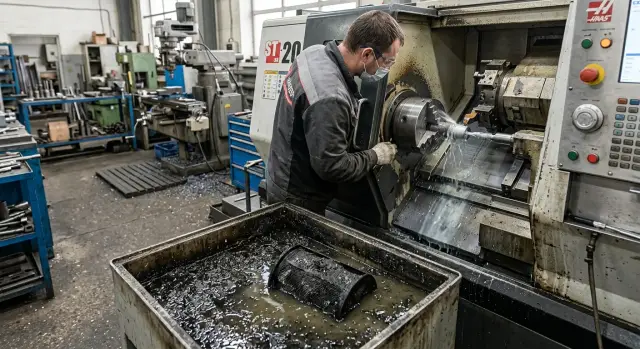
Why dirty coolant quickly affects the part
A machine can cut with the same tool and the same program, but the part still comes out different. Often the reason is not the feed or the insert wear, but the fact that dirt in the coolant tank changes how the fluid works in the cutting zone.
When sludge, fine chips, and thick sediment build up in the tank, the pump delivers coolant unevenly. At one moment the stream still looks fine, and an hour later it is weaker, and by the end of the shift it may come in spurts. The tool gets less cooling right when heat is rising. The metal expands, the cutter runs hotter, and the size slowly drifts. This is the worst kind of problem: the operator does not see a sudden failure, but the batch gradually slips out of tolerance.
The surface suffers even faster. Fine chips and abrasive sludge get back into the cutting zone and act like sandpaper. Scratches, dull spots, and a torn-looking tool path appear on the part. At first it looks like a random defect on one or two parts. Then the mark starts repeating in batches, especially on finishing operations.
Another separate problem is stray oil in the emulsion. It collects as a film, blocks proper heat removal, and changes the coolant’s lubricating properties. The fluid carries heat away less effectively, washes chips out worse, and protects the cutting edge less. Sediment at the bottom of the tank adds to the problem: part of the contamination keeps getting pulled back into the flow and goes to the tool again.
Usually it looks like this:
- in the morning, the size is stable;
- after a few hours, the spread grows;
- the surface becomes duller or rougher;
- after a stop and restart, the behavior changes again.
This time shift is an important clue. If the problem were only in the program settings, the defect would show up right away. Dirty emulsion hurts the process gradually: first coolant circulation changes, then the temperature rises, and only after that do the size and surface quality of the part drift.
In practice, this is often mistaken for tool wear. Of course the tool matters too, but dirty coolant speeds up that wear and hides the real cause. That is why the tank, filters, and flow should be checked as soon as the size starts to drift without any obvious reason.
What you can see in the size and on the surface
If the emulsion already contains fine chips, abrasive particles, and oily dirt, the machine rarely starts screaming right away. Usually it looks like small glitches: one part is in tolerance, the next is near the limit, and the third is out. For the operator, this often feels random, but a repeating drifting size almost always means cooling and lubrication are unstable.
The most common signal is that the size changes from part to part for no clear reason. The settings are the same, the program is the same, the blanks come from the same batch, but the diameter is a little larger or smaller each time. When dirt in the coolant tank interferes with proper delivery, the cutting zone gets different amounts of emulsion. The tool cuts sometimes in a cooler condition and sometimes in a hotter one, and the size starts to wander.
Then the spread usually grows toward the end of the batch. The first parts still hold steady, but later the diameter begins to drift noticeably. This is often because contaminated emulsion removes heat worse, while the fine particles behave almost like a paste. The tool heats up more, the cutting edge wears faster, and the machine no longer repeats the same result hour after hour.
The surface changes fairly early too. Instead of an even finish, you get fine scratches, dull patches, and a torn pattern in places. On a turning operation, this is especially visible on the finishing pass: it looks as if the part was machined with the same tool but a different feed. In reality, the problem is often not the cutting parameters, but the fact that the coolant stream no longer washes the fine chips out of the cutting zone.
Another clear sign is that the tool dulls sooner than usual. If an insert that used to last through a batch now needs replacement much earlier, it is worth looking beyond the cutting parameters. Dirty emulsion speeds up wear because the cutting edge works in worse conditions and is constantly exposed to hard particles.
A small but telling detail that is often overlooked: the first part after a pause behaves differently from the rest of the batch. After lunch, a tool change, or a short stop, it may come out with a different size or a rougher surface. That happens when dirt settles in the system and then the first flow comes through unevenly.
If these symptoms appear together, do not wait. One drifting size can still be a coincidence, but size scatter, early tool wear, and surface degradation in the same batch almost always point to a coolant problem, not a machine “quirk.”
What to look for in the tank, filters, and flow
Dirt in the coolant tank rarely looks like one major failure. Usually the system first sends small signals: the emulsion changes color, the pump gets louder than usual, and the stream no longer stays even. If you catch it in time, you can avoid scrap caused by size errors and surface marks.
Start with the tank itself. There should not be a dark oil film floating on the surface. That film often comes from the hydraulic system or the guides, blocks proper contact between the emulsion and the air, and speeds up fluid deterioration. The smell also changes quickly: instead of the normal working smell, you get a sharp, stale, or simply unpleasant odor.
Check the color and behavior of the emulsion. If it has become noticeably darker, cloudy, or starts foaming heavily, the mixture is already performing worse. Foam interferes with even delivery, and dirty fluid removes fine chips from the cutting zone less effectively. On CNC turning machines, this often shows up almost right away: the part surface becomes rougher and the size starts to drift without an obvious reason.
The bottom of the tank tells you just as much as the top layer. If thick sludge is collecting there, fine chips and abrasive material have been circulating for a long time. This sediment gradually gets pulled back into the flow, especially when the machine runs for a long time without cleaning or when the tank is small.
The filter side is usually easy to read. If the filter clogs too quickly with fine chips, the flow drops and the pump starts working under extra load. Then the stream comes in spurts: stronger, then weaker. Sometimes the operator only sees low pressure, but the sound already makes it clear that the pump is struggling to pull the fluid through.
Check these three places in a row:
- the tank surface — oil, foam, dark color;
- the tank bottom — sludge, dense sediment, fine chips;
- the delivery to the cutting zone — is the stream even, with no spurts or extra noise.
If at least two signs match, do not wait until the end of the shift. At that point the system is no longer just “starting to get dirty” — it is already affecting coolant filtration, coolant circulation, and part surface quality.
How to check the system step by step
It is best to inspect the system on a running machine and in the same coolant delivery mode. That way you see not a general picture, but the real condition of the system under load.
If dirt is already in the coolant tank, a quick glance from above tells you almost nothing. You need a short but consistent check at the start and end of the shift.
-
First, look at the stream. It should hit the cutting area, not miss the part or break up into weak spurts. If the spray is uneven, the flow pulses, or one nozzle is noticeably weaker than the other, look for a blockage, air intake, or a low tank level.
-
Then check the emulsion itself. Look at the level, color, and smell. Normal fluid has an even color, no thick film on top, and no strong rotten smell. If the emulsion has darkened, separated, or smells sharp, the problem is already affecting cooling and chip removal.
-
After that, remove the filter or screen and look at what has built up on it. A thin working layer is normal. A thick crust of sludge, sticky chips, and oily dirt is already choking coolant filtration. At that point the pump may still move fluid, but the cutting zone will not get the volume you expect.
-
Check concentration and temperature twice per shift. Take the first reading before starting the batch, the second closer to the end. If concentration has drifted and the fluid has heated up noticeably, coolant circulation is already working worse than the pump noise suggests. On the parts, this often shows up before the instruments do: the size slowly drifts and the part surface becomes uneven.
-
Write down not only the size drift itself, but also what changed before it. Added water, changed the tool, cleaned the filter, the machine sat idle for a long time, the tank almost ran empty — any of these small details can be the trigger.
A simple table works well: time, part number, size, emulsion temperature, concentration, filter condition, and notes about the stream. After a few shifts, it usually shows a direct link. The pattern is often simple: by mid-shift the filter clogs, the flow weakens, and the size drifts by a few hundredths.
Example: the size drifted by mid-shift
In the morning, everything looks calm. The operator starts a trial batch, takes the first measurements, and sees that the turning machine is holding size within tolerance. The surface is also clean, with no visible scratches or dull spots. At that point, it is easy to think the coolant is fine.
The problem shows up later, after the machine has been cutting the same series for several hours. Fine chips and sludge slowly clog the filter. From the outside, this is not always obvious, but the flow in the cutting zone is already weakening. The nozzle is not delivering as confidently, the stream breaks up, and part of the emulsion misses the tool.
Because of this, the tool removes heat less effectively. The part heats up more, the cutter starts working harder, and the size slowly drifts. At first it is only a couple of hundredths on individual parts. Then the operator notices the spread growing, and the part surface quality gets worse: roughness appears, the tool path starts to trail in places, and the edge is no longer as even.
Usually at that point people start looking for the cause in the offset, the tool, or the cutting parameters. That is understandable, but it often leads in the wrong direction. If dirt in the coolant tank has already built up and coolant filtration cannot keep up, tweaking the size only gives a temporary effect. An hour later the problem comes back.
A good shop-floor example looks like this: in the morning, the trial batch is stable; by mid-shift, the diameter starts drifting; after lunch, the operator has to measure parts more often and adjust the offset more frequently. At the same time, coolant circulation has become weaker, even though the pump is technically running.
When the tank is cleaned, sludge is removed from the bottom, the filter is flushed, and the nozzle supply is checked, the picture changes quickly. The flow reaches the cutting zone again, the temperature becomes more stable, and the size spread shrinks. Often that is enough to restore stability without changing the cutting parameters or replacing the tool unnecessarily.
If signs of dirty emulsion keep coming back from shift to shift, it is no longer a one-time blockage. At that point it is worth checking how often the tank is cleaned, what filter is installed, and whether it is enough for your chip volume.
Mistakes that make the problem worse
Most often, the problem grows not from one failure, but from a chain of small decisions. The operator sees a scratch on the surface or a size drift and first blames the insert. The insert is replaced, the offset is adjusted, the feed is reduced, but dirt in the coolant tank keeps circulating.
That is an expensive mistake. If the emulsion is already cloudy, smells bad, foams, or comes through weakly, the cause is often not the tool. The tank, filter, and pump matter just as much as the cutting parameters. When they are ignored, the problem is only hidden for half an hour or one batch.
One common mistake is adjusting the offset while the flow has already dropped. The size seems to come back, but only for a short time. After a few parts it drifts again because the cutting zone is still not being cooled and washed properly.
The same goes for cutting parameters. Some people immediately reduce speed or feed to remove lines and heat. Sometimes that helps temporarily, but weak coolant filtration does not go away. Chips and sludge stay in the system, get pulled back into the stream, and ruin the part surface again.
These actions often make the problem worse:
- adding water by eye without checking concentration
- putting off filter cleaning until the end of the shift
- not checking how the return flow goes back into the tank
- tolerating smell and foam until obvious scrap appears
Adding water by eye causes especially many problems. The emulsion can become too weak. Then lubrication drops, heat rises, and the surface dulls quickly. If there is too little water, the mixture becomes too thick, passes through the system worse, and foams more.
Smell and foam rarely appear out of nowhere. Usually they are an early sign that coolant circulation is already disturbed or the tank has long been due for cleaning. If you wait until scrap appears, the losses are much greater than an hour spent flushing and replacing the filter element.
On CNC machines this is especially noticeable in the middle of the shift, when the system has already warmed up. If the size starts drifting and the surface marks come in waves, you need to look at more than just the tool. First open the tank and check what is really happening with the emulsion and the flow.
A short check before starting a batch
Before a new batch, just a few minutes are enough to catch a problem before the first bad parts appear. If dirt in the coolant tank is already affecting machining, you can see it not only in the tank, but also in how the system behaves in the first minutes of operation.
Start with the simplest sign: the emulsion level. If it is lower than usual, the pump may pull air and the delivery will become uneven. On the machine, this quickly turns into unstable size and a rougher surface, especially on a long pass.
Then check the delivery itself:
- The stream should hit the cutting zone precisely, not the tool or the machine wall.
- The flow should be steady, with no spurts or drops.
- The filter should not be so clogged with sludge that the flow is clearly weakened.
- There should not be a thick oil layer on the tank surface.
- The color and smell of the emulsion should not differ sharply from the day before.
This kind of quick inspection often gives more than you expect. If a dense oil film is floating on top, the emulsion cools worse. If the filter is clogged, circulation drops and dirt goes back into the cutting zone. If the smell becomes sharp or the color turns dark and cloudy, the mixture is no longer working as it should.
After that, do not rush to start the entire batch. Make the first part and compare it not only with the drawing, but also with yesterday’s stable result. If the size stays where it was at the end of the previous shift, the system is probably fine. If the first part is already off by a few hundredths or the surface is more torn, do not expect the machine to “warm up” and even out on its own.
On turning operations, this shows up quickly: yesterday the finishing pass left an even trace, and today the first part already has a dull band and the size is drifting. At that point it is better to stop and check the tank, filter, and delivery again than to sort through dozens of parts later.
How to keep the tank from getting dirty
A tank rarely becomes dirty in a single day. More often, sludge, oil film, and fine chips build up little by little, and size and surface problems appear later. That is why cleaning is better tied to a schedule, not to operator complaints or scrap at the end of the shift.
Sludge should be removed based on the actual load on the machine. If the department often machines cast iron, cuts heavy stock, or runs for a long time without stopping, the tank gets dirty faster. In those conditions, waiting for a planned major wash is too long. It is easier to set aside a short window for regular cleaning than to later search for the cause of scratches and drifting size.
The oil film is better removed separately. If it sits on top for weeks, the emulsion breathes worse, spoils faster, and starts to smell. After that, both the delivery and the coolant behavior in the cutting zone change. On a CNC turning machine, this often does not show up right away: in the morning everything is calm, and by mid-shift the surface is already coming out worse.
The same story applies to filters. A clogged filter does not just collect dirt — it changes the flow. The pump pulls harder, pressure fluctuates, and sediment rises in the tank. That is why filters should be cleaned or replaced on time, especially after dirty materials and long runs.
After every top-up, check the concentration. Eyeballing the mix quickly breaks the process: today the emulsion is too weak, tomorrow it is too rich. In both cases, tool life and part surface quality suffer. One quick check after topping up usually saves more time than a repeat setup.
It helps to keep a simple log. It quickly shows where the failure repeats and where it was just a one-off.
- date and shift
- material and operation
- how much and what was added
- when the tank and filter were cleaned
- whether there were complaints about size or surface
After a couple of weeks, a clear pattern often appears. For example, surface marks show up after the second shift on the same steel, and the size drifts after a top-up without a concentration check. Then the cause no longer looks random, and tank maintenance can be adjusted to match the machine’s real workload.
What to do next if the symptoms keep coming back
If the size drifts again after cleaning, and the part surface is sometimes fine and sometimes scratched or spotted, do not look for just one cause. Usually the failure sits in several places at once. Dirt in the coolant tank rarely harms things on its own. It drags along weak flow, a clogged filter, air being pulled in by the pump, and nozzles that no longer deliver in the right place the right way.
Think of the tank, pump, filter, and nozzles as one chain. If the flow drops in one place, the whole coolant circulation suffers. Even fresh emulsion will not help if the pump cannot hold delivery or if dirt keeps rising from the bottom of the tank every time the machine starts.
It is useful to quickly check four things:
- how much coolant actually comes out of the nozzles, not just how much the spec says
- what is sitting in the filter after the shift and how fast it clogs
- whether there is dense sediment on the tank bottom and in areas that rarely get flushed
- whether the current coolant filtration can handle your chip volume
The last point is often underestimated. If the machine has started working with a different material, the feed has increased, or the chip shape has changed, the old filtration setup may no longer be enough. Fine dust, sticky chips, and sludge clog the system much faster than the tank may appear to show from above.
If the symptoms return a day or two after service, do not wait for steady scrap. One hour of proper inspection is cheaper than a batch of parts going out of tolerance by mid-shift. Service is not just for pump replacement. A specialist will check actual pressure, impeller wear, leaks, return channels, nozzle condition, and how the coolant moves through the full loop.
EAST CNC can help with machine inspection, choosing the right cleaning setup, and service maintenance. This is especially useful when the problem keeps coming back without an obvious cause. Record when the defect appears, on which material, with which tool, and after how long of running time. With that data, the source of the problem can be found much faster.