
CNC Changeovers for Small Batches Without the Fuss
CNC changeovers for small batches run more smoothly when you build a shared tool database, clear setup sheets and a simple job queue.
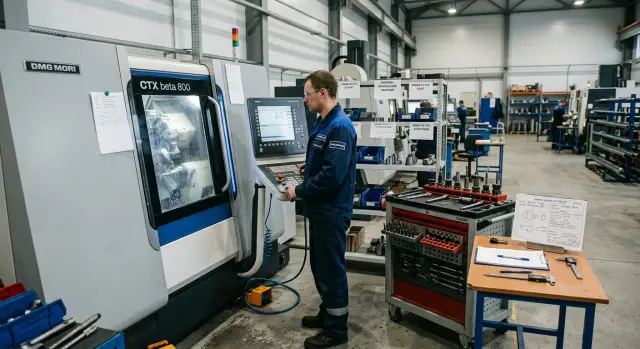
Why small batches disrupt the rhythm
The problem with small batches isn't the number of parts. Five or ten pieces can be machined quickly. The disruption starts between jobs, when the shift keeps jumping from one item to another — and each change brings searching for tooling, checking the program and repeat measurements.
With this kind of work, CNC changeovers stop being occasional. They happen almost without pauses. The shop works not to a plan but from stop to stop. Each stop may seem small, but over a shift they easily add up to hours.
Urgent orders break the sequence the most. The machine is set up for one part, then another task arrives and everything changes on the fly. The operator removes a set tool, hunts for a different arbor, checks the program, and later tries to restore the previous setup. On paper it looks like a short swap. In practice it’s often a long pause.
A lot of time is spent not cutting metal but searching. The operator stands at the cabinet looking for a chuck, cutter or adapter instead of starting the first part. If the same position is stored under different names, confusion grows. One person writes "through cutter 12", another — "external T12", a third uses a warehouse code. In reality it's the same tool, but finding it quickly becomes difficult.
The setup technician loses tempo for the same reason. They re-measure stickout, re-check offsets and double-check which holder was used last time. Even though this work has been done before, the knowledge isn’t in a shared place. It stays in one person's head, on a scrap of paper or in an old file that no one can open in two minutes.
The same repeats break rhythm most often: urgent insertions into the plan, searching for tooling before start-up, different names for the same tool and repeat measurements after an already completed setup.
A typical shift looks familiar: in the morning they do a small batch of bushings, then flanges, then an urgent repair part arrives after lunch. The machine barely stands idle, yet output still lags. The reason is simple — time is lost between jobs. Not on machining, but on getting back to the point where you can press "start" again.
What to keep in a shared tool database
A shared tool database isn’t for reporting. It’s there so the setup person doesn’t have to remember what is already assembled and what will work for the new job. With small batches, memory fails quickly, and one wrong choice of holder or stickout can cost 20–30 minutes.
Start with a simple rule: every tool assembly gets one code. That code should be for the working assembly the person brings to the machine, not for the insert alone or the holder alone. If the same inserts are mounted on different holders, those are different positions.
In the database record the full composition of the assembly: the code, the holder, the insert, the arbor, a photo of the assembled tool, the usual stickout and the working range. A person should open the line and immediately know what to take from the rack.
Photos greatly simplify searches. In a noisy shift where similar assemblies lie next to each other, one photo of the assembled tool is more useful than a long description. The eye finds the right item faster than text.
Record the typical stickout in the database instead of discussing it at the machine. If a tool normally runs with a 52 mm stickout, write that down. Next to it show the working range, for example 48–55 mm. Then the setup person immediately understands where they can adjust and where the risk of vibration, scrap or extra program correction grows.
It’s useful to note which parts this tool is already used on regularly. That helps arrange the job queue more calmly. If a cutter is already used for housings, bushings and similar-sized flanges, you don’t need to remove it every time and search again.
A good database doesn’t have to be large. It must quickly answer three questions: what is this assembly, where to get it and on which parts it has been proven. If the database gives these answers in a few seconds, changeovers become noticeably easier even with small batches.
How to make a setup sheet that’s understood at a glance
A good setup sheet saves minutes on every start. A bad sheet makes the operator squint at small text, flip through old versions and ask the setup tech again. With small batches, that’s enough to make the shop restless.
Make the sheet for the machine, not the archive. If the sheet can’t be understood in 20–30 seconds, it doesn’t help. Remove everything not needed right at the equipment: long explanations, duplicated process text, old notes. Leave only what the person actually uses to set the tool, chuck and part.
One page or one screen works best. It usually contains the part number, a short name, a tool list in turret order, basic sizes and offsets in plain language, and a photo of the assembled tooling.
Show tool order as the operator sees it on the machine — not just a list of names in random order, but T1, T2, T3 with a short clear description. If T4 holds a boring tool with a specific insert, write that. The fewer guesses, the fewer mistakes.
Write sizes without bureaucratic phrasing. Instead of a line of codes give a clear hint: "bar stickout 42 mm", "stop until contact", "check X offset on the first part". These phrases read faster than an overloaded table.
Photos remove many questions. One photo of the chuck with jaws and one of the stop often beats a long description. If the jaws are flipped or soft jaws are machined for a specific diameter, it should be visible immediately.
One small but impactful detail: include the date and name of who updated the sheet. Without this, two versions quickly appear and people pick the wrong one. If the setup technician changed the stickout yesterday, the operator should see that right away, not after the first scrap piece.
If the sheet is clear at first glance, the shift runs calmer. People ask less, search tooling less and reach the first good part faster.
How to queue jobs without unnecessary changeovers
With small batches, job sequencing solves almost everything. If you order parts in an inconvenient sequence, the shift spends time changing chucks, finding arbors and adjusting offsets instead of machining.
First look not at the ERP date or the paper deadline but at the physics of the setup. Put side by side parts that need the same chuck or at least the same clamping scheme. Even if sizes differ slightly, shared tooling often saves more time than strict calendar order.
Then check tooling. If two batches require almost the same set of cutters, drills and holders, run them one after another. The operator assembles the work zone once, checks stickouts once and then finishes a series of similar parts.
Don’t mix long and short cycles without reason. Short parts are convenient to group in blocks: the shop gets quick finished positions and doesn’t lurch every half hour. Group long cycles together, especially when the operator can prepare the next setup in parallel.
Urgent jobs will still come. Keep a separate slot for them instead of inserting them into the middle of the main chain. One reserved slot per shift usually beats several sudden rearrangements. If no urgent job arrives, fill the slot with the nearest batch from the same tooling group.
The working logic is simple: group by chuck and clamping scheme first, then by similar tooling, and only after that look at cycle length and deadlines.
On a turning shop this is obvious. Suppose three similar flange orders for construction equipment arrive in the morning and one urgent housing. If the flanges run consecutively, the shift needs one basic preparation. The urgent housing goes into the reserve window instead of breaking the entire queue.
Don’t freeze the queue for the whole day. The foreman or shift supervisor should review it at the start of each shift: what’s done, what’s delayed and where grouping logic failed. Five minutes is enough to avoid losing an hour and a half later on extra tooling changes.
How to roll out order step by step
Don’t try to change the whole shop at once. Start with one family of parts that run often on the same machine and need similar tooling. If you impose new rules everywhere at once, people will quickly tire and revert to hunting for tooling by memory.
Collect everything that repeats from order to order: cutters, drills, holders, chucks, arbors and measuring tools. This becomes the first version of the shared database.
Then proceed in stages:
- Take the last 10–15 orders for the chosen family and mark which tools appear most often. You don’t need a perfect list — you need a real working set.
- Standardize names and codes. If one operator writes "turning cutter", another "right-hand turning" and a third uses an internal code, confusion continues.
- Make a template setup sheet on one page. It should contain only what’s needed at the machine: part code, tool positions, stickouts, tooling, control dimensions and a note for the first run.
- Test the new order on one shift, preferably with similar consecutive jobs to see how it works without unnecessary jumps between different parts.
- Immediately after the shift collect short feedback from the operator and the setup technician. If the sheet is overloaded, the tool code is unclear or something is missing at the machine, fix it the same day.
During the trial watch not only the total changeover time. Note small losses: how many minutes were spent finding an arbor, who asked for the offset number, where people stopped because of different names in documents. These small issues later create chaos.
A simple positive sign: the operator takes the sheet, sees familiar codes, quickly sets the positions and doesn’t run around asking questions. If you save at least 10–15 minutes on each changeover in one shift, the order is already working.
Example of a shift with similar parts
Good shift rhythm comes from order, not haste. If in the morning a turning machine runs bushings and pins with the same chuck, the shop gains time even before the first start. The operator doesn’t touch the clamp, the setup tech avoids extra checks, and transitions between jobs are calm.
Imagine a usual shift with three small batches: 40 bushings, 35 pins and another 25 bushings of a different size. Parts have different lengths and slightly different diameters, but the base and clamping method are the same. For small batches that’s already a good situation.
Common cutters and drills are pre-loaded in the turret for the three jobs: typically a turning cutter, cutoff, a drill for the axial hole and a few standard positions. Because of this, the machine isn’t stopped for a full tooling swap.
On the first two jobs they change only one tool. For example, the pin needs a different cutter for a groove or a drill of another diameter. Everything else is already in place. That small change removes 15–20 minutes that would normally be spent finding an arbor, measuring stickout and re-checking offsets.
The setup tech doesn’t recall dimensions from memory or flip through old files. They take the setup sheet where the chuck, locating scheme, tool numbers, stickouts and first-part control dimensions are already shown. The start goes smoothly: load a blank, check the first part, adjust one dimension and run the batch.
By mid-shift the shop finishes two orders without rush. The third starts on the same general positions with one short change and a quick first-part check. In the end the shift completes three small batches without unnecessary stops.
It’s a simple but telling example. When similar parts are placed next to each other and tooling is ready in advance, small batches stop breaking the day.
Where the shop loses time
The shop doesn’t lose hours at once but in 5–15 minute chunks. Time goes to finding the right sheet version, arguing over a tool name, swapping tooling and handling an urgent job that slipped in without checking the main queue. Separately these look minor; over a shift they add up to serious loss.
A frequent mistake is an overly long setup sheet. If the operator has to flip through several pages to find stickout or holder number, the sheet hinders rather than helps. Only what’s needed right now should stay at the machine.
Old document versions also eat time. One sheet on the bench, another in a folder, a third on the foreman’s phone — people start comparing them instead of putting the part to work. One clear source is always faster than three almost identical ones.
Different names for the same tool are a quiet time sink. One person writes "turning cutter 20", another "T0101", a third uses an internal name known only on that shift. Then the storekeeper issues the wrong item, the setup tech clarifies, and the operator waits. If the tool database doesn’t speak one language, the shop pays for it in time every day.
Urgent orders break rhythm more often than it seems. The job itself may be only a few parts, but people change jaws, pull different tooling and break the prepared logic of the shift. Worst is when no one checks whether similar parts are nearby that could be run after and pay off the changeover.
There’s a mundane problem too — storing tooling without a simple order. If rare fixtures are mixed with common ones, the operator wastes time finding them and then putting them back incorrectly. The next shift repeats the story.
A short check before start
Before the first run the foreman and operator need three minutes for a quick check. Those minutes pay back during the same shift.
First, compare tool codes in the database and on the trolley. Then ensure the setup sheet is at the right machine and is the current version. After that review the job queue: foreman and operator must see the same plan, not different variants. If an urgent job appears, decide immediately — can it be inserted without a full changeover or is it better to give it a separate slot. Finally check rare tooling: keep it separate from common tooling so it doesn’t interfere with normal work.
In practice this is simple. In the morning three similar parts sit in the queue, all using a close set of tooling. The team leader places them consecutively, puts the setup sheets by the machine and sets aside the rare-fixture tooling for the evening. The operator doesn’t jump between tasks and calmly finishes the batch.
If at least one of the checks fails, delay the start a few minutes. It’s much cheaper to spend three minutes checking than to lose half an hour on an unnecessary tooling change or a machine stop.
What to do next on your shop floor
Start with one machine and one group of similar parts where changeovers cost the most time. On that scale it’s easier to see real problems: extra tools, different names for the same position, old setup sheets and queue confusion.
Assign one person responsible for the tool database and setup sheets. They maintain records, remove duplicates and decide which entry is the working one. When everyone edits a bit, the database quickly becomes a set of random files and verbal agreements.
For the first two weeks work with a simple cycle: choose the 10–15 most frequent tool positions, standardize names, create setup sheets for real orders, compare changeover time before and after the new rules, and note which positions aren’t used and which sheets aren’t understood at first glance.
Once a week do a short clean-up of the database. Remove duplicates, old versions and positions kept "just in case." If you don’t, staff will be back to searching for tools by memory in a month.
You’ll know order is working when the operator takes the sheet, assembles tooling without extra questions and similar jobs run consecutively without breaking the shift. Even 15–20 minutes saved on one changeover quickly adds up over a week.
If the shop’s limits are not only organizational but also equipment-related, consider the machine park. EAST CNC in Kazakhstan helps with selection, supply, commissioning and service of CNC lathes, and the company blog has practical metalworking materials. But start with simple order: one machine, one group of parts, one tool database and clear setup sheets.
FAQ
Why do small batches so often disrupt the shop's rhythm?
The problem isn’t the number of parts but the transitions between jobs. The shift spends time looking for tooling, checking programs, performing repeat measurements and returning to a previous setup. When these pauses happen many times a day, the shop loses hours even if cutting time is short.
What must be recorded in the shared tool database?
Keep one code for the assembled tool, a clear name, the tool composition, a photo of the assembled piece, the typical stickout, the working range and the storage location. That’s enough for a setup person to know what to take and where it is. It’s also useful to mark which parts this assembly has already been used on successfully.
Why give one code to the whole assembly rather than to separate parts?
Because the person brings a ready assembly to the machine, not separate parts. If codes are only for the holder or only for the insert, people will guess and may pick the wrong combination. One code for the complete assembly removes confusion and speeds up the start.
What should a setup sheet look like so it's immediately clear at the machine?
Make the setup sheet readable in half a minute. On a single page or screen include the part number, tool positions in the turret order, stickouts, tooling, control dimensions and a photo of the assembled tooling. Add the date and the name of the person who updated the sheet so the shift doesn’t pick an old version.
How is it best to queue jobs for small batches?
Put parts that use the same chuck or the same clamping scheme next to each other. Then check tooling: if two batches use almost the same set of cutters, drills and holders, run them consecutively. Only after grouping by tooling look at cycle length and deadlines. This reduces unnecessary tooling changes and helps the operator reach the first good part faster.
What to do with urgent jobs so they don't wreck the day?
Don’t insert every urgent job into the plan as it appears. Keep a separate window for urgent work and only put it in if it won’t break the prepared chain. One reserved slot per shift is usually better than multiple sudden changes. If an urgent job needs similar tooling, run nearby parts after it to pay off the changeover.
Where to start if the shop has no shared order yet?
Start with one machine and one family of similar parts. Take recent orders, collect repeating tooling, standardize names and create a simple setup-sheet template. This way you’ll quickly see where time is lost without trying to change the whole shop at once.
Who should be responsible for the tool database and setup-sheet versions?
Assign one person to maintain the tool database and the setup-sheet versions. They should update records, remove duplicates and decide which entry is the working one. If everyone edits a bit, the database becomes a pile of random files and verbal agreements.
How to tell if the new order really works?
Test the new order on one shift with similar consecutive jobs. Look not only at total changeover time but at small losses: minutes spent finding a collet, checking the offset number, or arguing over a tool name. If you save 10–15 minutes per changeover, the new routine is already delivering value.
Where does the shop usually lose time even when the machine rarely stands idle?
Time usually slips away in 5–15 minute pieces: finding the right sheet version, resolving different names for the same tool, digging for tooling or reacting to a sudden urgent job. Each delay looks minor, but across a shift they add up to significant downtime between jobs.