
Mistakes in CNC Machining of Cast Iron: Dust, Wear, Failures
Mistakes in CNC machining of cast iron often start with dust: it wears guides, interferes with sensors and shortens insert life.
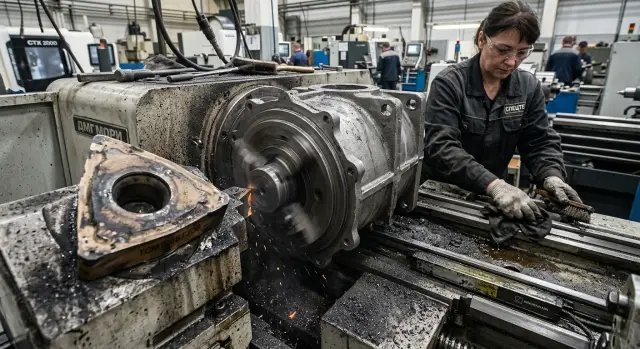
Where problems begin
Problems when machining cast iron on a CNC rarely start with a breakdown. Usually it looks almost harmless: after the first parts a thin gray film already lies on the housings, doors and table. The operator brushes it off with a rag and continues because the machine is still cutting fine.
That is the trap. Cast iron dust doesn't wait for the end of the shift. It quickly settles on exposed surfaces, works into gaps, sticks to guards and mixes with fine chips. At first it seems like ordinary dirt, but for the machine it is already abrasive.
The first failures often don't appear immediately, but by the middle of a run. In the morning the size holds steady, and after a few dozen parts it starts to "drift." The change can be small, a few tenths, so it's easy to blame the insert, warm-up or a setup error.
Then downtime increases. The operator changes inserts more often, although by calculation they should last longer. Time is also spent on small cleaning tasks: wiping a door, removing the deposit from the table, taking dirt off a guard, checking why the cutting sound got rougher. Separately these are trivial. Over a shift they eat a noticeable chunk of time.
Noise also changes sooner than many expect. When dirt accumulates in guards and near moving parts, the machine runs stiffer and louder. It’s usually not a sudden alarming noise but a constant rustle, a dry squeak or simply heavier motion.
This is how the problem usually starts: not with an accident, but with the habit of tolerating dust, extra noise and minor size drift. If a gray film appears after the first parts and the tool needs dressing more often by mid-run, the process is already not behaving as it should.
Why cast iron produces so much dust
When cutting, cast iron doesn't pull into a long ribbon like steel. It crumbles. Instead of large chips the machine gets a mass of small dry particles that scatter through the work area almost like powder.
The reason is the material's structure. Cast iron contains graphite, and that changes how the workpiece behaves under the cutter. The material breaks more easily, the chips quickly disintegrate into short fragments, and some of these fragments turn into fine dust.
Because of this, cast iron is often cut dry or with minimal coolant. For the process this can be convenient: there's no thick emulsion mess and chips don't wind on the tool. But dry machining has a downside. Airflow from the chuck, tool and enclosure spreads dust across the entire machine volume.
Large chips usually fall down or stay in an expected zone. With cast iron it's different. Fine dust gets into folds of guards, settles on housings, gets into gaps and collects where ordinary chips just don't reach. After a quick blow-off it often doesn't disappear but only moves elsewhere.
Graphite creates another problem. This dust is not only dry but also very clingy. It mixes with oil, lubricant residues and ordinary dirt, forming a dark deposit with abrasive properties. Visually it looks like dust. In reality it is a mixture that accelerates wear.
In shops where lathes and machining centers frequently cut cast iron, this is seen quickly. After a shift the deposit remains not only near the cutting zone but on doors, bellows, trays and around units that do not take part in cutting.
Many underestimate the risk because short chips seem less problematic than long ones. In fact, fine dry fractions are more dangerous precisely because they travel further and settle almost everywhere. So cast iron requires not only correct cutting parameters but also a different discipline for cleaning and protecting the machine.
Where the dust hits the machine
Cast iron dust is dangerous not only because of volume. It is fine, abrasive and very persistent. Dust follows lubrication, sticks to seals and returns to the working zone. Because of this the machine begins to lose smoothness and the problem looks like ordinary contamination for a long time.
The most affected components are those with motion and small clearances: guides, carriages, sensors, scales, limit switches, brushes, scrapers, seals, the chuck and the tool area.
On the guides dust mixes with lubricant and turns into a gray paste. The carriage runs over it dozens or hundreds of times per shift, and the abrasive is worked into the surface. First noise increases and axis motion changes. Then you get small jerks, heating and accelerated wear of the CNC guides.
Sensors suffer quieter but not less. Even a thin film on a scale or limit switch already interferes with correct reading. The machine may take longer to find zero, give floating size deviations or output strange signals that are hard to catch the first time.
Brushes and scrapers are supposed to protect internal zones, but when machining cast iron they themselves wear quickly. The edge loses shape, the pressure weakens, and dust goes deeper where it shouldn't be. After that contamination grows very quickly.
The chuck and cutting zone receive the same abrasive a second time. Dust settles on jaws, in slots, on tool seats and near the insert. If you simply blow it away with air, it doesn't disappear but flies to neighboring surfaces and returns to the cut. Because of this the insert life on cast iron decreases and the workpiece clamping becomes less stable.
A typical shop picture: after a series of housing parts the size is still OK, but the chuck is already gray, the slides have a sticky deposit, and the brushes are noticeably worn. If you ignore this trail for two or three days, the machine starts answering with small issues: floating size, accelerated consumable wear and extra stops for cleaning.
Signs to look for
Cast iron rarely causes an immediate problem. First the machine gives small signals that are easy to blame on a tired insert or a random glitch. So the same nuisance can drag on for weeks until size drifts out or stops occur.
One of the first signs is an axis moving unevenly after a long series. On a short test everything may look fine, and after a few hours the feed becomes jerky, especially on repetitive moves. This happens when dust and fine abrasive crumbs already sit where motion should be smooth.
False sensor signals also usually start without a complete failure. The machine changes position and the sensor triggers intermittently. The operator sees a rare error, clears it and continues. After a shift it repeats more often.
There are signs on the part itself:
- the surface becomes rougher even though cutting parameters haven't changed;
- torn marks appear on edges;
- size slowly drifts by the end of the shift;
- the insert chips earlier than usual;
- the cutting sound becomes drier and harsher.
If roughness suddenly worsens without changes in feed, speed or tool overhang, look not only at the mode. Cast iron dust often gets into zones where it interferes with stable feed, weakens repeatability and adds extra vibration. The part may still pass first-piece inspection, but then quality slowly slides down.
Early insert chipping also says a lot. When chips look normal but the insert lasts noticeably less, the reason is not only the material. Often the cause is a dirty working area, poor dust evacuation or micro-vibration.
The worst symptom is size drift by the end of a shift. In the morning the machine holds tolerance, and later the size starts to float. This hints at accumulated wear, dirty motion components or unstable sensors. If you simply tweak correction at that moment, the problem remains and will return on the next batch.
A good rule is simple: if failures repeat after a long series, look not only at the tool. With cast iron the source is often hidden in dust, not in settings.
Why the insert loses life
People often underestimate not the material itself but what happens around the cutting edge during cutting. Cast iron produces fine dry dust, and not all of it leaves the contact zone. Part of this dust returns under the insert and grinds the edge like sandpaper.
At first this is almost unnoticeable. The insert still holds size but cuts with more effort, heating increases, and then the edge starts to crumble. Wear does not proceed smoothly but suddenly: a few parts ago everything was fine, and then the surface is gone.
Too high speed only worsens the issue. The edge overheats, micro-chipping appears, and the insert loses life prematurely. On cast iron this shows quickly because the material is abrasive and the dust adds load.
Too low feed is also harmful. In this mode the insert rubs more than cuts. Temperature rises, dust packs into the contact zone, and wear accelerates even without clear impacts.
Early wear is usually linked to several causes at once: speed raised above what is reasonable for this grade of cast iron, feed reduced to get a cleaner surface, a geometry chosen that poorly tolerates impact loads, or runout in the chuck and part seating.
Incorrect geometry quickly breaks the edge in interrupted cuts. If the part has a casting skin, steps or windows, a weak edge gets hit at every entry. Externally this looks like random chipping, but the cause is usually a wrong insert choice for the specific operation.
There's another small but often missed detail: a dirty chuck. Dust and fine chips on the jaws cause runout, the part sits less true, and the insert receives extra impacts. Even a small eccentricity quickly ruins the edge, especially on finishing passes.
A common picture is familiar: the operator changes the insert but doesn't clean the chuck or change the mode. The new insert cuts well at first and then chips in the same way. This means the issue isn't only the insert. You must look at the whole chain: dust, mode, geometry and machine cleanliness.
How to set up the process step by step
Problems often begin before the first cut. Someone takes an old mode that once worked on another part and immediately loses time on rework. With cast iron that approach quickly creates extra dust in the cutting zone, heat and premature tool wear.
Start with two questions: what exact cast iron do you have and what is the part shape. Gray iron, ductile or thin-walled castings behave differently. If the part is long, ribbed or interrupted, you need to set the mode more conservatively than for a simple short blank.
Then build the process in order. First pick the insert for the task: a more durable geometry for roughing, a less aggressive one for finishing. Then set a starting regime with margin. It's better to start with moderate speed, feed and depth of cut, take a few parts and only then increase the load.
Plan how to remove dust from the cutting zone. If you use blow-off, the flow should not drive dust around the housing but move it away from the tool and guides. If you use coolant, the jet should reach the contact zone and not just wet everything.
On long runs short cleaning pauses help. Five minutes at set intervals often save sensors, guide protection and the tool. Even better, from day one record insert life: not only minutes or part count but the reason for replacement — chipping, bluntness, overheating, vibration or obvious dust deposit.
This order quickly gives a clear basis for adjustment. If an insert dies too early you'll see the cause in records rather than changing everything at once. If dust remains in the cutting zone, fix the blow-off or coolant delivery first before touching speed.
In the shop it looks simple: make a trial part, inspect the edge, remove dust, change one parameter, check again. Don't change three settings at once. Otherwise it's hard to know what actually worked.
Common mistakes
The most frequent slips start not in the program but in ordinary shop habits. Cast iron dust is fine, dry and unpleasant for the machine. If you work with it "quickly" it goes where later it is hard to reach.
The first mistake is blowing everything with one air gun into the deep working area. The operator quickly cleans the table and housings but dust flies to the guides, under covers, to sensors and into gaps. From the outside the machine looks clean, but inside the abrasive continues to act every cycle.
The second mistake is cleaning only what’s visible. The front of the zone may shine while sensors, limit switches, cable glands and areas by protective covers remain under a deposit. Then the machine begins to behave oddly: signals drop out, position floats, automatic changes run unevenly. Often it's not electronics but dust where no one has looked for a long time.
The third mistake is using the same insert and the same mode for gray and high-strength cast iron. These are different loads for the edge. What survives on gray iron may quickly blunt on ductile iron, heat up and show a completely different wear pattern.
Another costly habit is delaying replacement of brushes, scrapers and seals until they clearly fail. While the part is still within tolerance it seems fine. But a worn scraper already lets dust reach the guide and the machine quietly loses life.
The worst is checking only the machined size. The dimension can be within tolerance today while guides already receive excess wear. So at the end of a shift it's useful to check not only one result on a part but the condition of sensors, guards, insert edge, new noises on axes and accumulations of abrasive in corners of the working zone.
A common simple example: the operator blew the zone, changed the insert later than needed and produced a part in tolerance. The shift seemed fine. A few days later the machine starts to run stiffer and the cause has already accumulated from small things that each time seemed non-urgent.
An example from a typical shift
In the morning an operator starts a batch of cast iron bushings on the same turning operation. The first 8–10 parts go calmly: sound is even, size holds, surface without surprises. The insert is new, the mode is familiar, and the shift looks ordinary.
Closer to mid-shift the picture changes. The machine begins to sound harsher and protective housings and bellows darken with dry cast iron dust. It settles not only outside. Fine dust is pulled toward the guides, sensors and into zones not visible at first glance.
At first it seems minor. The operator hears an extra rustle, then notices the cut feels heavier than in the morning. After a few more parts the size starts to drift. After two dozen bushings the diameter already leaves the usual corridor, although the series started perfectly. Then the insert chips and the shift stops.
In such cases tools are often blamed. But the problem is usually broader. Cast iron dust interferes with normal movement, gets on a sensor, impairs chip evacuation and adds extra friction. Because of this noise increases, repeatability falls and insert life drops faster than expected.
Simple discipline helps. Stop the machine, remove dust with an industrial vacuum, clean the sensor, inspect guards and check whether anything has built up on the guides. After that slightly adjust the cutting mode. Often it's enough to reduce aggressiveness in feed or speed and recheck the first 2–3 parts.
After such a pause the run usually goes calmly again. Sound evens out, size returns to tolerance, and the new insert does not chip on the first passes. This is a typical cast iron story: everything is fine in the morning, and then fine dust gradually breaks the whole process.
Quick checks at shift end
Many problems start not during cutting but after the machine stops. If you leave cast iron dust overnight it will settle on guides, guards, doors and by sensors, and in the morning cause noise, jerks or size drift.
This check usually takes 10–15 minutes. That's enough to prevent small dirt from turning into an expensive repair.
- Remove dust from guides, telescopic covers and internal door surfaces. Don't postpone this to the next shift: overnight dust mixes with oil and starts to act like an abrasive paste.
- Gently wipe sensors with a clean cloth without strong pressure. A coarse rag and excessive force easily leave scratches and later cause false triggers.
- Inspect the insert edge under good light and immediately note the wear type. It helps to mark what you see: uniform edge wear, chipping, corner break-out or buildup.
- Jog the axes slowly at low speed and watch whether guards drag dirt along. If a guard collects dust at a joint or in folds, clean it right away.
- Enter at least three observations in the shift log: extra noise, axis jerks and size drift. Even a short note often saves hours of troubleshooting the next day.
A simple example: an operator noticed a light squeak on the X axis and a two-hundredths drift but recorded nothing. In the morning another shift starts reworking, changes the insert and tweaks the mode, while the root cause was the dirty guard and dust in the travel zone.
After cast iron, end-of-shift cleaning is not an "if there's time" task but a regular part of the process.
What to do right now
Don't try to change everything at once. Take one repetitive cast iron operation and check it separately. If you don't track insert consumption, cleaning time and small stops, dust and wear will look like ordinary running costs.
Most problems are visible after one week of observation. Choose one machine, one part and one tool. That's enough to see where the process goes into excessive wear and where equipment starts to suffer from dust.
Start with four actions: measure insert consumption for that operation over 5–7 shifts, compare actual regimes with those in the process card or program, check how often the operator cleans the machine and what exactly is cleaned, and inspect guards, seals and zones near sensors and guides.
Look not only at numbers. If the insert lives less than usual and cast iron dust accumulates quickly, the cause is often multiple. A slight overload in mode, rare cleaning and worn protection together give the familiar result: the insert wears out sooner, guides get dirty and sensors trigger sporadically.
If the batch repeats, lock a short checklist for the shift. You don't need a long manual. One clear page is enough: what to check before start, when to remove dust, where to look at guards and where to record insert consumption at shift end.
This routine quickly reveals weaknesses. On the same part you may see that insert consumption is higher after the evening shift. The reason is often simple: the machine is cleaned less frequently and dust stays longer in the working zone and near protections.
If the shop is selecting a CNC lathe for cast iron or wants to tidy service on current equipment, EAST CNC can help with selection, supply, commissioning and maintenance. The company operates in Kazakhstan as the official representative of Taizhou Eastern CNC Technology Co., Ltd., and the east-cnc.kz blog publishes equipment reviews and practical metalworking materials.
Today one step is enough: pick one machine for inspection, record current insert consumption and inspect guards. In a week you'll have not a feeling that "something is wrong" but a clear picture of the process.