
Circular Interpolation or Boring for a Precision Hole
Circular interpolation or boring: compare hole geometry, cycle time, and how easy size correction is so you can choose the right method for your shop.
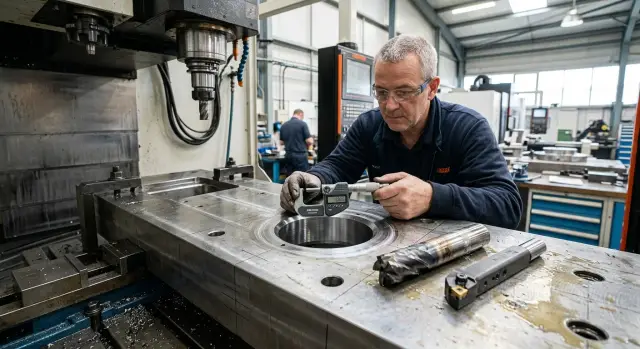
What is the problem with a precision hole
On the drawing, everything looks simple: there is a diameter and there is a tolerance, so the task is to hit the size. On a milling center, that is not enough. A hole can pass the diameter check and still work badly in assembly.
This is a common trap. The operator sees a good size on a bore gauge or plug gauge and considers the job done. Then a pin goes in too tight, a bearing sits skewed, or a bushing does not hold the way it should after pressing. The reason is simple: a precision hole is more than just a number in millimeters.
Shape matters just as much as size. If the hole is slightly oval, tapers with depth, or has a wavy surface, the part behaves differently in assembly. It may go in easily at the top and then seize lower down. The opposite can happen too: the diameter is within tolerance, but the fit is too loose because real contact happens only at a few points.
Usually, three things are checked:
- roundness;
- cylindricity;
- surface finish.
Roundness shows how close the cross-section is to a circle. Cylindricity tells you whether the hole stays the same through its depth. Surface finish affects the fit, wear, and how the assembly behaves in the first hours of operation.
Because of this, two parts with the same measured diameter can behave differently. One hole is straight along its full length, and the pin enters with a clear, consistent force. Another has a slight barrel shape or taper, and the same pin either sticks or has play.
That kind of spread comes from very understandable reasons. Tool stick-out, clamping rigidity, heat, cutting edge wear, and even chip evacuation from the cutting zone all play a role. That is why the question "circular interpolation or boring" usually does not start with speed. First, you need to understand what geometry the hole needs and what matters more for the part: simply hitting the diameter, or getting a predictable fit in real assembly.
This is especially noticeable in metalworking, where the same batch of parts may go into assemblies with different sensitivity to hole shape. The error rarely looks like obvious scrap. More often, it appears later, when assembly becomes difficult, time is lost, and the cause turns out to be geometry rather than the size itself.
How the two methods differ
With circular interpolation, the hole is cut by an end mill moving in a circle around the center. The final diameter depends on both the cutter size and the machine path. That means tool runout, tool stiffness, and how accurately the axes hold the circle all affect the result.
Boring works differently. The hole is formed by a cutting tool set to the required radius in a boring bar or head. The spindle rotates the tool around one axis while feed moves along the hole. The path is simpler, but stick-out, assembly rigidity, and spindle runout matter more here.
If you compare the methods without theory, the difference looks like this. Circular interpolation depends more on the machine moving in X and Y. Boring depends more on the setup and rigidity of the tool itself. One cutter is convenient for several diameters, while boring usually gives a more controlled final size on one precision hole.
The two methods also behave differently in terms of hole shape. Interpolation can give an accurate diameter, but it is harder to keep perfect roundness if the cutter is long, the part is thin, or the axes have noticeable reversal errors. Boring usually holds roundness and surface finish more easily if the setup is short and rigid. But a long boring bar can also deflect the hole, create taper, or leave a slight wave.
For roughing, circular interpolation is usually more convenient. It removes stock faster, does not require a separate tool for each size, and works well if there will be a finishing pass afterward. For final sizing, boring is often more stable: the operator can shift the tool slightly and land the size predictably without recalculating the whole path.
A simple example: you need to make a seating hole after rough machining. With a mill, it is easy to get close to size quickly and leave a small allowance. Then a boring head makes it easier to remove the last few hundredths when hole geometry and repeatability from part to part matter most.
What happens to hole geometry
When people argue about which method is better, the problem is usually not the diameter itself. Far more often, the defect comes from the hole shape: the size is within tolerance, but the geometry is already wrong.
With circular interpolation, the hole center is defined by the machine coordinates. If the table, spindle, and workholding are rigid, this method gives stable axis placement. For housing parts, that is a big plus: the hole ends up exactly where the drawing expects it.
But the shape is not controlled by the program alone. The whole setup affects it: tool runout, axis backlash, interpolation accuracy, and cutter deflection under load. That is why inspection sometimes shows ovality, slight faceting, or enlargement at the entry.
Roundness and wall shape through the depth
Boring usually gives a calmer shape when you need a clean fit and a straight wall through the full depth. The cutting tool removes a thin allowance along one path, and the hole usually comes out closer to a true cylinder. This is especially noticeable for fits with bushings, bearings, and precision pins.
But boring does not forgive weak mechanics. If the bar is long and stick-out is large, the tool deflects and the hole becomes tapered. The size at the entry may look good, while deviation appears deeper down.
Why rigidity often matters more than cutting conditions
Operators often start by changing feed and speed. Sometimes that helps, but not as much as they hope. If the part is clamped loosely, the spindle has runout, and the tool sticks out too far, the hole geometry will get worse even with a careful program.
Rigidity affects the result more than small changes in cutting conditions. With circular interpolation, roundness suffers more often because the cutter is pushed aside. With boring, the wall straightness suffers more often because the bar flexes.
If you need a good position and a normal size without extra steps, interpolation often wins. If hole shape, a straight wall, and a predictable fit are the top priority, boring usually gives a more precise result.
Where time is lost and where it is saved
Pure cutting time rarely decides everything. On a milling center, minutes are spent not only on the cut, but also on approach, entry, exit, tool changes, first-part measurement, and adjustments after the trial run.
Circular interpolation often looks fast because no special tool is needed. If the cutter is already in the magazine, the operator can start right away. But the hole itself often needs more motion than it seems: a helical entry, one or two roughing circles, a finishing pass, and sometimes a spring pass.
Boring feels slower when the batch is small and the tool still has to be set up. On one or two parts, the time loss is obvious immediately: install the boring head, make a test cut, measure, adjust, and check again. In minutes, that is often longer than milling the hole.
The picture changes in production runs. If the blank is stable, the allowance is consistent, and the boring tool is already set, the hole can be produced in one predictable finishing pass. Then the savings do not come from cutting seconds, but from the operator doing fewer unnecessary checks and sending fewer parts back for rework.
The number of passes has a big impact on output. If interpolation needs two passes and a check after the first part, while boring needs one pass but a longer setup, the mill will be faster on five parts. On fifty, the balance often shifts in favor of boring.
There is also a less visible time loss: changeover. If every new part requires a different boring tool to be installed, adjusted, and verified, the shop loses rhythm between jobs. In that case, interpolation is often more convenient, even if it cuts a little slower.
So you should count the whole cycle: setup, reaching the first good size, measurement frequency, and the risk of rework. That is where the real savings usually hide.
How to adjust size on the shop floor
The shop floor values a method that can be corrected in a couple of minutes, without a long machine stop or a new setup. Here, circular interpolation and boring behave differently.
With circular interpolation, the diameter is usually changed through cutter radius compensation or by shifting the path for that specific hole. If the size goes 0.02 mm undersize on diameter, the operator adds about 0.01 mm on radius. The tool stays in place, and the correction takes little time. That is handy when the hole shape is already fine and only the size needs a small touch-up.
There is an important nuance. If one cutter makes several holes of different diameters, a general tool correction will shift all of them. In that case, it is safer to change only one contour in the program, rather than the overall wear setting for the cutter.
With boring, the tool itself is usually adjusted. This is typically a micro-adjustment of the boring head or a slight shift of the cutting edge on the bar. The logic is the same: to add 0.02 mm on diameter, the tool is moved about 0.01 mm on radius. The program often stays unchanged. For one critical hole, that is a clear and calm way to work.
When to adjust the program and when to adjust the tool
It is easier to change the program if the deviation repeats consistently, if one tool is used for several diameters, or if you need to quickly correct only one hole in a batch.
It is easier to adjust the tool in boring when the head itself defines the size and the path is already correct. Then the setter changes one parameter and immediately sees what affected the result.
To reduce the number of trial parts, a simple discipline helps:
- leave the same allowance for the finishing pass;
- change only one parameter at a time;
- record every adjustment and the actual size;
- measure with the same instrument;
- do not remove the part for inspection before it cools to a normal state.
In practice, the choice is often decided not only by geometry, but also by how quickly the shift can get to size. For small diameter corrections, interpolation is usually more convenient. For one precision hole, boring is often easier to set up.
How to choose the method
It is better to choose based on the drawing and the real machine conditions, not on habit. The same diameter in different parts can require a different approach.
-
Look at the hole requirement as a whole, not just the size. If the tolerance is tight and there are strict requirements for roundness, cylindricity, and surface finish, boring usually gives a calmer result. If the tolerance is wider and the hole will be finished later anyway, interpolation can solve the task without extra changeover.
-
Evaluate the material and the tool stick-out. In tough steel, a long tool starts to vibrate sooner, and the geometry drifts. In aluminum or with a short rigid tool, interpolation often runs smoothly. If the wall is thin, check in advance whether cutting force will distort it.
-
Compare what is already in the tool cabinet and how many parts are in the batch. One cutter can cover several diameters, which is convenient for a small run. For a large batch, boring often pays off the setup because the size stays more consistent from part to part.
-
Think about how the shift will measure the hole between parts. If the operator checks size quickly and can correct the path confidently, interpolation does not create extra pauses. If it is easier on the shop floor to work through a clear boring tool correction, there is no need to complicate the process just for a shorter program.
-
Leave room for the first correction. Do not try to hit nominal on the first pass, especially on a new part. It is much calmer to take a trial part, see the actual size, and then bring the hole into tolerance.
In practice, it looks simple. For an aluminum housing with a not-too-tight tolerance, interpolation is often enough. For a steel part for a bearing, where hole shape matters more than saving a couple of minutes, boring is the more logical choice.
If both methods seem suitable after this check, choose the one the team can repeat reliably without long stoppages for adjustment.
A simple shop-floor example
A shop is making a small batch of gearbox covers for construction machinery. After milling the base face, a hole for a bushing fit has to be produced. The batch is small, but the tolerance is tight: if the hole goes oversize or loses its shape, the part is almost certainly scrap.
The operator does not want to spend extra time on each piece. But there is no room for risk either: the cost of a mistake is higher than an extra 2-3 minutes in the cycle on the first setup.
In a task like this, a two-step process often works well. First, the hole is brought close to size by circular interpolation, leaving a small allowance. Then the last few hundredths are removed by boring.
Why is that convenient? Interpolation quickly removes the main stock and almost immediately shows where the machine is really landing in size. On the first part alone, you can see whether the rigidity is enough, whether the cutter is being pulled off line, and whether there are any surprises after measurement.
Suppose the drawing calls for a 40 mm diameter with a tight fit. After interpolation, the operator gets 39.97-39.98 mm. That is already close to the target, and the correction at that stage is simple: the offset can be shifted slightly and the next part checked quickly.
But the size can be almost right while the shape is not. After interpolation, the hole sometimes still has a slight oval shape or a trace from the cutter moving along an arc. In assembly, that shows up right away, even though two-point measurement gives an almost perfect diameter.
That is where boring often wins. One finishing pass removes a thin layer, corrects the hole geometry, and gives a more consistent result from part to part. This is especially noticeable in the last 0.01-0.02 mm, where interpolation depends heavily on cutter wear, runout, and machine condition.
That is why shops often choose not one method, but a combination. Interpolation brings the hole quickly to target, and boring finishes the shape and stability where scrap is too expensive.
Where people most often make mistakes
Hole scrap usually appears not because of a complicated program, but because of a couple of wrong decisions at the beginning. When these two methods are compared, many people look only at diameter and ignore hole shape, tool behavior, and inspection time.
One of the most common mistakes in interpolation is choosing a cutter that is too small. It seems more convenient: one tool covers more sizes. But a thin cutter is easier to push into vibration, especially with long stick-out or hard material. You may still catch the size with compensation, but roundness will be lost.
Working without intermediate measurement causes just as many problems. If the tolerance is tight, checking only the first part is not enough. The tool heats up, the cutting edge wears, the machine comes up to working temperature, and the size starts to drift slowly. On a short run, that may go unnoticed. On a series, a pile of questionable parts appears.
Another common mistake is adjusting only the compensation number. If the diameter is now within size after an adjustment, that still does not mean the hole is good. Roundness and taper should also be checked. Otherwise the part will pass one measurement and fail in assembly.
Boring has a different trap. The diameter can stay steady, so it looks like everything is fine. But after a head adjustment or insert change, the hole shape sometimes changes more than expected.
Shops often lose time on the same things: choosing a smaller cutter "just in case," not allowing for wear during the batch, checking only the diameter, and comparing methods only by machine time without counting setup and measurements. For a precision hole on a milling center, that almost always costs more than it seems at first.
A quick check before you start
A precision hole is often ruined not by the method itself, but by small things before the first part. Five minutes of checking usually saves an hour of figuring out why the size is drifting from part to part.
First, check tool runout. With circular interpolation, even a small amount of cutter runout changes the actual path diameter and leaves a rough surface. With boring, runout also matters, but there it is usually visible right away in the mark and size spread.
Then look at part location and clamping. If the clamp pulls on a thin wall or the part sits less rigidly than it did during setup, you can get a good hole in the vise and a bad one after release.
Before starting, a short checklist is enough:
- measure tool runout directly in the spindle;
- make sure the part sits firmly on its datum and the clamp is not distorting it;
- leave a clear allowance for the finishing pass;
- choose one measurement method for the whole batch;
- decide in advance what correction you will use to adjust size.
Do not guess at the allowance. If you leave too little, interpolation will not remove the mark from the roughing pass. If you leave too much, the finishing pass will start pushing the tool, and the size will drift. Boring also needs allowance, but its behavior is usually easier to predict once the tool and stick-out are checked.
The measurement method should be the same for the whole batch. If the first part is measured with a bore gauge, the second with a plug gauge, and the third by feel, setup quickly turns into an argument. It is better to measure in the same zone of the hole, at the same part temperature, and with the same inspection tool.
What to do next on your own shop floor
Do not argue about the method in general. Take one real part where the hole regularly causes questions about size, roundness, or time, and collect simple data for it in one table. That is faster than relying for weeks on the habit of the foreman or programmer.
Usually, a few columns are enough: tolerance, material, diameter, depth, and batch size. Next to them, add the two machining options - circular interpolation and boring. After that, it becomes clear where speed matters more and where a calm finish to size matters more.
For a short test, three things are enough: measure not only diameter, but also roundness, taper, and repeatability; record the pure machine time and the time needed to bring the size in; and separately note who made the correction on the machine and how. One such test often removes half the unnecessary arguments.
If interpolation gives the required geometry without long fine-tuning, there is no point in making the operation more complicated. If the size drifts and every correction takes time, boring may end up cheaper in practice, even with a longer cycle.
After the test, it is useful to leave one clear size-correction rule in the operation card. Not a vague sentence, but a specific action. For example: if interpolation goes 0.01 mm undersize, change the tool radius by a set amount; for boring, adjust the head and take a control measurement after the first part. Then the operator does not guess or adjust the size by eye.
If parts are produced in batches, it is also worth adding a simple rule for choosing the method. For example: up to a certain tolerance and batch size, use interpolation; below that tolerance, or when geometry requirements are strict, use boring. Such a rule saves time as soon as new jobs are launched.
If the shop is choosing a milling center for these tasks, it is better to discuss the job not only by catalog, but also by typical holes, materials, and tolerances. EAST CNC, the official representative of Taizhou Eastern CNC Technology in Kazakhstan, works with equipment supply, commissioning, and service. The company also has its own blog with practical materials on metalworking, so that kind of discussion can start directly from the real needs of the shop.
The bottom line is simple: collect your own data, run a short comparison on one part, and lock the size-correction rule into the operation card. After that, the choice between interpolation and boring stops being a matter of habit.
FAQ
When is circular interpolation the better choice?
Circular interpolation is a good choice when you need to make a hole quickly without a separate tool for every size. It is especially convenient for roughing, small batches, and parts that do not have very strict requirements for hole shape.
When does boring give better results?
Boring is usually chosen for fits where the hole shape matters just as much as the diameter. For bushings, bearings, and precision pins, this method often gives a smoother wall and a more predictable fit.
Does it make sense to combine both methods on one part?
Yes, that is common practice. It is convenient to approach the size quickly with a mill, then remove the last few hundredths by boring to improve geometry and reduce variation between parts.
Why does a hole pass size checks but still work poorly in assembly?
Because assembly depends on more than diameter. Ovality, taper, and a rough surface often cause a tight fit, misalignment, or play even when the measured size looks fine.
What is faster on a small batch?
On a small batch, interpolation often wins if the mill is already in the machine and there is no long setup to reach size. On a series, boring often pays for itself because the operator does fewer repeat passes and fewer extra measurements.
What is the easiest way to adjust size on the shop floor?
With interpolation, size is usually adjusted by changing the tool radius compensation or shifting the contour, and that takes little time. With boring, you adjust the tool itself, and for one critical hole that path is often easier because the program stays the same.
How much stock should be left before the finishing pass?
It is better to leave a small, consistent allowance for the finishing pass instead of trying to hit nominal on the first pass. If the allowance varies, the finishing tool behaves differently and the size drifts even with the same program.
What most often throws hole geometry off?
The most common causes are tool runout, too much stick-out, weak clamping, heat, and poor chip evacuation. If the setup loses rigidity, changing feed and spindle speed helps less than people expect.
Is checking only the diameter enough?
No, diameter alone is not enough. For a precision hole, you should also check roundness, shape through the depth, and surface condition, otherwise the problem will show up in assembly.
What should you choose for a bearing or bushing hole?
For a bearing or bushing bore, it is usually best to start with boring or a two-step process. If the tolerance is wider and the material cuts easily, interpolation can also do the job, but the hole shape still needs to be checked.