
Chip control in turning without downtime
Controlling chips in turning reduces downtime during production runs. We cover the insert, feed, depth of cut and coolant pressure.
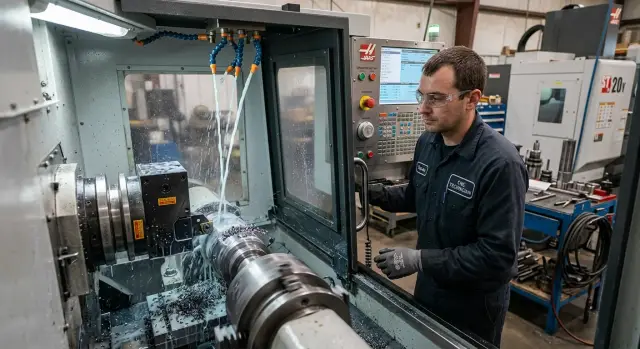
Why chips stop a shift
In production turning, chips can sometimes cost more time than a tool change. If a chip comes out as a long ribbon, it quickly winds around the workpiece and begins to rub the finished surface. Scratches appear, dimensions drift, and surface finish suffers.
The problem rarely stops at one part. The ribbon can catch the tool, chuck, or guard, and sometimes it blocks the cutting zone so the operator can no longer see what's happening. The machine keeps running, but the process becomes unstable. Then the familiar sequence follows: stop, manual cleaning, restart.
On paper this looks like a minor annoyance. On the shop floor each such pause takes 2–3 minutes. If the machine is stopped ten times per shift, almost half an hour of productive time is lost. On one machine it's painful. On several machines it's a noticeable drop across the whole batch.
Long chips hit not only time but repeatability. They reenter under the tool, change chip flow and increase load on the edge. The tool cuts worse, surface finish varies, and the operator checks parts more often. Instead of a steady cycle, he repeatedly returns to the same cause.
So chip control isn't about a "pretty" process. It's about calm and predictable work. When chips break short and leave the cutting zone, the machine cuts without unnecessary pauses, the operator doesn't approach the chuck with a hook, and the shift runs as planned. For a production run this is not a minor tweak but standard production discipline.
How to tell something is wrong
You usually see the problem not by the machine, but by the chips themselves. If the setup is off, the chip stretches into a long ribbon, winds on the part, or flies to one spot and quickly clogs the working area.
Start by looking at shape, length and color. For series work, short brittle chips are usually preferable. A long spiral or "spring" almost always indicates that the cutting mode, insert geometry or feed are outside the working range. Color helps too. If the chip darkens or blues where it used to be lighter, the cutting zone is overheating.
Next, find where the chips collect. If chips hang on the chuck, that's one cause. If they jam at the tool, get under the part or block the conveyor, the cause may differ. The pile-up point shows the chip flow direction and whether the coolant helps.
Compare the first pass and the last passes on the same part. In roughing the chip may break normally, but in finishing it can suddenly stretch into a ribbon. The opposite happens too: the cycle starts calmly, but near the end the chip catches on a step, groove or thin wall. These differences quickly narrow the list of causes.
To avoid searching for the problem after every stop, record a few things immediately: blank material and its condition, feed, RPM and depth of cut, insert grade and geometry, and the pass where chips began to interfere.
A simple example: a steel run goes fine for the first ten parts, then the operator more often opens the door and removes chips from the chuck. That's a signal to check not only the insert but coolant feed, edge condition and how chips behave on the final passes.
Without notes, the shop almost always works by guess. With notes you can see exactly what changed: material, regime or tool.
Where to start tuning
Adjustment rarely succeeds on the first try if you change everything at once. It's much faster to take small steps. That way you see which parameter actually breaks the chips and which only clouds the picture.
First fix the baseline conditions. Blank material, diameter and traverse length strongly affect chip form. The same regime on a short and a long cut gives different results: at first the chip crumbles, but after a few seconds it stretches into a ribbon.
On the first trial it's better not to change spindle speed. If you change speed, feed and insert at once you won't see the cause. Leave the spindle as is and start with one parameter. Most often people change feed or insert first, because they change chip behavior fastest.
A simple procedure: set the baseline, make one pass, change only one parameter and run another pass. After each pass check both the chip and the workpiece. If the chip got shorter but the surface shows torn marks, the regime isn't suitable. If the surface is clean and chips come out as short arcs or small curls, you're moving in the right direction.
Record a successful trial immediately. Memory doesn't hold long, especially in fast runs. After a couple of hours it's easy to mix up feed 0.22 and 0.28 mm/rev, and for chips that difference is noticeable.
Typically the setup card records material and blank size, insert brand and holder, feed, depth of cut and RPM, coolant pressure and direction, chip type and surface condition. That's enough to avoid searching for the regime again.
How the insert changes chips
Chip shape often depends not on the machine but on the insert. The same program at the same feed can give short chips with one geometry and a long ribbon with another. So you always check insert choice against the material and the specific pass.
Steel, stainless and aluminum need different chipbreakers. The pass itself matters too: roughing, semi-finish or finishing. A common mistake is fitting a finishing insert for a heavy rough cut. The chip won't break, will wind on the part and quickly interfere.
A finishing insert is made for small depths and gentle feeds. If you give it a heavy regime it often loses control of the chip. For a run that's a bad option. One good part doesn't mean much if by the tenth the machine already needs stopping.
Nose radius also strongly affects the result. A large radius with too small a feed often produces wide, long chips. A small radius at a higher feed may break chips better, but can sometimes worsen the surface. Radius must be considered together with real feed, not just the catalog.
In practice it's easier to compare two similar geometries than to try a dozen at once. Keep the same material, regime and tool overhang, change only the insert or chipbreaker geometry and compare results not after one trial cut but after 10–15 parts.
Another point is edge wear. Long ribbons often appear not immediately but after the edge dulls a bit. Dimensions may still stay in tolerance, so the issue is easy to miss. Inspect the insert earlier, before chips start to stop the cycle.
If one of two similar inserts gives slightly less life but consistently breaks chips, it's often the better choice for a run. Extra insert changes usually cost less than stopping the machine mid-batch.
How feed and depth of cut affect chips
Even a good insert won't save you if the regime is too soft. Operators reduce feed for a quieter sound and a smooth surface, and get a long ribbon that winds on the part, chuck or tool.
Reason is simple: chipbreakers work in a specific range. If feed is too low, the chip is thin and flexible. It doesn't break in time and stretches further, especially in ductile steels and stainless.
In production it's better to raise feed in small steps, about 0.02–0.05 mm/rev, and immediately watch chip shape, cutting sound and spindle load. Even a small feed increase often turns a long ribbon into a short arc or small curl.
Depth of cut follows the same rule. It is often reduced for a "cleaner" look, but too small a depth also prevents the chipbreaker from working. The insert starts to rub rather than cut. Surface doesn't always improve, and chips almost always get worse.
Watch not only the part but the stiffness of the whole system. On a short, rigid blank you can increase feed more boldly. On a long thin shaft check deflection and vibration first. On ductile material you shouldn't expect good chip breakage at an overly gentle regime. And if the machine is near its power limit, don't raise the regime blindly.
Simple example: when machining a bushing the operator ran 0.10 mm/rev feed and 0.3 mm depth and got long strips. Raising feed to 0.14 mm/rev and depth to 0.6 mm, without exceeding power reserve, shortened chips, smoothed the process and reduced cleaning stops.
If the regime doesn't help, don't push it at any cost. Check material grade, tool overhang, workholding and machine capacity. Feed and depth solve a lot, but only within what the part, tool and spindle can handle.
What coolant pressure and direction do
Coolant affects chips not only by cooling. If the jet hits the cutting zone exactly, it helps crack the chip, wash it out from under the insert and keep it from winding on the part or chuck jaws. In production this often helps more than another small adjustment of the tool.
A weak jet usually won't break a long ribbon. It just wets the cut and spreads chips around the working area. If the chip leaves as a continuous spring, first check actual pressure, filter condition and nozzle cleanliness rather than relying on the "feel" of the jet.
Even good pressure is useless if the nozzle misses. The jet must hit the point where the chip comes off the insert's rake face. A few millimeters off already changes results, especially on small diameters and ductile materials.
Simple checks: ensure the filter isn't clogged and the pressure hasn't dropped on the gauge, look for buildup or fine chips inside the nozzle, aim the jet at the contact point between tool and workpiece, and after the first passes see whether chips leave the working zone or go into the chuck and pocket.
On ductile steels and stainless the nozzle clogs more often. Chips stretch longer there, and any loss of pressure quickly brings back the long ribbon. So on those materials check the nozzle at each setup and after the first parts.
A small example: during roughing of a tube feed had already been raised but chips still flowed as a long blue ribbon. Two causes were found: the nozzle aimed slightly above the cutting edge and the filter was clogged with fine chips. Restoring pressure and aiming the jet correctly turned chips into short arcs.
Common errors in production
A small error on a run turns into downtime fast. One machine still holds up, but in an hour chips catch the part, clog the cutting zone and force the operator to stop more often than needed.
First common mistake: insert is changed but feed is left the same. A new geometry may break chips only within its specific range. If feed is too low, the chip still forms a long ribbon even when the insert is otherwise suitable.
Another typical mistake is immediately raising spindle speed. That seems quick, but usually produces more heat and less predictability. Feed usually affects chip form more than a simple speed increase. If chips get longer, check feed first, not speed.
A further mistake is looking for the answer only in coolant. Pressure helps, especially to blow chips out of the cutting zone, but it won't fix unsuitable insert geometry. If the chipbreaker doesn't work for your material and feed, a strong jet only gives a temporary effect.
Runs are often started with an already worn edge. At the start of the shift the machine still cuts tolerably, then chips become torn, wind on the part and scratch the surface. Saving on one edge easily turns into scrap and lost time.
There's also a quiet but expensive mistake: the regime is found, the run is completed and nothing is recorded. On the next batch the operator rediscovers everything. It's enough to note the insert and geometry, feed and depth, RPM, coolant pressure and nozzle position, and the material. Where this is done regularly, repeatability is higher and chip problems are fewer.
A simple shop example
In a production turning cell a steel shaft was being machined. The first pass was calm, but on the second a long blue ribbon appeared. It wound near the tool, caught on the part and forced the operator to stop more often than necessary.
Dimensions still held. That's the trap. While the part remains within tolerance, setup is often postponed. But after several stops scratches appear, cutting gets noisy and extra minutes of downtime add up.
The setter didn't change everything. First he fitted an insert with a different chipbreaker geometry designed for that material and regime. Then he changed only one parameter — slightly increased feed. RPM stayed the same to avoid mixing causes and see the result clearly.
On subsequent parts the picture changed. Instead of a long ribbon the chip became shorter and broke away from the cutting zone. It stopped hanging on the part and no longer interfered with the next pass.
After that the machine ran the batch more steadily. The operator almost stopped approaching the door to clear a winding chip, and dimensions stayed stable without extra pauses. For a series that's proper chip control: not a constant fight at the machine but a calm process without unnecessary stops.
The rule is simple. If a long chip appears on a particular pass, first check insert geometry, then carefully change feed. In many cases that's enough.
Quick checks before a production run
Before a run, 3–5 minutes at the machine often prevent winding in the middle of a shift. It's enough to check the tool, regime and coolant on the first parts, not after ten ruined blanks.
Look at the combination, not a single setting. Even a good insert won't save you if feed is too low and the coolant jet misses the edge.
Before start, make five quick checks. Match the insert to the material and cut. Check whether feed has been "softened" for quietness. See if coolant hits the cutting zone. After two or three parts evaluate chips by eye with the machine stopped: the norm is short, controllable chips, without bunches on the chuck or winding on the part. And agree in advance when the operator stops the machine. If chips catch the blank, hit the guard or block the view, don't stretch the cycle further.
In a run small things quickly become problems. The first part is clean, the second shows a long blue ribbon, and by the fifth it's hanging on the jaws. Often the cause is simple: feed fell below the working range or the nozzle shifted a few millimeters after setup.
Record the working picture in the setup card: insert grade, feed, depth of cut, coolant pressure and the normal chip type. Then the next start goes faster and the "it worked yesterday" argument nearly disappears.
If chips still misbehave after the first parts, don't change everything at once. First return feed to the normal range, then check the insert, and only after that adjust coolant pressure. That order usually saves both time and tools.
What to do next
If you managed to stabilize the process, lock the result into a table, setup card or shared shop database. The most common mistake after a successful setup is simple: the regime is found, the batch runs fine, and a month later everyone rediscovers it from scratch.
It's easiest to keep short notes by material and part type. No complex forms needed. Just record what helps repeat the result quickly: blank material and size, insert model and chipbreaker, feed, depth and speed, coolant pressure and nozzle direction, and the chip appearance at a stable regime.
Note successful combinations separately. Not only "which insert worked" but at what feed it began to break chips normally, on which pass it ran smoothly, and when first signs of wear appeared. These notes are more useful in practice than long discussions at the machine.
If chip problems repeat across batches, look wider. Sometimes it's not about one insert or one regime but about the machine's capabilities, coolant supply or the stiffness of the whole setup. In such cases a sober assessment of equipment helps more than endless tweaking of a single parameter.
For shops choosing CNC lathes for production these questions are especially important. EAST CNC handles supply, selection, commissioning and service of equipment, and on the blog east-cnc.kz they publish practical materials on metalworking. That helps not only to stop a winding chip on one part but to stabilize the whole process.
Good chip control looks very simple: short chips leave the cutting zone, the surface stays clean, the operator doesn't intervene every ten minutes, and the batch runs without unnecessary stops. If you make this a habit and record working regimes, the problem stops returning with every new setup.
FAQ
Что делать первым делом, если стружка наматывается на деталь?
First, don't change everything at once. Keep the spindle speed as is, check the insert and raise the feed in small steps, then observe the chip shape and the workpiece surface.
Почему на черновом проходе все нормально, а на чистовом стружка тянется?
This happens often. On finishing passes the feed and depth are smaller, so the chip comes out thinner and breaks worse, especially on tough steel or stainless.
Нужно ли сразу поднимать обороты, если стружка стала длинной?
Usually no. First check feed, depth of cut and insert geometry — they more often change chip form. Increasing speed often only adds heat.
Как понять, что проблема в пластине, а не в СОЖ?
If you raised the feed and the chip barely changed, look at the insert. If cleaning the filter and repositioning the nozzle immediately removed the chip from the cutting zone, the coolant was the cause.
Как подача влияет на ломку стружки?
Feed helps the chipbreaker operate in its intended range. When feed is too low, the chip is thin and flexible, so it stretches into a ribbon instead of breaking into short arcs.
Может ли слишком малая глубина резания портить стружку?
Yes. With too small depth of cut the insert often rubs rather than cuts, and the chip breaks worse. In that mode you can get a long ribbon even with a correct insert.
Куда направлять СОЖ, чтобы она помогала со стружкой?
The jet should hit directly into the cutting zone where the chip leaves the insert's rake face. If the nozzle sprays above or to the side, the pressure will do little good.
Когда менять пластину, если размер детали пока держится?
Don't wait for obvious scrap. If the chip lengthens, noise appears or the operator cleans the area more often, change the insert earlier, even if dimensions are still within tolerance.
Что стоит записывать после удачной настройки?
Record the material, blank size, insert and holder, feed, depth, spindle speed, coolant pressure and nozzle position. That's enough to avoid searching for the regime again.
Что делать, если на разных партиях стружка снова мешает работе?
Then look broader. Check clamping stiffness, tool overhang, coolant supply and the machine's capabilities — a single insert setting may no longer solve the issue completely.