
Batch traceability in machining without an expensive MES
You can set up batch traceability in machining without an expensive MES: assign a batch code and link blanks, NC program, tooling and inspection in a simple scheme.
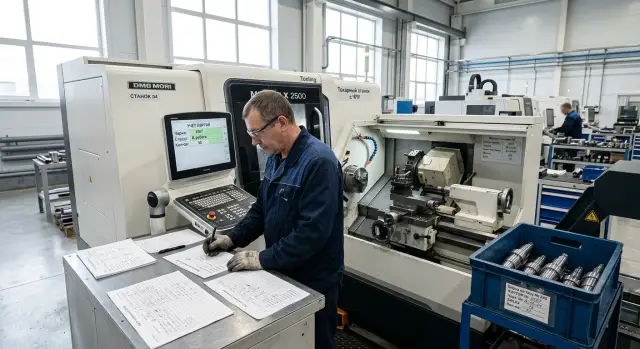
Where a batch gets lost
A batch rarely disappears in a single step. Usually it fragments into separate traces: the batch number stays on paper, the NC program sits in a folder with a similar name, inspection results are written in a separate log, and the blanks after the first operation already sit in a common bin.
The first problem starts where the batch number lives only on the routing sheet. Paper gets put on the machine, gets stained with coolant, moved around, sometimes rewritten by hand. At the end of the shift you may still find the sheet. A few days later it’s unclear whether it’s the original or a revised copy.
After the first operation the confusion grows faster. Two similar blanks made from the same steel and almost the same size look nearly identical. While they sit next to a tag, everything is clear. Once the operator moves parts to another container or sends some to wait, the link breaks. Later the supervisor opens a box of similar parts and wastes time guessing.
The NC program story is the same. Files quickly accumulate names like "корпус_нов", "корпус_нов2" or "финал_испр". After a week it’s hard to remember which version actually ran, who edited it and for which batch. If the program name, edit date and machine aren’t recorded, nobody can reliably reconstruct the picture later.
Tool tracking is a separate pain. A part might have come out correct only on a specific insert, with a specific compensator and after a single adjustment of parameters. But such details often remain in the setup technician’s notebook or in the shift’s memory. When dimensions drift, the shop sees scrap but not the cause.
Inspection is similar. The protocol stays with the inspector, the routing card with the supervisor, and operation notes are in the machine log. Formally the data exist. In practice you can’t quickly assemble a chain: which blank it was, which NC program ran, which tooling, on which machine and what the inspection result was.
That’s how batch traceability in machining disappears — not from one big failure, but from many small breaks that accumulate every day.
What one record must include
One batch record should answer a simple question: what the part was made from, which program ran, which tooling was used and what inspection showed. If any block is missing, the cause of defects will be hunted blindly.
Start by recording the batch itself: batch number, part number from the drawing and, if needed, the order or routing card number. This is already enough to avoid mixing identical parts for different customers or different shifts.
Next tie the blank. The record should include material, melt or certificate number, initial blank size and the date it arrived on the shop floor. If a dimension later drifts or the surface behaves oddly, you immediately check whether the problem came from the material.
The next block is the NC program. Record the file name, version, release date and who approved the program for production. If a technician opened an old version, it becomes obvious at once. On CNC machines such a small detail often saves a whole shift.
For tooling, don’t write generic notes — record facts: set number, which positions were in the turret or magazine, which station held the tool and when the operator replaced an insert or the whole tool. If dimensions drift after 40 pieces, that note quickly narrows the search.
For inspection five things are enough: which dimension was measured, with what instrument, the measured value, who checked it and when. It’s better to record the actual number rather than just "OK" or "not OK". Then you can see how the dimension changed during the batch.
A good record shouldn’t be long. Imagine: on the 58th part the diameter shifted by 0.03 mm. If one line contains batch number, melt, NC version, insert change and a post-process measurement, the supervisor understands where to look in minutes. Without that, the usual routine begins: dig up paper, call the shift and lose time.
The minimum to get started
You don’t need a complex MES or a long implementation project for normal operation. On most floors a few simple rules bring order and don’t hinder production.
The idea is simple: each batch has one code, and that code is repeated everywhere the batch "lives" — on paper, in files, on containers and in the shift log. Traceability comes not from expensive software but from discipline.
At the start four elements are usually enough:
- a single routing card with an unchanging batch code;
- a simple shift/status table;
- tags for containers, pallets and finished parts;
- a shared folder with consistent file names.
The shift table doesn’t need many columns. Batch code, operation, machine, operator, start time, pause and end, reason for stoppage, quantity accepted and quantity rejected are sufficient.
Define file names right away. For example: "P-241015-07_Op20", where the first part is the batch code and the second is the operation number. This format removes the constant question which NC program belongs to this blank and which inspection protocol the supervisor needs.
In practice that’s enough to quickly reconstruct a batch history. If an operator on a lathe or horizontal machine notices a dimension deviation, the supervisor opens one folder, takes the routing card and immediately sees which NC program ran, which tool was changed and after which shift the fault appeared.
The worst approach is mixed: the code exists only on paper while files are named "new", "final" or "last version". A simple scheme without extra fields is better than a large template nobody fills out completely.
How to build the system step by step
The system starts with one rule: every batch has its own code and everyone writes it the same way. If the code is short and clear, tracking works even without sophisticated software.
For a shop with CNC lathes and machining centers the typical sequence is:
- Set the batch code format before starting. For example, 24-04-117 showing month and number. Don’t make a half-line cipher.
- Introduce one naming rule for everything related to the batch. Routing card, NC program, tool card and inspection report should share one root.
- Record the start of an operation at the moment the batch goes on the machine. Date, time, machine number, operation number and surname are enough.
- If the operator replaces an insert, holder or the whole tool, they mark it immediately. A short note is enough: what was replaced, at which operation and why.
- At the end of the operation the operator or inspector adds the inspection result to the same record: initial measurement, final batch result and status "ok", "rework" or "reject".
A simple naming example helps bring order on day one:
Партия: 24-04-117
Маршрутная карта: MK-24-04-117
УП: UP-24-04-117-OP20
Инструмент: IN-24-04-117-OP20
Контроль: K-24-04-117-OP20
You can keep all this without fancy software. Often a paper routing card per batch, a shared folder on the shop PC and one table capturing operation starts, tool changes and inspection results are enough.
If the shop runs two shifts, the rule must be the same for both. Otherwise the day shift writes "UP-24-04-117" and the night shift writes "prog117", and after a few days nobody knows which program ran on the parts.
The check is simple: the supervisor should be able to find within 30 seconds which program the batch used, who changed the tool and what the inspection result was. If that works, the scheme is effective.
How to label containers and documents
If the batch code exists only on a sheet of paper it almost always gets lost first. Paper gets put in the wrong folder, dirtied with oil or carried to the machine with other work. So label not only the routing card but also the container: box, pallet, cassette or plastic bin with the blanks.
The same code must repeat everywhere unchanged. If the box reads "P-241105-07", the same code should be on the routing card, in the tracking table and in the folder with files for the batch. When the code differs by even one character, people start guessing and recordkeeping breaks on an ordinary day.
Internal abbreviations that only one setup technician understands rarely work. Better write full identifiers: part number, batch number, material, quantity, drawing revision and date. Short notes like "shaft 12, old" won’t mean anything a week later and often lead to confusion.
On a CNC shop pick one convention. Put the batch code and part designation on the container. Duplicate the same code without abbreviations on the routing card. Add code, machine, operator and status to the shared table. Include the batch or order number in the NC file name or printout.
Also tidy the NC programs. The working program and the old version should not sit in one folder with similar names. Otherwise an operator can easily run the wrong file, especially if only the last digits differ. It’s easier to keep two folders with clear names: "In work" and "Archive." Only the current version lives in the working folder.
Example: the pallet shows the batch code, the routing card has the same code, the Excel table includes the code, machine and operator, and the NC file name contains the batch number. The operator checks the code for 10 seconds, starts the cycle and if something goes wrong the supervisor quickly sees which tool was installed, which NC program ran and which batch the part belongs to.
How it looks for a single batch
A batch of 40 blanks for a turning operation arrives on the shop. The supervisor assigns number P-240617-04 and writes it on the routing card. The operator also notes the number in the machine log so the batch doesn’t turn into an unnamed pile.
Before starting the operator selects NC program version 03 and logs it in the batch card. He records the machine number, date, his surname and the tool compensator number. This takes a couple of minutes but prevents disputes later about which program ran.
This is enough to link the blank, NC program and first operation. If a dimension deviation appears later, the supervisor won’t need to check every program version and guess what was in the machine that day.
The first parts come out fine. The operator performs routine checks and enters sizes on the same sheet: part 1, part 5, part 10. After the 18th part he sees the insert has worn, replaces it and adds a short note: "after part 18 - insert change, position T0202." That single line is enough to split the batch into two clear segments.
The inspector receives parts and immediately sees the boundary. Everything produced before the insert change is the first group. Parts from 19 to 40 belong to the second. If dimensions shifted only after the change, the cause is easier to find: it’s likely the new tool, its setup or compensator, not the blank or the old NC program.
This kind of record doesn’t require an expensive MES. One routing card, a machine log and a size report file are enough. The important thing is the same batch number everywhere.
When the supervisor needs a full report, they open the batch folder and in a minute assemble the picture: which blank came in, who started the operation, which NC program was used, when the insert was changed and what measurements the inspector recorded. If a customer asks about parts 23–28, the answer is in the record, not in the shift’s memory.
Where mistakes happen most often
The most frequent problem isn’t the machine or the people. The batch loses its trail in small details: the operator adjusted the NC program, the setup technician swapped an insert, the inspector saved the report differently and the record was left outdated. After a week no one can quickly prove which program version made the parts and how they were measured.
NC programs are often edited on the fly to remove a burr or correct a dimension. This is fine if the shop immediately writes the new version into the routing card or shared table. The mistake is when the file has changed but the version in the record stayed the old one. After that the cause of defects is searched in the wrong place.
Another common and dangerous error is filling the log at the end of the shift from memory. After a long shift people mix up times, tool numbers and even counts of accepted parts. Work records must be made right after the operation or right after the measurement. Otherwise the log becomes approximate, not useful.
Confusion also starts with containers. Two batches are put in one box "temporarily" to save space, and an hour later no one is sure which blanks passed the first operation and which are still waiting. Even when parts look identical, each batch must have its own container with a clear label and date.
Failures also appear in inspection. One person saves the report as "batch 12", another as "12_new", a third as "inspection after edit." You can find the right file, but every disputed case costs an extra 10–15 minutes. Much better to have one naming template: batch number, operation, date, NC version.
Many forget to record who performed the operation. Without a name or employee number you can’t quickly clarify what happened on the machine, which tool was installed and why an adjustment was made. This isn’t about blame — it’s about order.
The rule is simple: changed the NC program — update the version in the record immediately; recorded a measurement — enter the result at once; moved parts — don’t mix batches in one container; saved a report — use the same filename format; finished the operation — note the executor.
Pre-start check
Five minutes before start often saves half a shift of searching, calls and arguments. If nobody verified basic items before start, the batch quickly loses its trail: parts are already in work while the table still has an empty or mismatched record.
Before the first part check five points:
- the batch code matches on the container, the routing card and the table;
- the NC program name on the machine or in the folder matches the recorded name;
- the tool set is logged before start and subsequent changes will be noted immediately;
- the inspection folder is created in advance and will receive protocols, photos of the first part and initial measurements;
- the shift knows who marks the start and who records inspection results.
In practice it’s simple. The operator takes the container, checks the batch code against the card, opens the NC program and tells the supervisor. The supervisor checks the table, sees the same code, the same program and the logged tool. The inspector already knows where to put the first-part measurements. When roles are clear no one leaves records "for later."
If the shop runs two shifts, add one rule: the incoming shift does not continue a batch until it has seen the last record of the previous shift. This prevents confusion over tool changes, NC edits and intermediate inspections.
If even one item doesn’t match, stop the start and fix the record now. It’s easier to correct the entry than to sort out a pile of parts without a clear history later.
What to do next
Don’t roll the scheme out to the whole shop at once. Start with one part, one shift and one machine. This quickly shows where records work and where people start to forget or skip data.
For the first run a short chain is enough: blank number, NC program number, toolset, operator, date and inspection result. If that record holds consistently for a few days, the foundation is in place.
Then remove anything that doesn’t add value. If a supervisor, operator or inspector skips the same field three times in a row, don’t argue with reality. Either drop the field or make it clearer. Recordkeeping breaks not from too few columns but from too many unnecessary ones.
A useful check is simple: once a week open any completed routing card and try to reconstruct the batch history in five minutes. You should quickly answer four questions: which blank arrived, which NC program ran, which tooling was used and what inspection showed.
If any answer takes too long, the scheme is still raw. Usually the problem is the form of recording: someone writes the number by hand and it’s read differently, someone uses two names for the same NC program, or the inspection sheet sits separately from the batch.
As the shop grows, don’t complicate recordkeeping prematurely. First bring order to the rules for writing codes and folders. Only later decide if you need a higher level of automation.
If you expand equipment or add a second shift, check in advance how new machines will fit into your NC, tooling and inspection records. In such cases it’s useful to discuss the scheme with EAST CNC — the official representative of Taizhou Eastern CNC Technology Co., Ltd. in Kazakhstan. The company handles machine selection, supply, commissioning and service, so it’s better to have that conversation before launch rather than after the first tracking failures.
FAQ
Do I need an expensive MES to set up batch traceability?
No. To get started you usually only need one batch code, a routing card, a simple shift table, tags on containers and a shared folder for files. If everyone repeats the same code without improvisation, traceability will work.
Where is the best place to start on a small shop floor?
Start with one part, one machine and one shift. Define the batch code format, a rule for file names and one place to store the routing card, NC program and inspection records. This quickly shows where people get confused and what needs simplifying.
What must be recorded for a batch?
At minimum: batch number, part number, material or heat number, NC program name and version, machine, operator, tooling, recorded tool changes and measurement results with actual numbers. That is enough to avoid guessing later where a deviation came from.
What should a batch code look like?
Choose a short, clear format that people will remember without prompts. Codes like 24-04-117 or P-240617-04 work well. Don’t make a long cipher that everyone will shorten differently.
How should NC files and inspection protocols be named?
Give all files a common root based on the batch code and operation number. For example, NC program, tool list and inspection file should follow the same template instead of being named “new” or “final”. That way the supervisor finds the right version in seconds.
How not to lose a batch after the first operation?
Mark not only the paper but also the container: box, pallet, cassette or plastic bin. The same code must appear on the container, routing card, shift table and NC file name. If the code differs by a single character, confusion starts immediately.
What to do if the operator changed a insert or the whole tool?
Record the tool change immediately, not at the end of the shift. A short note is enough: what was changed, at which operation, after which part and why. That single line lets you split the batch into clear segments later.
What to check before starting a batch?
Before the first part check five things: the batch code on the container matches the routing card and the table; the NC program name on the machine matches the record; the tool set is logged before start and further changes will be noted; the inspection folder is ready and will receive first-part photos and reports; the shift knows who marks the start and who records measurements. A few minutes here can save half a shift of searching later.
How do I know the tracking system is working?
Open any completed batch and try to answer four questions within five minutes: what blank arrived, which NC program was used, which tooling was installed and what did inspection show. If you can, the system is working. If not, data are scattered or people record things inconsistently.
Where do shops usually make mistakes?
Most mistakes come from small things: filling the log from memory at the end of the shift, putting two batches in one container temporarily, changing the NC program without updating the version, or saving inspection reports under different names. The simplest fix is to record changes immediately and never mix batches in papers, files or containers.
What does a complete record for one batch look like?
If you need a full report, open the batch folder and you should be able to see in a minute: which blank arrived, who started the operation, which NC program was used, when the insert was changed and what measurements the inspector recorded. This takes one routing card, a machine log and a size report — not an expensive MES.