
Backup Plan for a Machine Breakdown Without Disrupting the Route
A backup plan for a machine breakdown helps you quickly move a part to another route: what to prepare in programs, fixtures, and inspection in advance.
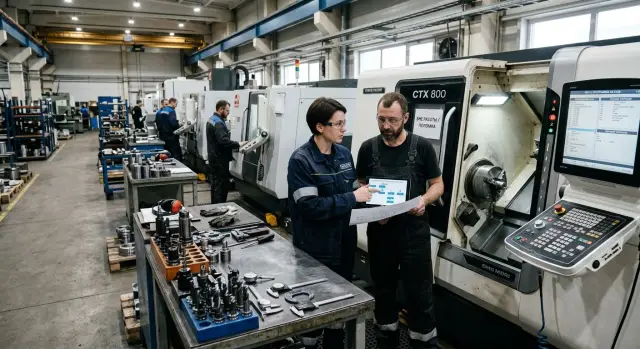
Why one machine can stop the whole route
A part route rarely depends on one step alone. It depends on the order of operations, datums, tools, and the time between stages. If one machine suddenly stops, the flow breaks right away: the previous operation keeps producing semi-finished parts, while the next operation is already waiting for the part in a different condition and in a different shift window.
From there, the problem quickly spreads across the shop. Blanks pile up at the failed operation, the setup tech drops current work, quality shifts the inspection queue, and shipping loses its delivery buffer. Even one hour of downtime often turns into not one hour of loss, but half a shift.
Replacing a machine is usually harder than simply moving a part to the next machine. Another machine may have different kinematics, work envelope, setup method, tool set, overhangs, cutting modes, and program logic. Even the order of first-piece inspection changes.
Because of that, not only the schedule breaks, but also the quality. A part moved to another machine without preparation almost always needs extra setup work. In the worst case, the shop gets scrap not because of the breakdown itself, but because of the rush that follows it.
Losses appear in several places at once. The deadline shifts. The operator spends time looking for the right program. The setup tech sets the fixtures again. The inspector rechecks the base dimensions, because they may drift after the move. If the part is complex, one emergency transfer can cost more than several hours of clean downtime.
This is especially noticeable where a part passes through several CNC machines one after another. If one station drops out, the others do not become useless, but they start working out of sync. The shop is busy, people are not standing idle, but finished parts still do not come out.
That is why a backup scenario is better prepared in advance. Not after the failure, when everyone is rushing, but before it, while there is time to check programs, choose fixtures, and understand which machine can really take over the operation without extra risk. Such a plan does not prevent the breakdown, but it keeps it from stopping the whole route.
Which operations should not be moved blindly
The biggest problem is usually not the breakdown itself, but moving through a stage where the part base changes. If the operation stays in the same setup, removes stock, and does not finish a critical size, it can often be moved to a neighboring machine almost immediately. But after a base change, part flip, or switch to finishing, rushing usually costs more than downtime.
It helps to split the route into two groups right away. The first group includes operations that can really be moved quickly: rough turning, pre-drilling, simple facing, and stock removal. The second group includes everything tied to precise location: finishing diameters, fits, center distances, holes after re-clamping, and threads with strict requirements for pitch and concentricity.
Transitions where datums change deserve special attention. On paper, the route may look smooth, but in the shop this is where size drift and runout appear. One machine holds repeatability better in a chuck, another behaves differently on a long part, and a third gives a different tool position after a turret or cassette change. If a size is built from a datum created on the failed machine, moving it without checking is risky.
Some sizes depend on more than just the program. They are affected by the machine itself: axis geometry, spindle condition, chuck accuracy, tool overhang, probe behavior, and even heating during the shift. This usually shows up on finishing passes, boring, seat machining, and parts where several surfaces must stay concentric.
To avoid solving everything again in the middle of a breakdown, keep a short card for each important route. It is enough to note the operation number, datum, required tool and fixture, the dimensions the operation closes, and the inspection method. That is enough to quickly see what can be moved without delay and where you need a trial part, measurement, and offset correction first.
For shops with CNC lathes of different layouts, this is especially important. The same operation name does not mean the neighboring machine will give the same result on the first run.
What to keep in reserve for programs
When one machine stops, time is often lost not on the move itself, but on finding the right file. If the archive holds only one working version with no notes, people start guessing where the latest program is, which postprocessor it was made for, and on which machine it has already been run without edits.
For a backup plan, it is not enough to save the NC file in a shared folder. You need at least two versions: the current working program and a backup copy you can return to if the latest edit contains an error. Then nobody argues at the control panel about which revision was the right one, and no one loses an hour comparing lines.
In the file name and in the program card, it is best to write down what people usually try to remember in a hurry:
- part code and operation number
- machine model where the program has already run
- postprocessor
- coordinate system, for example G54 or G55
- revision, date, and author of the edit
That is enough to quickly understand whether the program can be run on a neighboring machine or whether it first needs checking in CAM and on an air run.
It is useful to mark separately where the program runs without changes and where it needs adaptation. If the operation already ran on a similar slant-bed lathe with the same controller, the technologist can immediately see whether the file fits as is or whether a new tool setup, a different zero point, and cycle changes are needed.
Do not keep knowledge only in the setup tech’s head. Next to the program, keep short notes: which cutting modes were already tested on this part, where feed was reduced because of vibration, on which pass size compensation was added, and which tool most often drives the diameter off. Usually five lines are enough so the next person does not repeat someone else’s mistakes.
And one more simple rule: one person is responsible for archive accuracy. That person does not have to write every CNC program personally, but they must track revisions, remove duplicates, record file replacements, and check that the new version made it into the archive after an edit instead of staying only at the control.
On the shop floor, this saves not minutes, but a shift. When the file is clearly named, the backup version is close at hand, and the notes on operating conditions are next to it, moving the part to another machine goes much more calmly.
How to prepare fixtures in advance
Fixtures often decide everything. If one machine stops, even a ready program will not save the route if the neighboring machine does not have the right chuck, jaws, or mandrel. That is why the backup scenario starts not with the breakdown, but with preparation.
First, make a live list of all fixtures used in the route. This usually includes chucks, soft and bored jaws, mandrels, adapter bushings, tool holders, and shanks. It is better to keep such a list not for the whole store, but by specific parts and operations. Then the supervisor can immediately see what is needed for the transfer instead of searching through the general inventory.
Next, check the setup. The backup fixture must give the same datums as the main one. Otherwise, the part is moved to another machine and the dimensional chain is lost right away. If the part is clamped on the main machine with bored jaws and a stop, the backup machine should use the same principle, not just a similar chuck.
What to record in advance
A label on the shelf is not enough. For each assembly, it is worth recording the installation height, tool and mandrel overhang, reference point, setup scheme, and storage slot number in advance.
These details save hours. The setup tech does not measure everything again from scratch and does not guess why the cutter does not reach the machining zone or, on the contrary, sticks out too far.
For similar machines, it is useful to keep simple transition solutions: a set of adapter rings, a spare set of soft jaws for the same diameter, or a separate holder for another turret head. It is not a perfect replacement, but such a set often helps keep production moving until repair is done without losing the shift.
Mark items that are hard to find or slow to prepare separately. These are usually bored jaws for a rare part, long mandrels, and nonstandard holders. Those items are the ones most often lost in storage. They are better kept in a separate area and tied to a specific route right away.
The sign of order here is very simple: if the machine stops in the middle of the day, the section knows within 20-30 minutes what can replace the fixture and where to get it, instead of searching from memory.
How not to lose measurement and tolerances
Moving a part to another machine usually fails not because of the program, but because of inspection. The machine can be started quickly, but if the team does not know where and how to check the first part, scrap appears right at the start. That is why the inspection point is better assigned in advance: at the machine, at the inspection station, or in a measuring area with the right instruments and proper conditions.
If the route changes, first check not every size in a row, but the operation datum. You need to confirm that the new setup holds the same support surfaces, the same zeros, and the same inspection points as the original machine. Otherwise, the operator sees an in-tolerance size, but the next operation already drifts.
For the transfer, it helps to make a short inspection card specifically for that operation. It is enough to record what is measured immediately after the first part, what is repeated on the fifth part, and which dimensions can never be skipped.
What should be on hand
Before starting, check not only the program and fixtures, but also whether the result can actually be measured. In practice, an hour is often lost not on machining, but on finding the right micrometer or go/no-go gauge.
- gauges for the tightest tolerance sizes
- micrometers and bore gauges of the required range
- an indicator for checking runout and setup
- a simple protocol template for the first and fifth part
The template should be short. It is enough to include the operation number, machine, program, tool, base dimensions, actual values, and the signature of the person who accepted the first part. The fifth part is not for formality. It shows whether the process shifted after warm-up, a tool change, or a repeated setup.
Even before a breakdown, it is worth agreeing on who gives the green light for batch start. If this is not defined, the operator waits for the setup tech, the setup tech waits for the inspector, and time keeps slipping away. In a working setup there is one responsible person: they review the protocol, compare the base dimensions, and make the decision.
When this process is practiced, inspection after transfer becomes a normal procedure. You do not need a long regulation. You need clear measuring points, available instruments, and one person who accepts the first good part.
The order of actions in the first hours
The first 2-3 hours after a machine stops decide whether you lose the whole shift or only shift the schedule. The supervisor immediately stops production on that route and records where the flow stopped: which operation failed, how many parts are still in process, and which blanks are already waiting for that setup.
After that, do not jump between all orders at once. First separate urgent batches from those that can wait until the end of the day. Usually the priority is parts for the nearest shipment, then batches that would stop the next operation, and only after that the rest of the series. This approach reduces losses better than trying to save everything at once.
Choose the backup machine not by the principle of "any free one," but by compatibility with the operation. If the datums do not match, travel is not enough, or the required fixture is missing, time will be lost to extra dry runs and new errors.
Before moving the job, quickly check five points:
- do the datums and clamping method match
- is there enough axis travel and tool overhang
- are the required cutters, mandrels, chucks, or fixtures available
- does the backup program fit the kinematics of this machine
- can the first part be measured the same way as before
After selecting the machine, load the backup CNC program and check the setup in air. It is better not to skip this step, even if the program is already in the archive. On another machine, small details often appear: a different tool number, another length compensation, a shifted zero, or differences in clamping or coolant delivery.
Take the first part as a setup part, not as the start of a series. Measure the datums, critical diameters, lengths, runout, and the point where the new operation must connect exactly with the next one. If the size drifted by 0.03 mm, it is better to catch that on one part than on twenty.
The working pace in the first hours is simple: record the stop, set priorities, choose the right machine, check the program in air, make one part, and only then release the series. On paper this seems slower, but on the shop floor this order usually saves half a day.
Example of moving the job to a neighboring machine
In one shop, a turning center stopped after rough machining a housing. The blanks had already passed the first operation: the main stock had been removed, base surfaces had been formed, and the part was ready for finishing. Finishing passes and drilling came next in the route, and the batch was needed the same day.
They did not wait for repair. The neighboring machine matched the axis travel, spindle, and tool set, but it had a different chuck, so the previous clamping scheme could not be copied one to one. If the parts had simply been moved and the old program started, the scrap risk would have been too high.
The technologist did not start with the program, but with the datum. On the failed machine, the part was clamped by one surface, and on the neighboring machine they decided to change the setup and support it by an already machined diameter with a different overhang. For that, they installed another jaw set and rechecked whether the clamping was enough for finishing and drilling. After that, the operator did not move the program blindly, but made a short adaptation for the new chuck, part zero, and tool numbers.
Inspection was also tightened. Two dimensions were added to the standard check:
- distance from the new datum to the face
- concentricity of the hole relative to the finished diameter
These would have shown fastest whether the part had shifted after the setup change. The first part was run more slowly than usual, with pauses after finishing and before drilling. That took about an hour, but by the second part the cycle was running almost at normal pace.
In the end, the batch was late by a few hours, but the whole route did not stop. In situations like this, it is important to check three things quickly: clamping, datum, and inspection dimensions. If those are clear, the transfer usually goes smoothly. If not, the downtime later costs less than a bad batch.
Where people most often make mistakes
The most common mistake is simple: the shop takes an old program and puts it on a neighboring machine because "we have done it before." In an emergency, this seems like the fastest way out, but the part revision may have changed by then. Sometimes the edit exists only in the latest CNC program version, and the old one cuts the part to the previous size or with a different pass order.
Just as often, the operation is moved and the datums are not checked. On paper the route is the same, but in reality the other machine clamps the part differently, the tool sticks out to a different length, and the zero is set in a new point. Because of that, the very first run causes a size error, a chuck mark, or a collision on approach. The worst case is when the mistake does not show up right away, but on a finishing surface.
Another typical problem is checking "one number only." The setup tech measured the diameter, saw it was within spec, and released the batch. But after a transfer, not only the size suffers. Concentricity, runout, flatness, hole position, and groove depth drift too. If the part goes through a long route, such a miss appears only on the next operation, when time is already lost.
Fixtures are also rushed too often. People take chucks, prisms, mandrels, and adapters from different sets without clear marking. At first glance everything fits, but one small detail changes the part seat by tenths of a millimeter. Later no one can quickly tell what the setup was built from and why the result varies from part to part.
Another weak point is missing notes. During a breakdown, people change offsets, shorten tool overhang, move zero, and change clamping. If these edits are not written down immediately, the next shift starts over from scratch. Worse, a temporary fix can accidentally remain as the "working" one, and a week later no one remembers why the program differs from the standard.
In practice, it helps to stop for 15 minutes and check four things:
- did you take the right revision of the program and drawing
- do the datum, clamping, and tool overhang match
- what dimensions and geometry need to be measured after the transfer
- who records all emergency edits and where
Those 15 minutes usually save half a day, and sometimes a whole batch.
Short checklist before restarting
Before starting the batch after a breakdown, do not rely on memory or verbal agreements. You need a few simple confirmations that clear up the most common confusion in the first hours.
-
The backup program has been found and named clearly. The file name should include the part number, machine or machine group, revision, and date. If three similar files are in the folder, the operator can easily choose the wrong version.
-
A separate fixture list has been prepared for the backup machine. It includes the chuck or fixture, jaws, holders, tool, probes, and everything needed for this transfer. It is better to check this list at the machine, not against an old setup card.
-
Quality control knows which dimensions to measure right after the first part. These are usually the datums, fits, lengths after refixturing, and places where a move to another machine most often causes drift.
-
The setup tech understands the reference order. First the datum and part zero, then the tool offsets, then a dry run at a safe height, and only after that the trial cut.
-
The supervisor has already appointed one person who can approve the batch start. Not a team and not a chain of approvals. If one specific person makes the decision, the shop does not lose another hour on coordination.
Such a checklist works only when it is close at hand and actually used. If even one point is hanging, it is better not to push the series. Losing 20 minutes on checking is cheaper than scrapping a batch and rebuilding the route.
What to do next so you do not live in emergency mode
Emergency mode repeats where the shop depends on the setup tech’s memory and on one combination of "machine - program - fixtures." After an unplanned stop, it is better not to limit yourself to a quick part transfer. It is much more useful to lock in a new way of working so the next failure does not break the whole route.
Once a month, go through the most common routes and look for weak spots. They usually show up right away: an operation runs only on one machine, backup CNC programs are stored in different folders, and the needed fixtures are tied up on another batch. This review takes little time, but later it often saves an entire shift.
The program archive should be updated after every noticeable edit. If the setup tech changed feed, shifted the datum, or corrected the safe approach, the new version should go into the shared archive the same day. Otherwise, at the next transfer, people will run the old file again and start adjusting the process on the fly.
The same rule applies to fixtures. For common parts, keep at least one backup option. Not a full duplicate of the store, but the minimum that is really needed for the transfer: a second jaw set, a mandrel, an adapter plate, or a proven set of holders. That costs less than an urgent line stop because one item is missing.
If the machine park does not provide a backup even on paper, it is better to say so openly. That means some operations depend on too narrow a set of machines. In that case, it makes sense to discuss with EAST CNC the selection of a machine, machining center, or automated line for your route. The company east-cnc.kz offers supply, commissioning, and service, so such a conversation is useful not only at the time of purchase, but also when you need to close a weak spot in an already running production line.
It is better to gather all this into one working document instead of keeping it in chats and personal notes. Usually five points are enough:
- main and backup machine for each operation
- current program version and storage location
- fixture set for transfer
- who makes the transfer decision
- who performs the first inspection and by which checklist
When such a document sits with the technologist, supervisor, and setup tech in the same form, decisions are made faster and without arguments. Then the backup scenario stops being improvisation and becomes a normal part of production.
FAQ
What should you do in the first hour after a machine breakdown?
Stop production on that route right away and count where the flow got stuck: which operation failed, how many parts are still in process, and what is due soonest. Then choose not any free machine, but the one that matches the setup, travel, tooling, and inspection method.
Which operations should not be moved without checking?
Do not rush clean finishing, operations after a setup change, or steps that hold fits, concentricity, or exact center distances. Roughing steps and stock removal are usually easier to move if the setup and tools match.
How do you know the neighboring machine will really work?
Look at four things: clamping method, datums, axis travel, and available tooling. If even one point does not match, you can only move the job after a trial part and measurement.
Which programs should be kept as backup?
Keep two versions: the current working program and a backup you can roll back to. Put the part, operation, machine model, revision, and date in the file name so nobody has to guess what to run at the machine.
What should be recorded in advance about fixtures?
Write down the setup scheme, tool and mandrel overhang, installation height, storage location, and the place for each set. That way the setup tech does not rebuild everything from memory and waste half a shift on repeat measurements.
How do you avoid losing tolerances after moving a part to another machine?
First check the operation base, not just one dimension on the part. After a transfer, concentricity, runout, lengths after refixturing, and hole positions usually drift, so they must be measured on the first part right away.
Who should authorize a batch start after an emergency transfer?
It is better to assign one responsible person in advance. That person checks the first part, compares the key dimensions, and decides whether the batch can start, so the shift does not wait for a chain of approvals.
Do you need a trial part if the program is already in the archive?
Yes, almost always. Make one part as a setup piece: run the program in air, measure the dimensions, check runout, and only then increase the pace.
What mistakes most often lead to scrap after a machine breakdown?
Most often, people take the wrong program revision, change the base without checking, or measure only the diameter and forget the geometry. Another common problem is that temporary edits are not recorded, so the next shift starts searching for the cause from zero.
What should you keep in reserve if you do not have the budget for a full duplicate of fixtures?
Start with a second set of jaws or a mandrel for common parts, a backup version of the CNC program, and a short inspection checklist for the first part. Even that minimum greatly reduces losses if the main machine stops in the middle of the shift.